
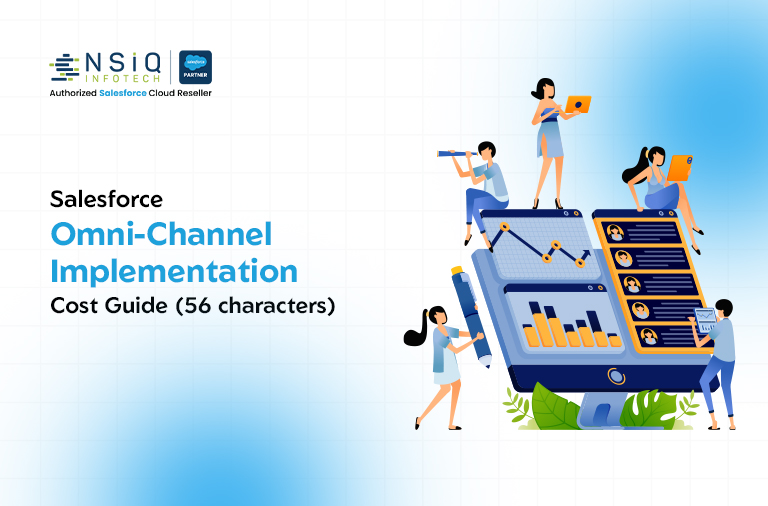
If you’re a CFO, IT head, or part of a procurement team, you’ve probably heard the same pitch a dozen times: “Omni-channel will transform your customer service.” What you haven’t heard enough of is the real number attached to that transformation.
That’s the gap this guide fills.
Salesforce Omni-Channel is a powerful routing engine built into Service Cloud. It automatically assigns customer cases, chats, calls, and social messages to the right agent based on skill, capacity, and priority. On paper, it sounds like a simple feature toggle. In reality, the total salesforce implementation cost for a proper omni-channel rollout depends on licensing, configuration complexity, integrations, and ongoing support — and most vendors won’t walk you through all of it upfront.
This blog breaks down exactly what goes into omni channel pricing, what a realistic budget looks like across company sizes, and where most businesses either overspend or get blindsided by hidden costs.
What Is Salesforce Omni-Channel, and Why Does It Cost What It Costs?
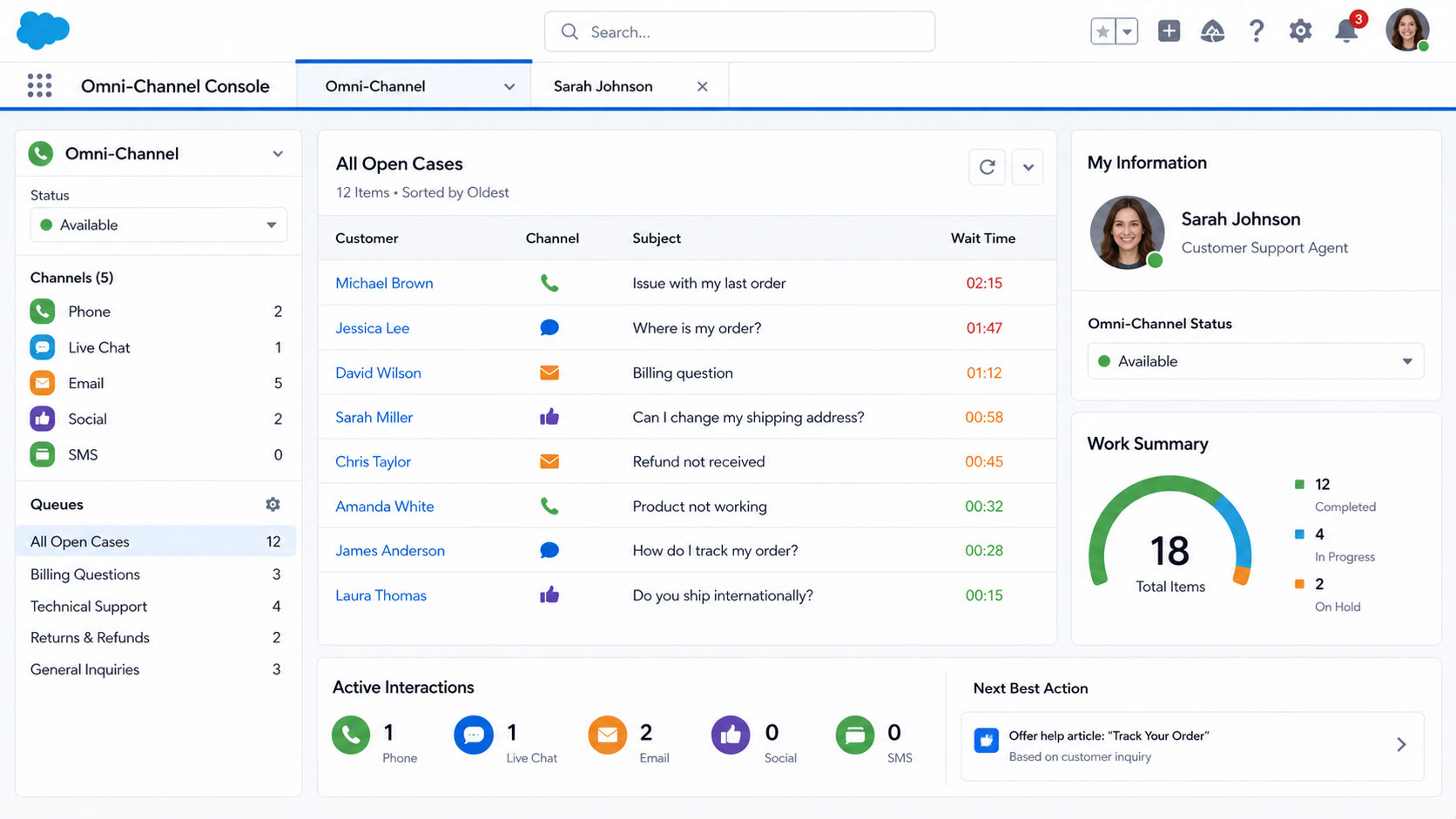
Salesforce Omni-Channel isn’t a separate product you buy off the shelf. It’s a feature within Service Cloud (and available in some Sales Cloud editions) that intelligently routes work items to agents across channels — email, chat, phone, WhatsApp, social media, and SMS — from one unified queue.
The reason pricing varies so much comes down to three things:
- License tier — Omni-Channel routing capabilities differ across Service Cloud Essentials, Professional, Enterprise, and Unlimited editions.
- Configuration depth — A basic routing setup is inexpensive. Skill-based routing with capacity models, service-level agreements, and queue prioritization takes real engineering time.
- Channel integrations — Connecting WhatsApp Business API, Facebook Messenger, or a custom mobile app to Salesforce isn’t free, and each channel adds testing and maintenance overhead.
Understanding these three cost drivers is the first step to building a budget you can actually defend to your finance team.
Salesforce Omni-Channel Cost Breakdown: The Core Components
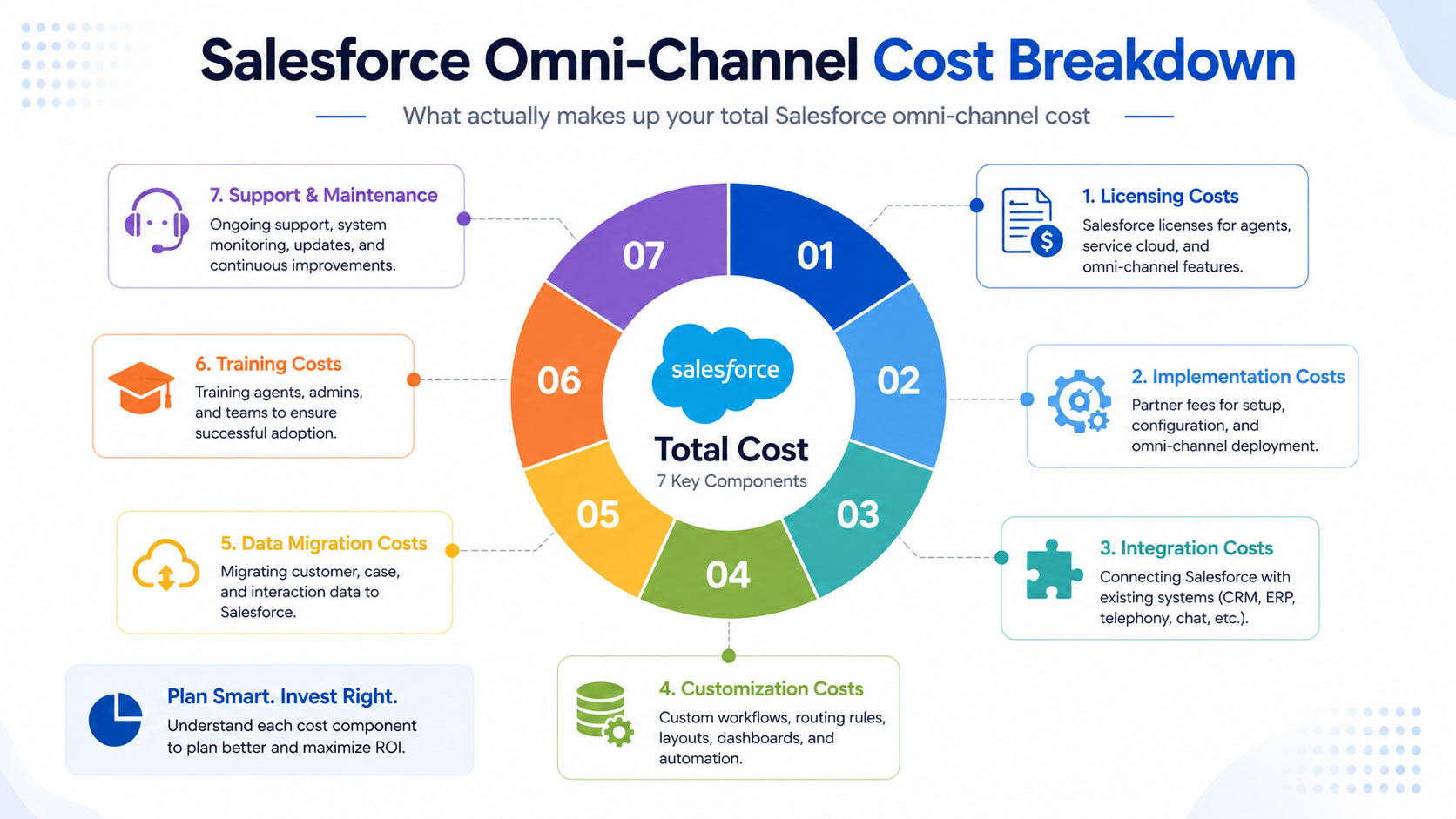
Before you get a single vendor quote, it helps to know what you’re actually paying for. Here’s how the total salesforce omni channel cost typically breaks down.
1. Salesforce Licensing Costs
This is the recurring, non-negotiable part of your budget. Omni-Channel routing is bundled into Service Cloud licenses, so your cost depends on the edition and number of user seats.
- Service Cloud Professional: mid-range per-user, per-month pricing with basic routing
- Service Cloud Enterprise: higher per-user cost but unlocks advanced routing rules, queues, and capacity-based assignment
- Service Cloud Unlimited: top-tier pricing with the most flexibility, automation, and support included
Licensing is billed annually in most cases, so this becomes a fixed line item in your yearly software budget, not a one-time cost.
2. Implementation and Configuration Cost
This is where a certified Salesforce partner (like NSIQ INFOTECH) does the actual setup work: defining routing configurations, skill definitions, presence statuses, queue structures, and capacity models.
A simple, single-channel routing setup (say, just email and chat) is far cheaper than a complex, multi-channel model with capacity-based routing across ten agent skill groups.
3. Channel Integration Cost
Each channel you connect — WhatsApp, Messenger, live chat widget, voice, SMS — needs its own integration and testing cycle. Voice and WhatsApp integrations, in particular, tend to add the most cost because they often involve third-party telephony or messaging providers.
4. Customization and Automation
Many businesses want Omni-Channel to work alongside Flow automation, Einstein Bots, or custom Apex logic for advanced routing logic (like VIP customer prioritization). This custom development adds to the implementation cost but often pays for itself in faster resolution times.
5. Data Migration
If you’re moving from an existing help desk tool (Zendesk, Freshdesk, or a legacy CRM) into Salesforce, migrating historical case data, contact records, and routing rules is a separate cost bucket.
6. Training and Change Management
Agents and supervisors need training on new queues, presence statuses, and dashboards. Skipping this step is one of the most common reasons omni-channel rollouts underperform in the first three months.
7. Ongoing Support and Maintenance
Post-launch, you’ll need someone to monitor routing performance, adjust capacity models as team size changes, and troubleshoot integration issues. This is usually billed as a monthly retainer or a support-hours package.
Realistic Salesforce Implementation Cost Ranges by Company Size
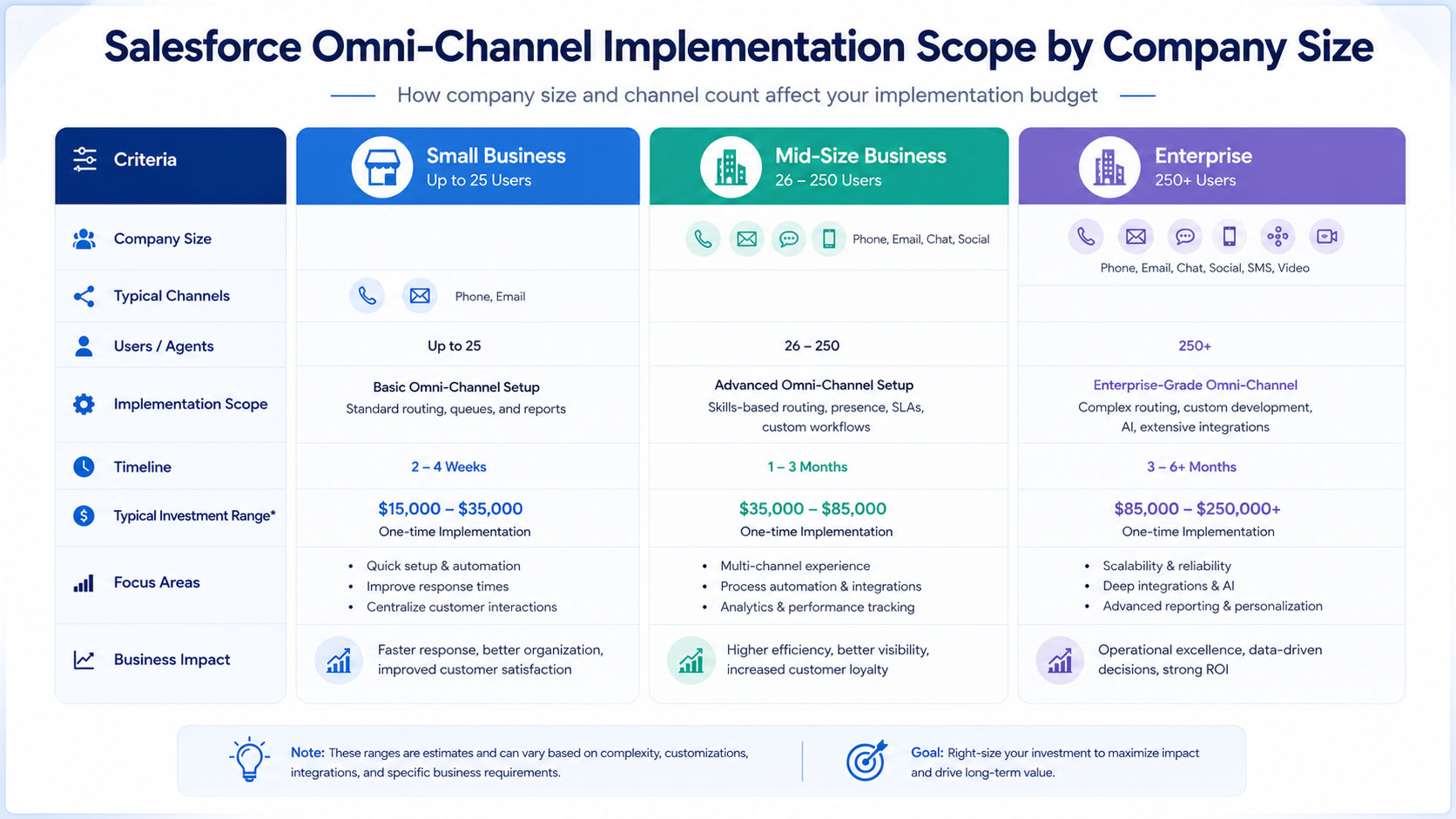
To make this concrete, here’s a general guide based on the patterns we’ve seen across different company sizes and complexity levels. Treat these as planning ranges, not fixed quotes — your actual number depends on channels, integrations, and team size.
Small business (under 50 agents, 1-2 channels): A lean setup with basic email and chat routing, minimal customization, and standard onboarding sits at the lower end of the spectrum. Most of the cost here is licensing plus a short, focused implementation sprint.
Mid-size business (50-200 agents, 3-4 channels): This is where most companies land. You’re typically adding chat, WhatsApp, and phone routing, along with skill-based assignment and a moderate level of Flow automation. Implementation timelines usually run 6-10 weeks.
Enterprise (200+ agents, 5+ channels, complex routing): Large organizations often need capacity-based routing across multiple business units, Einstein Bot integration, custom Apex logic, and multi-region deployment. These projects can take three to six months and involve a dedicated project team.
Practical example: A mid-size retail company with 120 support agents recently consolidated Zendesk, WhatsApp, and email into Salesforce Omni-Channel. The rollout took eight weeks, added skill-based routing across four product categories, and reduced average case assignment time from 4 minutes to 40 seconds. Their support team reported a 22% drop in first-response time within the first quarter after go-live.
That kind of result is exactly why the investment matters — but only if the underlying configuration is done right the first time.
Omni Channel Pricing: What Actually Drives the Number Up or Down
Not every business needs the same setup, and pricing swings a lot based on a handful of decisions you make early on.
Factors That Increase Cost
- Adding voice and telephony integration (often the most expensive single channel)
- Building custom capacity models based on agent skill combinations
- Integrating Einstein Bots or AI-based case classification
- Migrating large volumes of historical case data
- Supporting multiple business units or regions with separate routing logic
- Building custom reporting dashboards beyond standard Salesforce reports
Factors That Reduce Cost
- Starting with 1-2 channels and expanding later in phases
- Using Salesforce’s standard routing templates instead of fully custom logic
- Keeping data migration limited to active/open cases only
- Choosing a phased rollout instead of a single “big bang” launch
- Reusing existing Salesforce infrastructure if you’re already on Sales Cloud or Service Cloud
Actionable tip: If your budget is tight, don’t try to launch every channel at once. Start with your two highest-volume channels, prove the ROI with real data, then use that data to justify budget for phase two. This phased approach is consistently the single biggest cost-control lever we see work for clients.
The Real Cost of Getting It Wrong
It’s worth pausing here, because underbudgeting doesn’t just mean a smaller invoice — it usually means rework.
According to Salesforce’s own State of Service research, high-performing service teams are significantly more likely to use automation and intelligent routing to manage rising case volumes, and teams without it consistently report slower resolution times and lower customer satisfaction scores. In other words, cutting corners on routing configuration to save money upfront tends to cost more later in agent inefficiency and customer churn.
Separately, McKinsey has noted that omnichannel customer engagement strategies can meaningfully improve customer satisfaction and reduce cost-to-serve when implemented with proper cross-channel data visibility — but the operative phrase is “implemented with proper cross-channel data visibility.” Half-configured integrations that don’t sync data properly between channels tend to create more agent confusion, not less.
And a widely cited HubSpot statistic found that a large majority of service teams consider providing a connected, omnichannel experience important to their overall strategy — yet a much smaller share feel fully equipped to deliver it. That gap between intention and execution is usually a budgeting and planning problem, not a technology limitation.
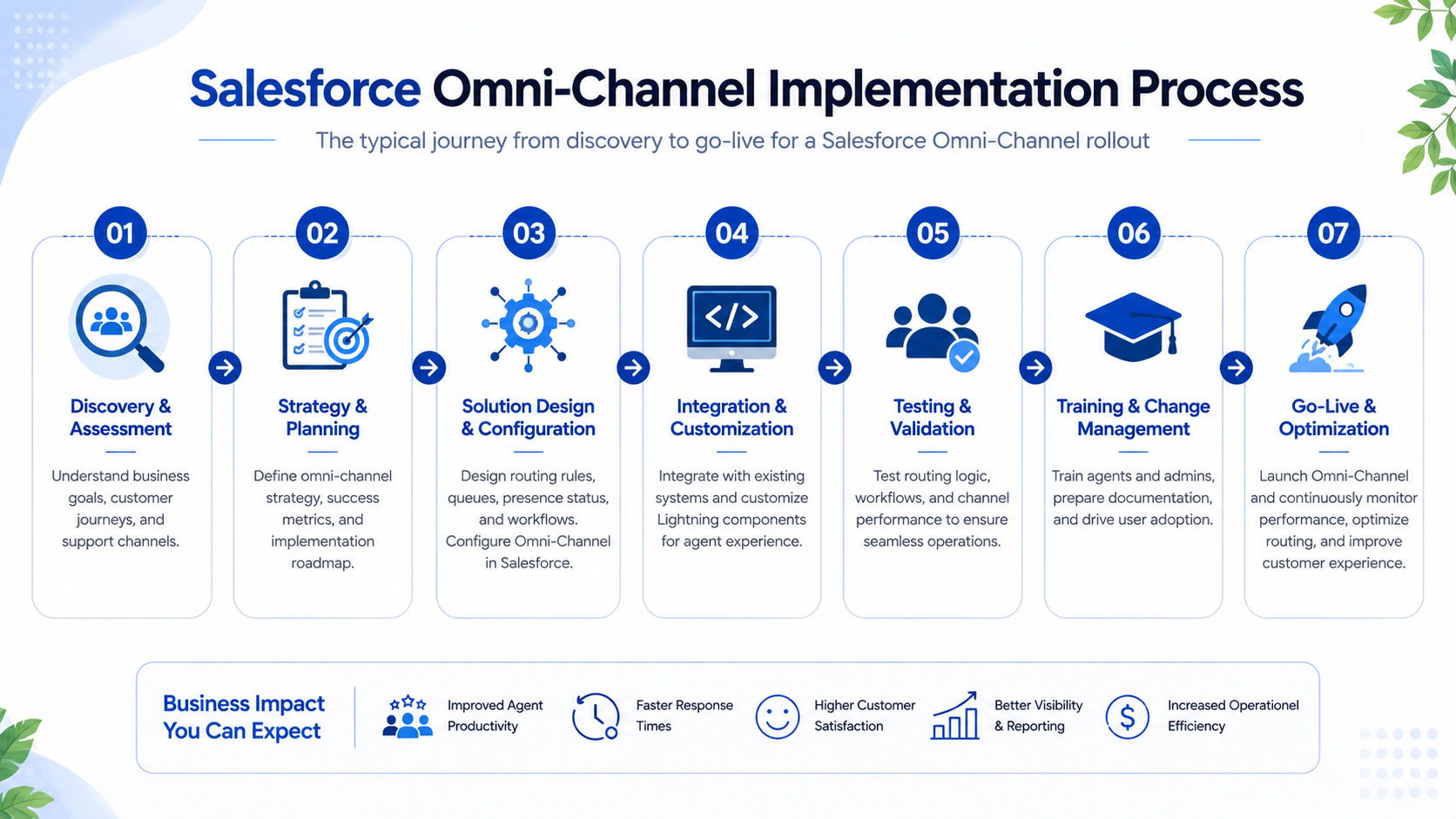
Step-by-Step: How a Typical Omni-Channel Implementation Unfolds
This section works well as a quick-reference visual for your team or leadership deck.
- Discovery and requirements mapping — Define channels, agent skill groups, and current pain points in your existing routing (or lack of one).
- Solution design — Map out queues, routing configurations, capacity models, and presence statuses.
- Configuration and build — Set up Omni-Channel routing, connect channels, and build any required automation or Apex logic.
- Data migration — Move historical cases, contacts, and routing rules from legacy systems.
- Testing and QA — Validate routing accuracy, load testing for peak volumes, and edge-case handling.
- Training and enablement — Train agents and supervisors on new dashboards, queues, and presence controls.
- Go-live and hypercare — Launch with close monitoring for the first 2-4 weeks to catch routing misfires early.
- Optimization — Review routing performance data and refine capacity models based on real usage patterns.
Keeping this sequence visible to your stakeholders helps set realistic expectations on both timeline and cost — most surprises happen when a step gets skipped, not when it gets budgeted for.
How to Budget Smart: A Practical Checklist
Before you approve any Salesforce omni-channel budget, run through this list with your implementation partner:
- Confirm which Service Cloud edition you actually need — don’t overbuy Unlimited if Enterprise covers your use case.
- Get a channel-by-channel cost breakdown, not just one lump implementation number.
- Ask for a phased rollout plan with cost estimates per phase.
- Clarify what’s included in “support” post-launch — is it hours-based, retainer-based, or ticket-based?
- Request a realistic timeline with milestones, not just a final go-live date.
- Ask how data migration scope affects the quote — full history vs. active cases only.
- Confirm training is included, and how many sessions/agents it covers.
This checklist alone can save you from the most common budgeting mistake: agreeing to a number without understanding what’s actually inside it.
Where a Certified Implementation Partner Makes the Difference
A lot of the cost variation in omni-channel projects comes down to experience. Teams that have configured Omni-Channel routing across dozens of industries know which capacity models actually hold up under real call volume, which integrations are prone to failure, and which shortcuts quietly create technical debt.
At NSIQ INFOTECH, we work with CFOs, IT heads, and procurement teams to build Salesforce Omni-Channel implementations that match actual business needs — not an inflated scope designed to pad the invoice. Our approach starts with a clear cost breakdown by channel and phase, so you know exactly what you’re paying for before a single line of configuration begins. If you’re evaluating vendors right now, it’s worth asking any partner for that same level of transparency.
Conclusion
Budgeting for a Salesforce Omni-Channel implementation isn’t about finding the cheapest quote — it’s about understanding exactly what drives the cost so you can make informed decisions. Licensing, configuration depth, channel integrations, data migration, training, and ongoing support all play a role in the final number, and skipping any of these to save money upfront usually costs more down the line in rework and lost efficiency.
The businesses that get the best return treat this as a phased investment: start with your highest-impact channels, measure the results, and expand from there with real data backing the next budget request.
If you’re currently evaluating your options and want a clear, itemized cost breakdown based on your specific channels and team size, NSIQ INFOTECH can walk you through a scoped estimate with no inflated line items. Book a consultation with our Salesforce team to get a realistic number you can take straight to your finance team.