

Introduction: Completing the Restoration Is Only Half the Job
Imagine a commercial warehouse suffers severe water damage after a major pipe bursts overnight.
Your restoration team arrives quickly. Technicians assess the affected areas, remove standing water, install drying equipment, and begin documenting the damage. The building is moving toward recovery, and your operations team is doing exactly what it should.
Then the administrative work begins.
The insurance adjuster requests additional photographs. The estimator needs to explain a revised scope of work. The billing team is waiting for approval, while the project manager is searching through emails for the latest instructions. Meanwhile, the carrier wants the documentation submitted in a particular format.
The restoration work is progressing, but the claim is not.
This situation is familiar to many restoration contractors. Completing a job requires skilled people and the right equipment, but getting the claim reviewed and settled also depends on accurate documentation, timely communication, and a clear understanding of what the insurance carrier needs.
That is where a well-designed insurance restoration CRM can make a meaningful difference.
By configuring Salesforce Service Cloud around restoration and insurance-claim workflows, companies can bring claim records, adjuster communication, project updates, supporting documents, and follow-up activities into a more coordinated system.
The objective is straightforward: give field teams, project managers, estimators, billing staff, and insurance adjusters a clearer view of the same claim, with fewer administrative gaps.
Why Restoration Companies Need Better Insurance Claim Management
Restoration projects rarely follow a perfectly predictable path. A job that initially appears straightforward may reveal additional damage after materials are removed. Drying requirements may change, documentation may need to be updated, and the scope may require further discussion with the adjuster.
When every department manages its own information, even a capable restoration team can struggle to keep the claim moving.
1. Important evidence gets scattered across different systems
Technicians may capture photographs on mobile devices, record moisture readings in field applications, and send updates through messaging tools. Estimators maintain their own project files, while billing teams rely on emails and spreadsheets.
Each individual record may be useful, but finding the complete story of a claim becomes difficult.
An adjuster asking why additional drying equipment was required should not have to wait while three departments search for supporting evidence.
A centralized CRM can associate relevant records, communications, tasks, and documents with the appropriate claim, making it easier for authorized team members to find the information they need.
2. Carrier deadlines are easy to overlook
Restoration carrier programs may establish requirements for initial contact, inspections, estimates, progress updates, and documentation.
When these deadlines are tracked manually, a busy project manager can miss a reminder or assume that another team member has completed an important task.
Salesforce can be configured to track milestones, calculate due dates, send reminders, and escalate overdue activities. The precise rules should reflect each carrier agreement rather than applying one deadline to every claim.
3. Supplement requests become difficult to follow
Additional damage discovered during demolition or mitigation may require a revised estimate or supplemental request.
Problems arise when the original scope, revised estimate, supporting photographs, and adjuster comments are stored in separate locations. Team members may struggle to identify which version was submitted and whether the latest request has received a response.
A structured workflow can connect the original estimate, subsequent revisions, supporting evidence, submission dates, and approval status.
This does not guarantee approval, but it makes the review process easier to understand and manage.
4. Management lacks a complete view of claim progress
A restoration company may have dozens or hundreds of active jobs across multiple locations and insurance programs.
Without consolidated reporting, leadership may know which jobs are underway but have limited visibility into which claims are awaiting adjuster feedback, which supplements remain unresolved, and which approved jobs are still awaiting payment.
A well-configured Salesforce solution can turn these separate activities into a more useful operational picture.
What Is Salesforce for Insurance Claims in the Restoration Industry?
Salesforce is a customer relationship management platform that can be configured to support business processes beyond traditional sales management.
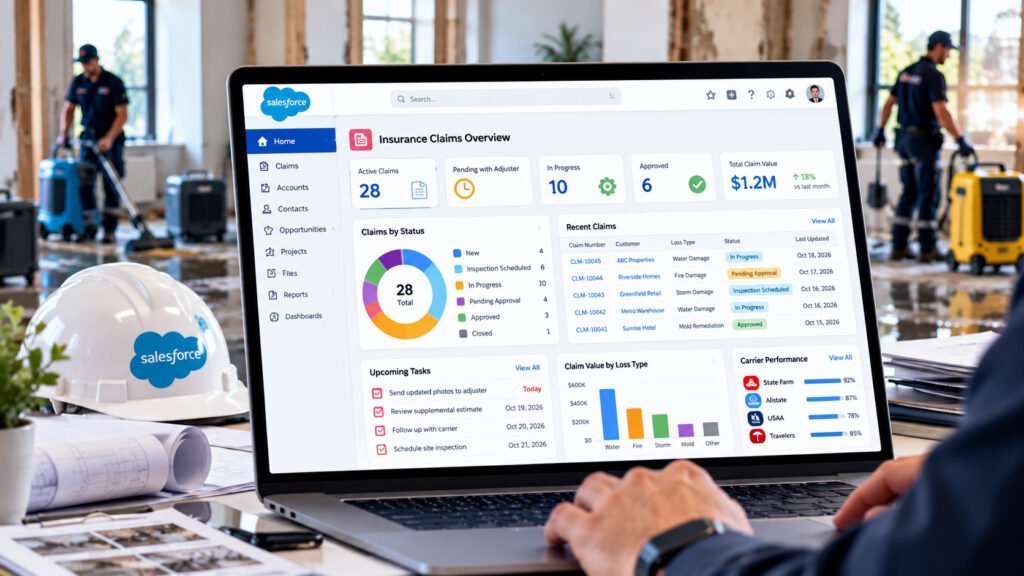
For restoration contractors, Salesforce Service Cloud can serve as the central coordination layer for claim-related customer service, carrier relationships, internal tasks, communications, and service workflows.
It can also work alongside field-service applications, estimating systems, accounting software, document repositories, and other operational tools through suitable integrations.
Rather than replacing every specialist application, the aim is to connect the information and activities that need to work together.
For example, a restoration company could configure Salesforce to manage:
- Insurance carrier, adjuster, and third-party administrator records.
- Claim intake and initial loss information.
- Property details and assigned restoration teams.
- Inspection and documentation milestones.
- Estimate and supplement tracking.
- Adjuster communications and follow-up activities.
- Carrier-specific service-level agreements.
- Claim status dashboards and management reporting.
- Customer and partner communication histories.
The final design depends on the company’s operating model, existing software, reporting needs, and carrier requirements.
Four Salesforce Workflows That Can Improve Restoration Claim Management
The value of restoration insurance claims software is not simply the ability to store information. It is the ability to help people complete the right action at the right time.
Here are four practical workflows restoration companies can consider.
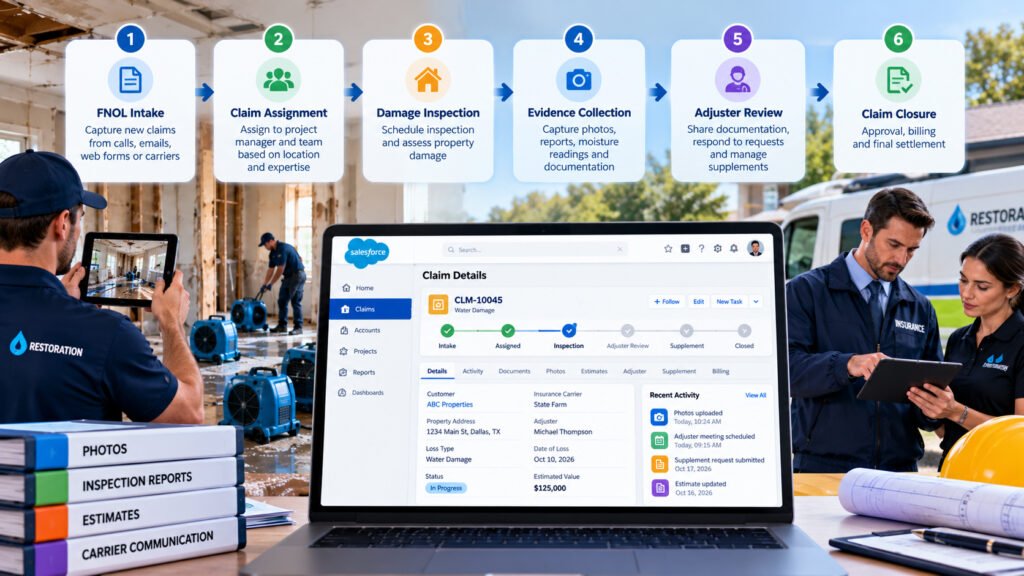
Workflow 1: Automated First Notice of Loss (FNOL) Intake
The challenge: A new claim arrives through an email, referral network, carrier portal, telephone call, or integration. Someone must capture the details, identify the correct team, and ensure that the appropriate people are informed.
How Salesforce can help:
A configured intake workflow can create a claim or service case from an approved source and capture available information, such as:
- Property address and contact information.
- Date and category of loss.
- Reported damage and urgency.
- Insurance carrier and claim reference.
- Assigned adjuster or third-party administrator.
- Required response and inspection milestones.
The system can then route the case according to configured rules, such as service area, team availability, loss category, or technician qualifications.
It can also create follow-up tasks and send an acknowledgement to the appropriate contact.
Real-world example:
A property manager reports water damage at a distribution centre. Salesforce records the initial details, creates the claim record, assigns the case to the relevant operations team, and alerts the project manager.
The project manager can see the reported loss, the assigned personnel, and the outstanding intake requirements without starting a separate spreadsheet.
Business benefit: Less manual re-entry, clearer ownership, and better visibility from the moment a claim enters the business.
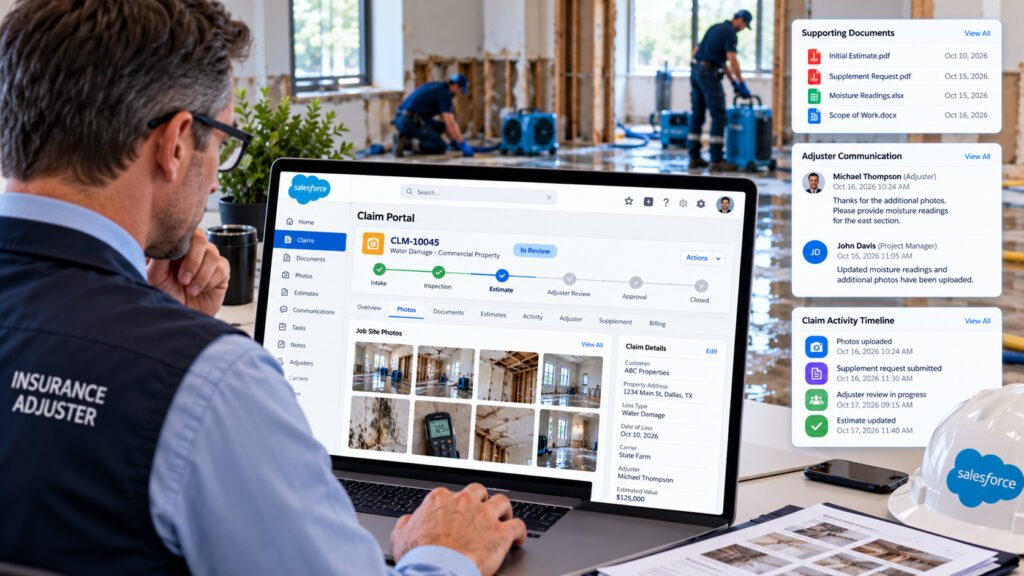
Workflow 2: A Complete Digital Evidence Package for Adjusters
The challenge: The restoration team has completed the work, but the adjuster needs additional evidence to understand the damage, the work performed, or a proposed change in scope.
Searching through individual email attachments and disconnected photo folders slows down the review.
How Salesforce can help:
A claim record can serve as the central reference for supporting information, including:
- Before-and-after photographs.
- Inspection reports and site notes.
- Moisture readings and drying logs.
- Equipment deployment records.
- Estimates and revised scope documents.
- Explanations for additional work.
- Relevant adjuster correspondence.
Where field applications and estimating tools support integration, information can be transferred into the appropriate claim workflow rather than being entered repeatedly.
The system can also help staff identify missing documentation before a submission is sent.
Real-world example:
During the removal of damaged flooring, the restoration team discovers moisture affecting an adjacent area. The project manager records the additional findings, links the relevant photographs and readings to the claim, and coordinates the revised estimate.
When the supplement is submitted, the supporting information is available alongside the request.
The adjuster has a clearer explanation of what changed, why the additional work is being proposed, and which records support the request.
Business benefit: Better-organized evidence, fewer avoidable information requests, and a more transparent review process.
Workflow 3: An Adjuster Portal Using Salesforce Experience Cloud
The challenge: Adjusters and carrier representatives repeatedly contact project managers to request updates, retrieve documents, or check the status of a claim.
Internal teams spend time responding to routine enquiries instead of coordinating restoration work.
How Salesforce can help:
Salesforce Experience Cloud can be used to build a secure external portal for authorized customers or business partners.
Depending on the design, the portal could allow an adjuster to:
- View assigned claims and their current status.
- Access approved photographs and reports.
- Review relevant project milestones.
- Download submitted documents.
- Check whether additional information is required.
- Submit comments or requests.
- Review the status of a supplement.
Any approval or sign-off functionality must follow the company’s actual authorization process. The portal should not automatically imply that a carrier has approved a claim simply because a document has been viewed or uploaded.
Access controls are equally important. Each user should see only the records and documents they are authorized to access, and sensitive internal financial information should remain restricted.
Real-world example:
An adjuster managing several commercial losses logs in to a portal and opens the record for a warehouse restoration project. The adjuster can see the latest approved progress report and retrieve the relevant documentation without requesting the same files from the project manager again.
Business benefit: More convenient information sharing, fewer repetitive enquiries, and improved visibility for external partners.
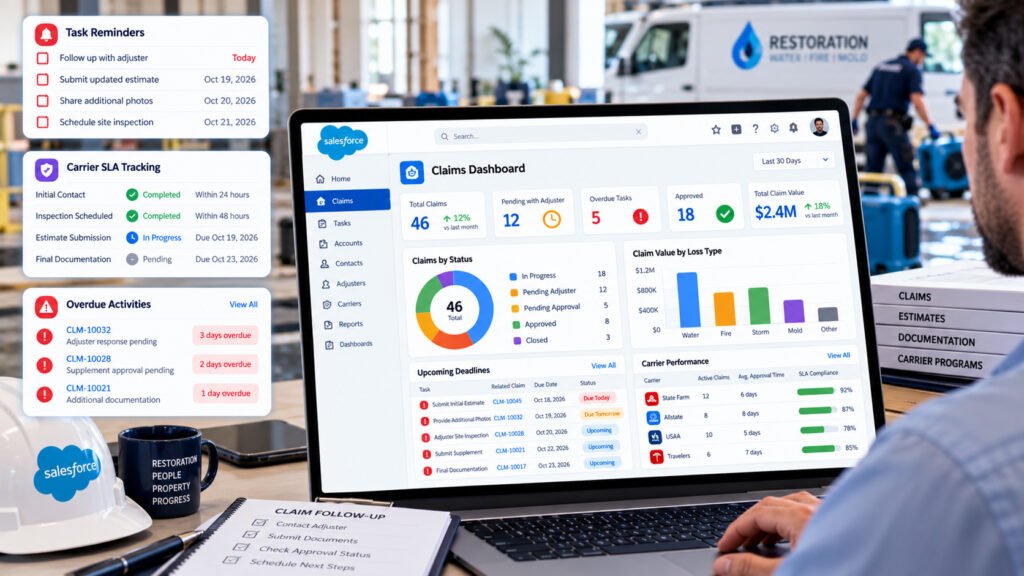
Workflow 4: Automated Follow-Ups and Carrier SLA Tracking
The challenge: A submitted estimate or supplement remains under review, but nobody is certain when it was last followed up or who owns the next action.
Meanwhile, another claim is approaching a carrier-program deadline.
How Salesforce can help:
Workflow automation can track submission dates, due dates, response status, and outstanding tasks. Salesforce can then send reminders or escalate cases according to configurable business rules.
For example, a company could establish a rule that prompts the assigned project manager to follow up when a supplement has been awaiting a response for a specified period.
The system could also flag a claim when a required milestone is approaching its deadline.
These rules should account for carrier-specific requirements, business hours, holidays, and any agreed exceptions.
Real-world example:
A revised estimate is submitted on Monday. The system records the submission and schedules the next follow-up based on the company’s defined procedure.
If the claim remains unresolved when the reminder becomes due, Salesforce alerts the responsible team member. If the item continues to remain outstanding, a further escalation can notify the operations manager.
Business benefit: Clearer accountability, fewer forgotten follow-ups, and better control over carrier-program obligations.
Salesforce Service Cloud vs. Traditional Restoration Claim Management
Different restoration applications solve different problems. Field-focused platforms may be excellent at recording site conditions and managing restoration activities, while a CRM provides broader capabilities for managing relationships, communications, workflows, and reporting.
| Operational requirement | Fragmented manual approach | Salesforce-based approach |
| Claim intake | Details copied between emails and spreadsheets | Configured intake and case creation |
| Adjuster information | Contact details maintained in separate records | Centralized carrier and contact relationships |
| Evidence collection | Files spread across folders and messages | Claim-linked documents and records |
| Supplement tracking | Manual status checks and email searches | Defined statuses, owners, and follow-up tasks |
| Carrier deadlines | Calendar reminders and individual tracking | Configurable milestone alerts and escalations |
| External collaboration | Repeated emails and telephone calls | Optional secure Experience Cloud portal |
| Management reporting | Manually consolidated spreadsheets | Dashboards and reports using available data |
| System connectivity | Repeated data entry across applications | API or middleware integrations where supported |
Salesforce does not automatically deliver every capability listed above. The workflows, integrations, permissions, and dashboards must be configured and tested for the organisation’s actual requirements.
The strongest approach is usually to identify which activities create the most administrative friction and address those first.
How Salesforce Integrates With Restoration and Estimating Software
A restoration company may already use specialist applications for estimating, field documentation, scheduling, accounting, and customer communication.
Replacing all these systems is not necessarily the right solution.
Instead, Salesforce can be designed to exchange selected information with existing applications through supported APIs, middleware, or other approved integration methods.
For example, an integration may be designed to exchange:
- Claim identifiers and property information.
- Estimate totals and revision references.
- Project status and completion milestones.
- Inspection documents and supporting evidence.
- Invoice references and payment status.
- Relevant updates from field-service applications.
Platforms such as Xactimate or Symbility should be assessed individually before promising a particular integration. The available API access, file formats, licensing arrangements, and permitted data exchanges will determine what is practical.
The same applies to accounting systems. An integration should define which application owns each data field, how updates are synchronized, and how errors or duplicate records are handled.
A good integration connects the right information without creating another source of conflicting records.
Important Considerations Before Implementing Salesforce
A successful implementation begins with the way your restoration business actually operates, not with a long list of software features.
Before starting, consider the following areas.
Map the existing claim lifecycle
Document what happens from the first loss notification through inspection, mitigation, estimation, supplement review, invoicing, and final closure.
Identify where information is entered more than once, where ownership becomes unclear, and where work routinely waits for a response.
Define carrier-specific requirements
Different carriers and managed repair programmes may have different deadlines, documentation expectations, and communication procedures.
Create configurable rules that reflect those requirements instead of forcing every claim through the same process.
Plan for field conditions
Technicians may work in basements, industrial facilities, remote locations, or buildings with unreliable connectivity.
If offline data capture is required, validate the capabilities of the selected Salesforce mobile or field-service solution. Offline availability, supported objects, synchronization behaviour, and conflict handling depend on the implementation.
Protect claim information
Insurance claims can contain personal information, property details, financial records, and sensitive documents.
Use appropriate authentication, permissions, sharing rules, audit controls, retention policies, and secure external access. Portal security should be tested before external users are given access.
Establish measurable success criteria
Define a baseline before implementing the new workflow. Useful measures may include:
- Time from loss notification to first contact.
- Percentage of required milestones completed on time.
- Number of submissions returned for missing documentation.
- Average time spent preparing claim evidence.
- Age of outstanding supplement requests.
- Time between approval and invoicing.
- Days sales outstanding (DSO).
These measures help management determine whether the implementation is delivering real operational improvements.
Frequently Asked Questions
1. Can Salesforce be used as restoration insurance claims software?
Yes. Salesforce can be configured to manage claim intake, carrier relationships, adjuster communication, supporting documents, task assignments, deadlines, and reporting. Specialist estimating and field applications can remain in place and integrate where supported.
2. Is Salesforce an alternative to dedicated insurance adjuster software?
It depends on the requirement. Salesforce can support communication, case management, partner portals, and business workflows. It should not automatically be considered a replacement for specialist claims adjudication, estimating, policy administration, or insurer-specific systems.
3. Can Salesforce integrate with Xactimate or Symbility?
Potentially, subject to the supported integration methods and access available for the specific product and environment. The integration scope should be confirmed with the relevant software providers before implementation.
4. Can insurance adjusters access claim information without a full Salesforce user licence?
External access may be possible through an appropriately licensed Salesforce Experience Cloud configuration. The applicable external-user licensing, authentication, sharing, and usage requirements must be confirmed for the proposed solution.
5. How does Salesforce help restoration companies manage carrier programmes?
Salesforce can track carrier-specific requirements, assign responsibility for milestones, generate reminders, and report on completion rates. This helps teams monitor compliance, although the software cannot guarantee a particular carrier score or continued referral volume.
6. Can Salesforce help reduce supplement delays?
It can help organize supporting evidence, track submissions, identify outstanding requests, and prompt follow-ups. Actual review and approval times remain dependent on the carrier, the claim, the documentation, and other circumstances outside the contractor’s control.
7. Can technicians upload site photographs and inspection records?
Yes, through suitable Salesforce mobile capabilities or integrated field applications. The precise process depends on the selected application, file-handling configuration, device permissions, and connectivity requirements.
8. Can management track outstanding claims and unpaid invoices?
Salesforce can provide dashboards and reports using available claim, approval, billing, and payment data. Accurate reporting depends on connecting the relevant systems and defining consistent status and financial-data ownership.
9. How long does Salesforce implementation take for a restoration company?
There is no single implementation timeline that applies to every business. A limited initial deployment may be considerably simpler than a solution involving several integrations, multiple carrier programmes, extensive data migration, and an external adjuster portal. A realistic estimate should follow requirements discovery and technical assessment.
10. What should a restoration company automate first?
Start with the workflow that creates the greatest measurable operational problem. For many businesses, that may be claim intake, deadline tracking, evidence preparation, or supplement follow-up. Establish a baseline, implement a manageable first phase, and expand after validating the results.
Conclusion: Give Your Restoration Team a Clearer Path From Job Completion to Claim Resolution
Restoration companies operate in a demanding environment. Teams must respond quickly, manage unpredictable site conditions, document their work carefully, and coordinate with insurance carriers throughout the claim lifecycle.
When claim information is scattered across emails, spreadsheets, field applications, and individual inboxes, even straightforward administrative tasks can become unnecessarily difficult.
A thoughtfully configured Salesforce solution can bring those activities into a more connected process. It can help teams manage carrier relationships, coordinate claim documentation, monitor deadlines, organize supplement submissions, and give authorised partners better visibility into progress.
The real opportunity is not to add another application to the technology stack. It is to make the existing workflow easier to follow, easier to measure, and easier for everyone involved to understand.
For restoration contractors looking to strengthen their insurance-claim operations, the right starting point is a detailed review of the current process, followed by a Salesforce architecture that fits the company’s actual requirements.
Looking to Streamline Insurance Claim Workflows With Salesforce?
Explore how Salesforce Service Cloud, workflow automation, system integrations, and secure partner portals could support your restoration business.
Contact your Salesforce implementation partner to discuss your claim lifecycle, carrier-program requirements, integration needs, and opportunities for practical automation.