
Introduction
A manufacturer may know exactly how many products have been dispatched to its distributors. But does that mean the company knows how many products have actually reached customers?
Not necessarily.
A distributor might have thousands of units in stock while the manufacturer continues producing more based on previous orders. Dealers may be struggling to get product information, sales enquiries might remain unattended, and incentive claims could sit pending for weeks. Meanwhile, the management team may be making decisions using reports that are already outdated.
These problems are common in manufacturing businesses that depend on a large network of dealers, distributors, retailers, and regional partners.
In India, the situation can become even more complicated when different teams rely on WhatsApp messages, Excel sheets, Tally records, emails, and phone calls to exchange business information. Each system may serve a purpose, but bringing everything together for a clear view of channel performance becomes difficult.
This is where distributor management software and a well-designed Salesforce partner portal can make a meaningful difference.
A connected portal gives manufacturers a structured way to manage partner relationships, track business activities, handle requests, and improve access to information. More importantly, it can make everyday work easier for the dealers and distributors who use it.
In this article, we explain how Salesforce Experience Cloud can support channel management, which features manufacturers should prioritise, what implementation mistakes to avoid, and how better channel data can support business decisions and website content.
What Is Channel Visibility in Manufacturing?
Channel visibility means understanding what is happening across your distribution network, rather than looking only at the products leaving your warehouse.
It connects information about dispatches, distributor inventory, dealer orders, customer enquiries, sales performance, claims, and payments.
For example, imagine a manufacturer dispatches 5,000 units of a product to its distributors during a month. That figure tells the company how much stock it has supplied to the channel. It does not automatically reveal how many units distributors have sold to dealers or how many have reached end customers.
Without this information, the company might mistake inventory accumulation for growing demand.
With better channel visibility, management can answer important questions:
- Which distributors are meeting their sales targets?
- Which products are selling quickly, and which are moving slowly?
- How much stock is available across the distribution network?
- Are dealer enquiries receiving timely follow-ups?
- Which orders, incentive claims, and payment requests are still pending?
- Which regions or partners need additional sales support?
Having these answers helps manufacturers make decisions based on more complete information instead of relying entirely on periodic reports or individual updates.
Why Is Channel Visibility So Difficult to Achieve?
The challenge is not always a lack of software. Often, it comes from the way information is collected and shared.
Distributors operate independent businesses and usually have their own billing systems, employees, and processes. A manufacturer might use Salesforce for customer relationships, while a distributor manages invoices and stock through Tally or another accounting application.
If the manufacturer asks the distributor to enter the same information into another system without providing a clear benefit, the process creates additional work.
Over time, the distributor may update records less frequently or return to familiar methods such as phone calls and spreadsheets.
The solution is to build a system that supports both sides. Manufacturers need reliable information, while distributors need convenient access to orders, product details, claims, and business updates.
A successful channel management strategy should address both requirements.
What Is a Dealer and Distributor Portal on Salesforce?
A dealer or distributor portal is an online platform where authorised business partners can access relevant information and complete routine activities without depending on repeated communication with the manufacturer’s internal teams.
Using Salesforce Experience Cloud for manufacturing, companies can build a branded partner portal connected to their Salesforce environment. Depending on the implementation, it can share relevant information with Sales Cloud and integrate with existing ERP, inventory, billing, or distributor management systems.
For example, a distributor could submit an order through the portal and check its status later. The manufacturer’s sales team could review the order within its connected Salesforce processes, while the distributor receives updates according to the configured workflow.
Similarly, a dealer could submit a warranty claim with supporting documents and check its progress without repeatedly calling the service department.
The portal becomes a common access point for approved information and business activities.
However, the exact capabilities depend on the Salesforce configuration, integrations, data access rules, and business processes. An existing distributor management system does not necessarily need to be replaced.
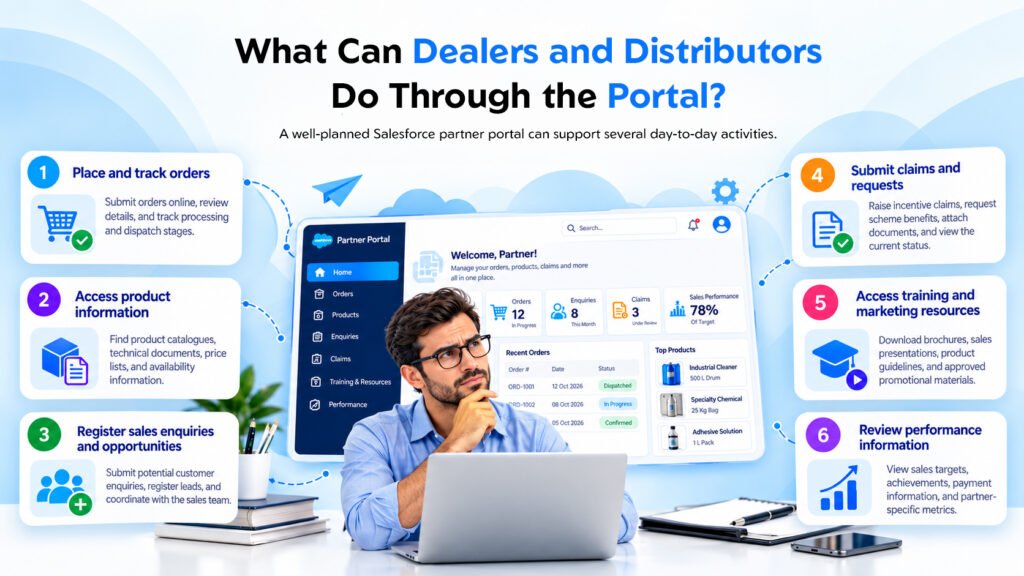
What Can Dealers and Distributors Do Through the Portal?
A well-planned Salesforce partner portal can support several day-to-day activities.
- Place and track orders
Partners can submit orders online, review order details, and follow the order through the configured processing and dispatch stages.
- Access product information
Dealers and distributors can find approved product catalogues, technical documents, price lists, and availability information where the relevant data is connected.
- Register sales enquiries and opportunities
Partners can submit potential customer enquiries, register leads, and coordinate with the manufacturer’s sales team.
- Submit claims and requests
Distributors can raise incentive claims, request scheme benefits, attach documents, and view the current status of their submissions.
- Access training and marketing resources
Authorised partners can download product brochures, sales presentations, product guidelines, and approved promotional materials.
- Review performance information
Depending on the data available, the portal can display sales targets, achievements, payment information, and other partner-specific business metrics.
These capabilities reduce the need to contact different departments for routine information and help partners manage their relationship with the manufacturer more efficiently.
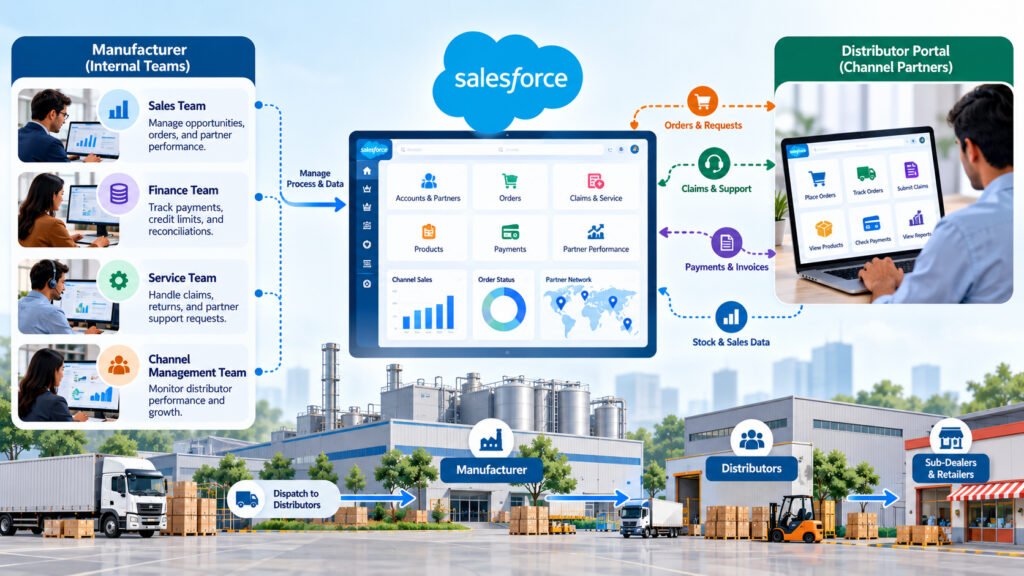
How Salesforce Helps Manufacturers Manage Their Channel Network
While distributors use the portal, the manufacturer’s internal teams can manage the underlying business processes through Salesforce.
The value comes from connecting partner activities with the workflows and information used by sales, finance, service, and channel management teams.
Partner Onboarding and Management
Manufacturers can maintain partner records, track onboarding progress, manage required documents, and define approval processes.
For example, when a new distributor applies to join the network, the company can create a structured onboarding process rather than handling every step through separate email conversations.
Sales Targets and Incentive Programmes
Sales teams can monitor partner targets, review achievements, and manage incentive-related processes according to company rules.
This makes it easier to understand which partners are performing well and where additional support may be needed.
Primary and Secondary Sales Reporting
Primary sales generally refer to sales from the manufacturer to its distributors. Secondary sales refer to sales from distributors to dealers or retailers.
Both views matter.
Primary sales help manufacturers understand what they have supplied to the channel. Secondary sales provide additional insight into how products are moving through the distribution network.
A Salesforce dashboard can bring these figures together when the relevant data is available and properly integrated.
Claims, Approvals, and Notifications
Salesforce workflows can help route claims and other requests to the appropriate teams, record decisions, and notify relevant users about status changes.
This creates a more structured process for handling requests and makes it easier to identify delays.
Management Dashboards
Leadership teams can use dashboards to review sales performance, partner activity, pending requests, and regional trends.
Instead of collecting updates from several departments before every review meeting, managers can access information from connected records and reports.
The quality of these insights still depends on accurate data, appropriate integrations, and clear ownership of business records.
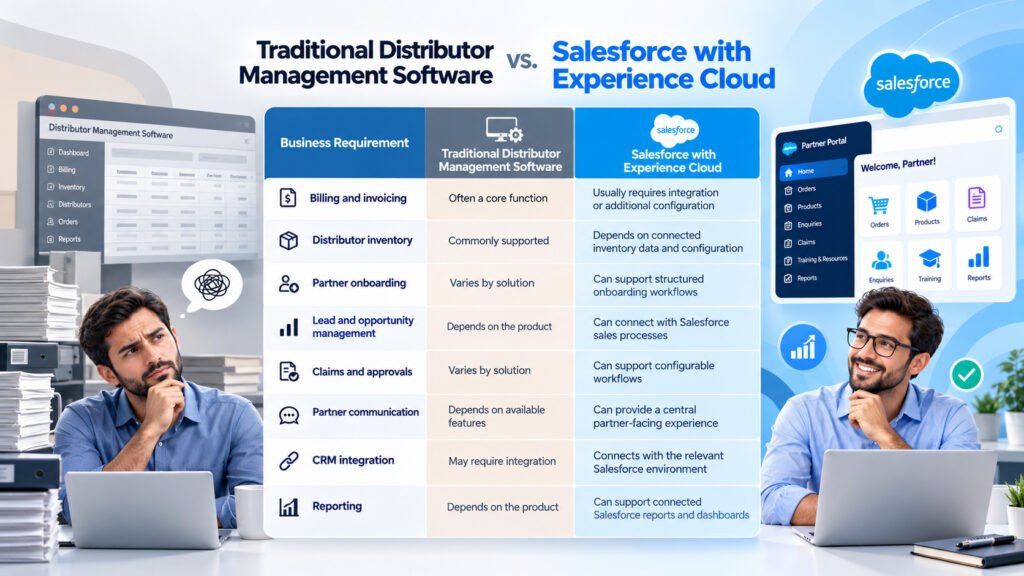
Distributor Management Software vs. Salesforce Experience Cloud
Manufacturers often compare traditional distributor management software with a Salesforce-based partner portal. Although these solutions can overlap, they do not always serve exactly the same purpose.
Traditional distributor management software often focuses on operational activities such as billing, inventory, invoices, and distributor-level transactions.
Salesforce Experience Cloud, connected with the relevant Salesforce applications, is particularly useful for managing partner interactions, sales processes, onboarding, claims, and access to shared business information.
| Business Requirement | Traditional Distributor Management Software | Salesforce with Experience Cloud |
| Billing and invoicing | Often a core function | Usually requires integration or additional configuration |
| Distributor inventory | Commonly supported | Depends on connected inventory data and configuration |
| Partner onboarding | Varies by solution | Can support structured onboarding workflows |
| Lead and opportunity management | Depends on the product | Can connect with Salesforce sales processes |
| Claims and approvals | Varies by solution | Can support configurable workflows |
| Partner communication | Depends on available features | Can provide a central partner-facing experience |
| CRM integration | May require integration | Connects with the relevant Salesforce environment |
| Reporting | Depends on the product | Can support connected Salesforce reports and dashboards |
The right choice depends on the manufacturer’s existing systems, operational requirements, budget, and distribution model.
For some businesses, replacing the existing distributor management system may be unnecessary. They can retain their current application for billing and inventory while using Salesforce to improve partner relationships and channel visibility.
The objective should be to build a connected business process, not introduce another disconnected system.
Seven Common Mistakes Manufacturers Should Avoid
Investing in dealer portal software does not automatically improve channel visibility. The outcome depends on how the portal is planned, implemented, and adopted.
Here are seven mistakes worth addressing before implementation.
1. Treating the Portal as Only an IT Project
A portal can be technically sound and still fail to solve the problems that matter to the business.
The sales team may need better lead tracking, finance may need a structured claims process, and distributors may simply want reliable order updates.
If the project is designed without input from these teams, important requirements can be missed.
What to do instead: Involve sales, finance, operations, IT, and selected channel partners during requirement gathering. Agree on the business problems the portal must solve before deciding which features to build.
2. Designing for Head Office Instead of Partners
Manufacturers often focus on the reports their management team wants to see. However, distributors are more likely to use a portal consistently when it helps them complete their own work.
A distributor should not have to navigate several screens just to find an order status or check whether a claim has been approved.
What to do instead: Prioritise common partner activities. Keep navigation simple, minimise unnecessary data entry, and make important information easy to find.
3. Tracking Primary Sales but Ignoring Secondary Sales
Dispatch figures are useful, but they do not tell the complete story of market demand.
Suppose a manufacturer sees increasing orders from distributors. Without secondary sales information, it may not know whether customers are buying more products or distributors are accumulating inventory.
What to do instead: Establish a practical process for collecting secondary sales and stock data. Depending on existing systems, this could involve integration, scheduled uploads, or a phased reporting process.
Start with the information that can be collected reliably and improve coverage over time.
4. Overlooking Data Quality and Ownership
A dashboard is only as reliable as the information behind it.
Duplicate dealer records, inconsistent product codes, incorrect partner details, and outdated stock information can lead to misleading reports.
These problems can become harder to correct when information is exchanged between several applications.
What to do instead: Define ownership of partner and product records. Establish validation rules, required fields, naming standards, and a process for correcting errors before the portal is rolled out widely.
5. Making Claims and Incentives Difficult to Track
Claims and incentive programmes can involve several steps, including document submission, verification, approval, and settlement.
When partners cannot see the status of a request, they may contact multiple employees for updates. Internal teams then spend time answering repeated questions instead of processing the requests.
What to do instead: Provide a clear submission process, define approval responsibilities, and make relevant status updates visible to authorised partners. Ensure that the workflow reflects the manufacturer’s actual approval policies.
6. Launching Across the Entire Network at Once
A large rollout can expose the business to several problems simultaneously, including training gaps, incorrect records, integration issues, and partner confusion.
Fixing these issues becomes more complicated when many regions are affected.
What to do instead: Begin with a pilot involving one region or a small group of distributors. Collect feedback, correct the problems, and confirm that the main processes work as intended before expanding the rollout.
7. Measuring Portal Logins Instead of Business Outcomes
Login numbers show whether partners are accessing the system. They do not prove that the portal is improving business performance.
A portal may have regular users but still fail to reduce claim delays or improve order processing.
What to do instead: Define measurable objectives before launch. Review indicators such as the percentage of orders submitted through the portal, average claim processing time, secondary sales reporting coverage, and dealer lead conversion.
Compare results with the baseline established before implementation.
How Better Channel Data Can Support Your Website’s SEO
A Salesforce partner portal is primarily a business tool, but the information collected through channel operations can also support a manufacturer’s content and search strategy.
The important distinction is that a portal does not directly guarantee better Google rankings. Its potential SEO value comes from the reliable business information it helps the company organise and use.
Create Original Content From Business Insights
Manufacturers often publish similar product descriptions, industry articles, and general advice. These pages can be useful, but they may not explain what makes one manufacturer’s experience different from another’s.
With appropriate permissions and privacy safeguards, aggregated channel data can help a business publish more specific insights.
For example, a manufacturer might analyse common product enquiries, regional demand patterns, recurring service requests, or frequently reported distribution challenges.
These insights could become an industry article, a practical guide, or an original research report.
Only use information that can be shared responsibly. Commercially sensitive distributor data and identifiable partner information should not be published without appropriate authorisation.
Build Pages Around Real Search Intent
Different audiences search for different reasons.
A manufacturing business evaluating distributor management software may want to understand features, integration requirements, implementation costs, and the differences between a DMS and a CRM-based portal.
A customer looking for an authorised dealer may want a location-specific page with accurate contact details and product availability information.
Creating useful pages for these different needs helps visitors find information relevant to their situation.
Manufacturers can use verified dealer records to support dealer locator pages, provided the information is current and the partners have authorised its publication.
Help Dealers Share Accurate Product Information
Authorised dealers and distributors can be valuable sources of relevant industry information and customer access.
Manufacturers can provide partners with approved product descriptions, technical resources, and links to official product pages. This helps maintain consistent information across the network.
Where a dealer website independently finds the content useful, it may link to the manufacturer’s relevant resources. Such links should be earned through relevance and genuine value rather than purchased or artificially created.
A connected partner portal can make approved information easier to distribute, but SEO performance still depends on the overall quality, relevance, accessibility, and usefulness of the website.
Key Features to Include in a Salesforce Partner Portal
The best portal is not necessarily the one with the largest number of features. It is the one that supports the most important business activities without making routine work unnecessarily complicated.
Features for Distributors
- Online order placement and order status tracking.
- Access to approved product information and price lists.
- Stock and secondary sales reporting.
- Claim and incentive submission with status tracking.
- Relevant payment and outstanding balance information.
- Access to distributor-specific announcements and resources.
Features for Dealers
- Lead and enquiry registration.
- Product information and availability lookup.
- Quotation and order-related requests.
- Warranty and service request submission.
- Access to training resources and approved marketing materials.
Features for the Manufacturer
- Partner onboarding and document approval.
- Territory and sales target management.
- Partner performance dashboards.
- Claims and incentive workflows.
- Role-based data access and permissions.
- Notifications for important process updates.
- Reporting on channel activity and sales trends.
Not every manufacturer needs all these capabilities in the first release. The initial scope should reflect actual partner requirements, existing systems, and the business outcomes the company wants to improve.
How to Implement a Salesforce Dealer and Distributor Portal
A structured implementation approach helps manufacturers avoid unnecessary customisation and reduces the risk of building a portal that partners find difficult to use.
Step 1: Map Your Distribution Network
Identify distributors, sub-dealers, retailers, and the relationships between them.
Understand how orders, products, payments, and business information move through the network. This creates a clearer picture of the processes the portal must support.
Step 2: Identify the Biggest Visibility Gaps
Document the information that is missing, delayed, or difficult to access.
For example, you may have reliable dispatch data but limited secondary sales reporting. Or you may be able to record claims but have no convenient way for distributors to check their status.
Prioritise the gaps that have the greatest impact on business operations.
Step 3: Choose the First Use Cases
Select a small number of high-value activities, such as order tracking, claim submission, partner onboarding, or lead registration.
Avoid trying to digitise every process in the first release.
Step 4: Review Existing Systems and Data
Determine which information resides in Salesforce, ERP, accounting software, inventory applications, or distributor systems.
Decide where each type of data should be maintained and how the relevant systems will exchange information.
This step is especially important when the business wants to retain an existing DMS.
Step 5: Configure Sales Cloud and Experience Cloud
Design the internal Salesforce processes and partner-facing portal around the agreed requirements.
Set up appropriate access permissions so that distributors and dealers can view only the information they are authorised to access.
Configure the necessary workflows, integrations, and reports.
Step 6: Run a Pilot
Launch the portal with a limited group of partners.
Observe how they use it, identify confusing steps, and collect feedback from both external partners and internal teams.
Step 7: Train Partners and Improve Adoption
Provide straightforward onboarding instructions and practical training. Make sure partners understand how the portal helps them complete routine tasks.
Establish a support process for resolving access issues and answering questions.
Step 8: Measure Results and Expand
Review the agreed KPIs, identify areas for improvement, and refine the portal before extending it to additional regions or partner groups.
This phased approach helps manufacturers learn from actual usage rather than relying entirely on assumptions made during planning.
Practical Examples: How a Salesforce Partner Portal Can Help
The following scenarios are illustrative examples designed to explain how these processes can work. They are not claims about specific client projects or measured customer results.
Scenario 1: An Industrial Equipment Manufacturer in India
An industrial equipment manufacturer receives distributor orders through email and phone calls. Its sales team records some information in spreadsheets, while stock details remain in separate systems.
As a result, the production planning team primarily relies on previous dispatch figures.
The manufacturer introduces a Salesforce partner portal with order tracking and a structured process for collecting secondary sales and stock information.
Distributors can submit orders through the portal, while internal teams review connected reports to understand channel activity.
Potential business value: The company can improve order visibility, reduce manual status enquiries, and make production decisions using a broader view of channel demand, subject to the completeness and accuracy of the available data.
Scenario 2: A Consumer Durables Manufacturer With a Large Dealer Network
A consumer durables company receives customer enquiries through multiple regional offices. Dealer lead information is recorded inconsistently, and warranty claims are handled through separate email conversations.
The company introduces lead registration and claim tracking through Experience Cloud, connected to its Salesforce processes.
Dealers can submit enquiries and review the status of their requests. Internal teams can follow the configured processes and access relevant records.
Potential business value: The company can improve enquiry follow-up, establish a clearer claim management process, and reduce repeated requests for status updates.
These examples demonstrate an important principle: technology delivers more value when it addresses a defined operational problem.
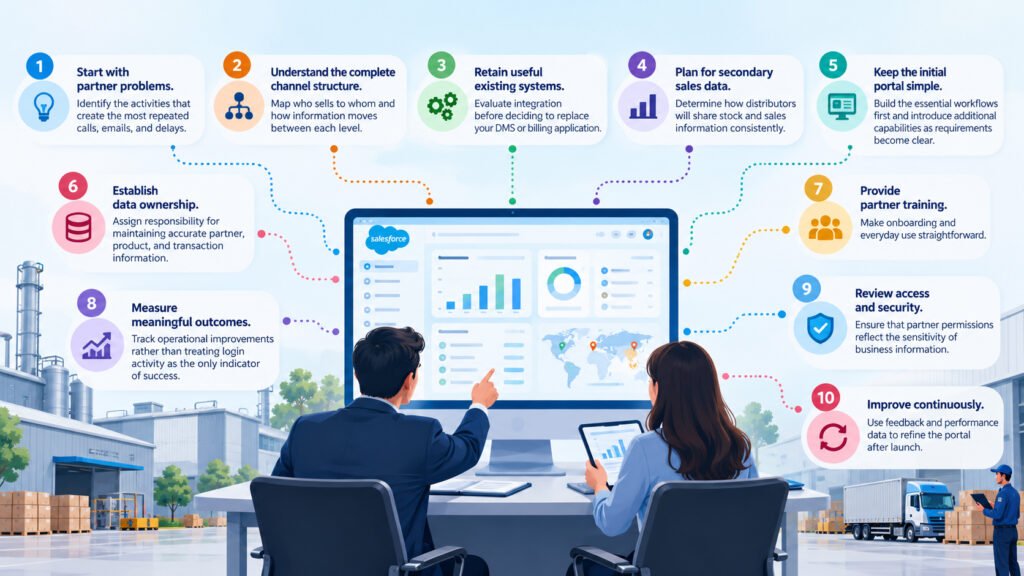
Actionable Tips for Manufacturing Leaders
Before investing in distributor management software or expanding an existing Salesforce environment, consider these practical steps:
- Start with partner problems. Identify the activities that create the most repeated calls, emails, and delays.
- Understand the complete channel structure. Map who sells to whom and how information moves between each level.
- Retain useful existing systems. Evaluate integration before deciding to replace your DMS or billing application.
- Plan for secondary sales data. Determine how distributors will share stock and sales information consistently.
- Keep the initial portal simple. Build the essential workflows first and introduce additional capabilities as requirements become clear.
- Establish data ownership. Assign responsibility for maintaining accurate partner, product, and transaction information.
- Provide partner training. Make onboarding and everyday use straightforward.
- Measure meaningful outcomes. Track operational improvements rather than treating login activity as the only indicator of success.
- Review access and security. Ensure that partner permissions reflect the sensitivity of business information.
- Improve continuously. Use feedback and performance data to refine the portal after launch.
How NSIQ INFOTECH Helps Manufacturers Improve Channel Visibility
At NSIQ INFOTECH, the focus is on understanding business requirements before deciding how Salesforce should be configured.
For manufacturers working with dealers and distributors, a well-planned partner portal can help connect internal teams with the external partners responsible for selling and supporting their products.
NSIQ INFOTECH can help manufacturers plan and develop a Salesforce-based approach around requirements such as:
- Mapping dealer and distributor workflows.
- Configuring Salesforce Sales Cloud and Experience Cloud for relevant business processes.
- Designing partner onboarding and access workflows.
- Supporting order-related processes, lead registration, and claims management.
- Planning integrations with existing business applications.
- Developing reports and dashboards for channel performance.
- Supporting phased implementation, partner training, and adoption.
The appropriate solution depends on the manufacturer’s current technology environment, data requirements, and distribution model.
The goal is straightforward: help internal teams gain a clearer view of channel activity while giving dealers and distributors a more convenient way to work with the manufacturer.
To explore how Salesforce can support your channel management requirements, visit the NSIQ INFOTECH website and discuss your business needs with the team.
Frequently Asked Questions
1. What is dealer portal software?
Dealer portal software is an online platform that allows authorised dealers to access product information, register enquiries, submit requests, and manage relevant business activities with a manufacturer. Available features depend on the software and its configuration.
2. What is a Salesforce partner portal?
A Salesforce partner portal is a partner-facing digital experience that can be built using Salesforce Experience Cloud. It allows authorised partners to interact with relevant Salesforce records and business processes through a controlled online interface.
3. How is distributor management software different from a Salesforce partner portal?
Distributor management software often focuses on operational tasks such as billing, inventory, invoices, and order processing. A Salesforce partner portal can focus on partner relationships, leads, onboarding, claims, communication, and connected sales processes. The exact distinction depends on the products being compared.
4. Can Salesforce replace an existing distributor management system?
It depends on the manufacturer’s requirements and existing systems. Some businesses may consolidate selected processes, while others may retain their current DMS for billing and inventory and use Salesforce for partner relationship management and channel visibility.
5. What is Salesforce Experience Cloud for manufacturing?
Salesforce Experience Cloud enables businesses to build digital experiences for external users, including distributors, dealers, customers, and other partners. In manufacturing, it can support use cases such as partner onboarding, product information access, lead registration, and service requests.
6. What does partner relationship management mean in Salesforce?
Partner relationship management involves organising partner information, onboarding, sales opportunities, performance, communication, and related business processes. Salesforce can support these activities through its CRM capabilities and partner-facing experiences.
7. Can a Salesforce partner portal track secondary sales?
Yes, provided the solution includes a suitable process for collecting secondary sales information. Data may be submitted through portal forms, uploaded files, or integrations with existing distributor systems. The quality of reporting depends on data completeness and consistency.
8. Will distributors actually use a Salesforce portal?
Adoption depends on whether the portal provides practical value. Distributors are more likely to use a system that makes it easier to track orders, check claims, access product information, or submit requests without duplicating work.
9. How long does it take to implement a dealer or distributor portal?
Implementation time depends on the number of features, integrations, data quality, access requirements, and complexity of existing business processes. A focused pilot can help a manufacturer validate the approach before committing to a broader rollout.
10. Can a Salesforce portal manage claims and incentive schemes?
A Salesforce-based portal can support claim submission, document collection, approval workflows, notifications, and status tracking when these processes are configured appropriately. Financial settlement may also depend on integration with the company’s finance or ERP system.
11. Is Salesforce suitable for manufacturers with multiple distributor levels?
It can be suitable, provided the solution is designed around the manufacturer’s channel structure. Partner relationships, record access, reporting, and responsibilities must be configured carefully so that each distributor or dealer sees the information relevant to its role.
12. What should manufacturers consider before selecting distributor management software?
Manufacturers should evaluate their channel structure, billing and inventory requirements, CRM needs, integration options, partner experience, reporting requirements, security, implementation costs, and long-term maintenance. The best solution is the one that addresses these requirements without creating unnecessary complexity.
Conclusion
Improving channel visibility is not simply a matter of introducing another software application. It requires manufacturers to understand what information they need, how that information is generated, and why their dealers and distributors would want to share it.
A well-designed Salesforce dealer and distributor portal can provide a structured way to manage partner interactions, track business requests, improve sales visibility, and connect channel activities with internal workflows.
However, success depends on more than technology. Accurate data, practical workflows, appropriate integrations, partner adoption, and clear ownership are equally important.
Manufacturers do not need to build every feature at once. Starting with a few important use cases, testing the portal with a limited group of partners, and measuring actual business outcomes can provide a stronger foundation for long-term improvement.
Better channel visibility begins when the system works for the people using it. When manufacturers make that the priority, Salesforce can become a valuable part of a more connected and efficient distribution network.
Looking to improve dealer and distributor management with Salesforce? Connect with NSIQ INFOTECH to explore a partner portal approach aligned with your manufacturing business requirements.