
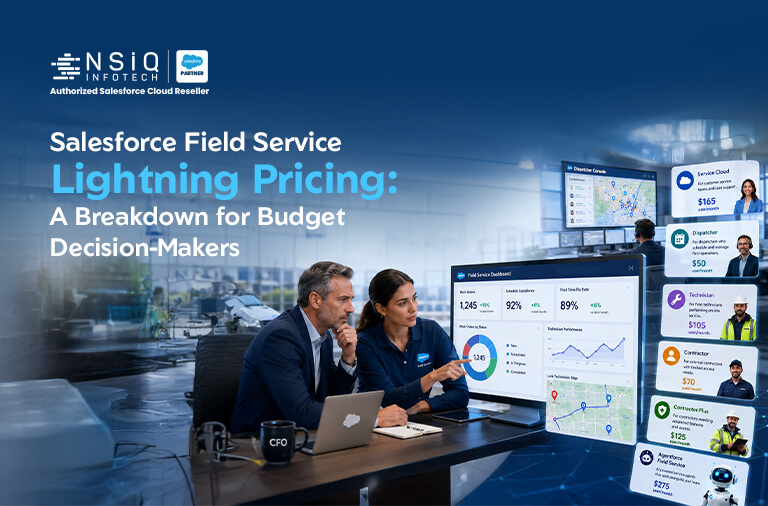
If you’re a CFO, procurement leader, or IT budget head trying to pin down Salesforce Field Service Lightning pricing before signing off on a deal, you’ve probably noticed something frustrating: the numbers never seem to add up the same way twice. One quote shows a flat per-user rate. Another buries costs inside “Contact Sales” links. A third arrives from your Salesforce Account Executive with three tiers, two add-ons, and a renewal clause you weren’t expecting.
That confusion is normal — and it’s expensive if you don’t sort it out early. Field Service Lightning (now officially called Salesforce Field Service) isn’t priced like a simple SaaS subscription. It’s a layered licensing model built on top of Service Cloud, with different rates for dispatchers, technicians, contractors, and now AI-powered agents.
This guide breaks down exactly what you’re paying for, where the hidden costs sit, and how budget owners can plan a realistic, defensible number before it ever reaches a board meeting.
What Is Salesforce Field Service Lightning, and Why Does Pricing Matter So Much?
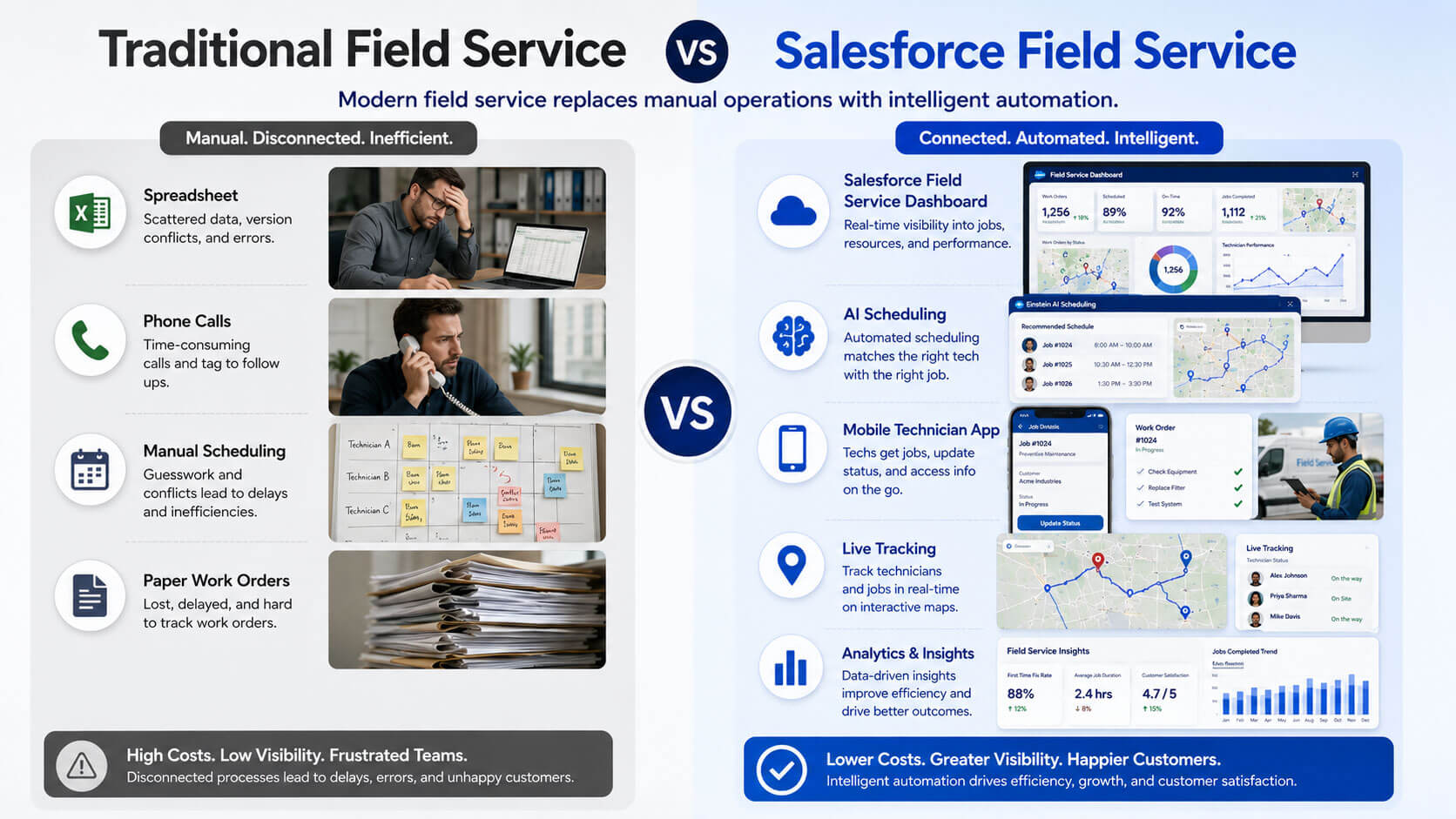
Salesforce Field Service Lightning helps companies manage mobile workforces — think HVAC technicians, telecom installers, medical equipment engineers, or utility crews. It handles scheduling, dispatching, work orders, inventory, and mobile access, all connected back to the core CRM.
For an operations leader, that’s a productivity story. For a finance leader, it’s a licensing puzzle. Field Service is not sold as a single product — it’s an add-on layered on top of Service Cloud, which means your total bill depends on several moving parts working together, not one flat number.
Why CFOs and Procurement Teams Struggle with FSL Cost Estimates
Most budget conversations stall for three reasons:
- Salesforce doesn’t publish a single, universal price — quotes shift based on edition, region, and negotiated discounts.
- Field Service depends on a mandatory Service Cloud base license, which is easy to overlook when comparing vendor quotes.
- There are five distinct field service user profiles, each priced differently, and most vendors don’t explain how to mix them correctly.
Once you understand the structure, though, the pricing logic becomes much easier to model — and much easier to negotiate.
Salesforce Field Service Lightning Pricing Breakdown (2026)
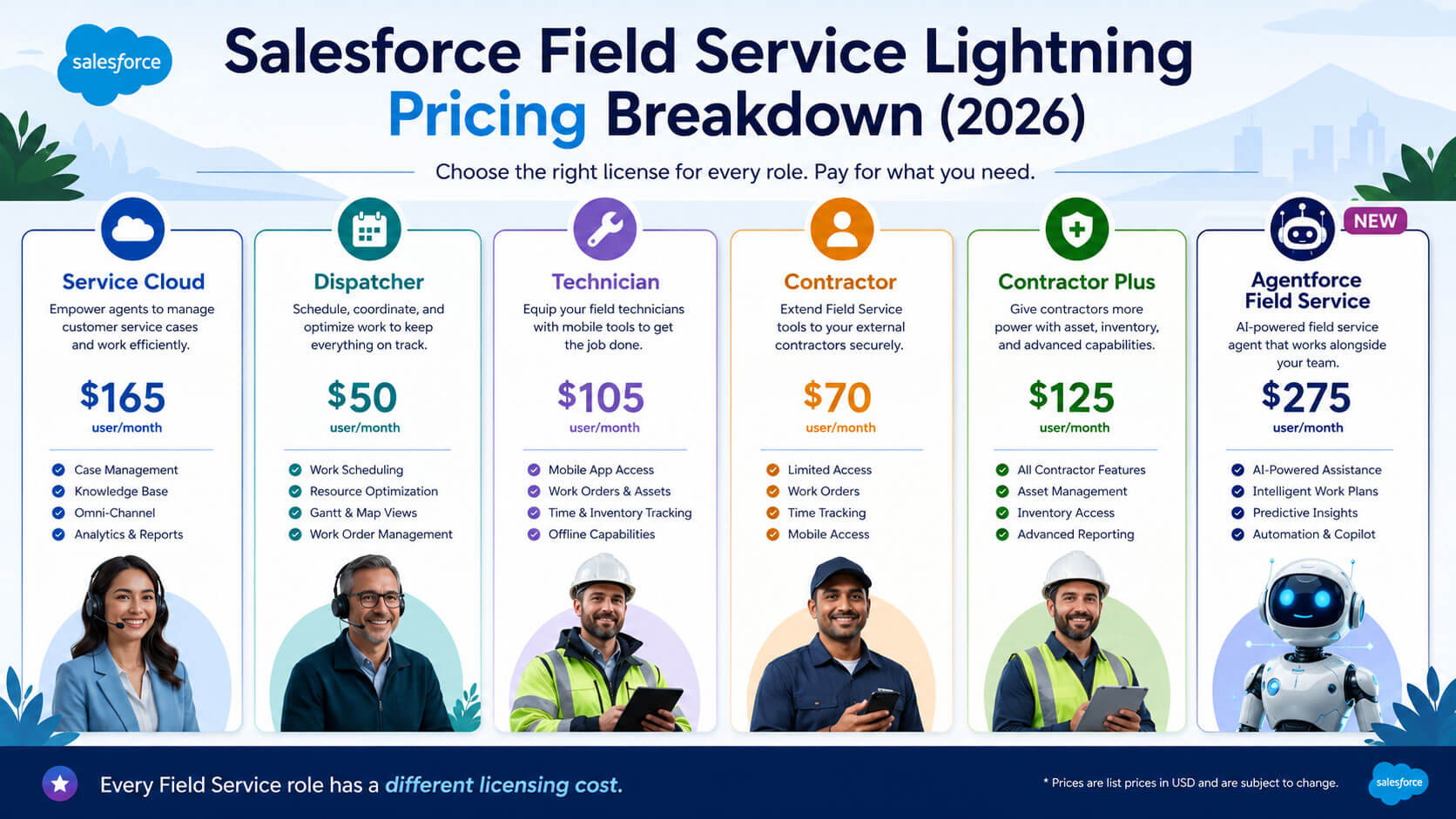
Here’s the core structure decision-makers need to know before requesting a quote.
Mandatory Service Cloud Base License
Every organization using Salesforce Field Service must hold at least one Service Cloud license, since Field Service sits on top of it rather than standing alone. At list price, the Service Cloud Enterprise edition runs roughly $165 per user per month. This is the base cost many teams forget to include when they compare Field Service Lightning cost across vendors — and it’s often the first number procurement pushes back on once discovered mid-negotiation.
Dispatcher and Technician License Pricing
These are the two core field service roles. At Enterprise edition list pricing, both Dispatcher and Technician licenses run about $175 per user per month. Dispatchers get full access to the Gantt scheduling board and optimization engine, while Technicians use the mobile app with more limited access — same price, very different day-to-day functionality.
Contractor and Contractor Plus Licensing
For seasonal or third-party field workers, Salesforce offers a lower-cost, constrained-access tier. Contractor licenses list at around $55 per user per month, while Contractor Plus, which adds enhanced data access, runs closer to $80 per user per month. These tiers matter most for organizations that scale their field workforce up and down seasonally — HVAC and utility companies, for example.
Field Service Plus Bundle
If your field technicians also need to manage customer cases directly, Field Service Plus Bundles Service Cloud functionality into a single per-user cost. It’s often more economical than buying Service Cloud and Field Service licenses separately for the same user, so it’s worth asking your Account Executive to model both scenarios side by side.
Agent force 1 Field Service (the AI Tier)
Salesforce’s AI-assisted tier, Agent force 1 Field Service, is priced at around $650 per user per month and includes autonomous scheduling intelligence and predictive maintenance capabilities. It’s the most expensive line item by far, so it should only go to a small group of power users — dispatchers managing complex, high-volume territories — rather than your entire field team.
What this means for your budget: according to Gartner’s survey analysis of field service management deployments, companies can typically expect to recover their investment within roughly nine months of going live. That payback window matters because it reframes the conversation — instead of asking “why is this so expensive,” a CFO can ask “what’s our expected payback period at our own utilization numbers,” which is a far more useful budgeting question.
Infographic-Friendly Summary: Salesforce Field Service Lightning Pricing at a Glance
This table is designed to be pulled into a quick-reference infographic for internal budget decks.
| License Type | Approx. List Price | Best Suited For |
| Service Cloud Enterprise (base) | $165/user/month | Mandatory base for all Field Service orgs |
| Dispatcher | $175/user/month | Schedulers managing the Gantt board & optimization |
| Technician | $175/user/month | Field staff using the mobile app |
| Contractor | $55/user/month | Seasonal or third-party field workers |
| Contractor Plus | $80/user/month | Contractors needing enhanced data access |
| Agent force 1 Field Service | $650/user/month | AI-driven scheduling for select power users |
Prices reflect list pricing at the Enterprise edition tier and are subject to change; always confirm current numbers on Salesforce’s official pricing page before budgeting.
Hidden Costs That Impact Your Total Field Service Lightning Cost
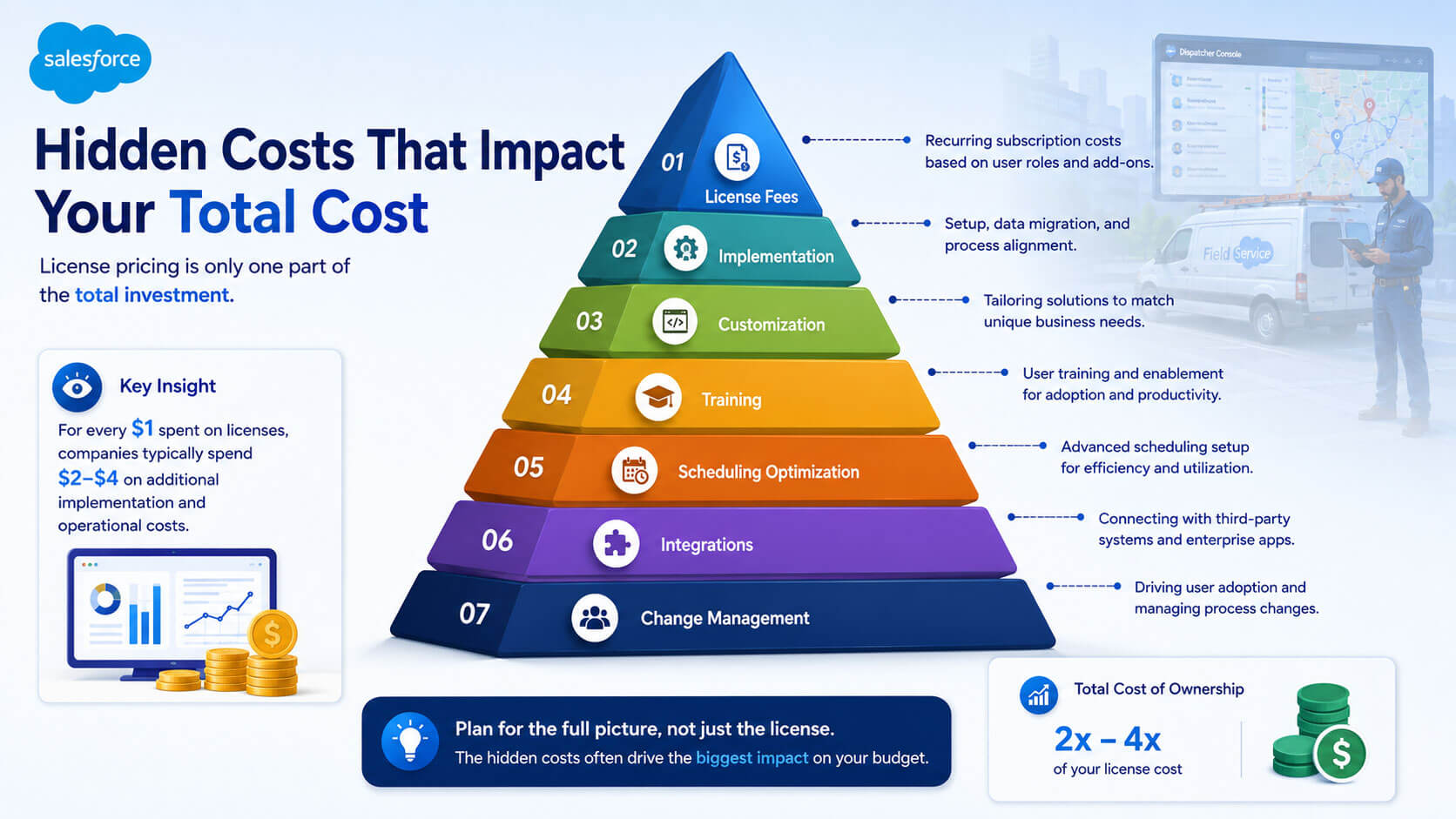
License fees are only part of the story. Budget heads who only model per-seat pricing are almost always surprised by the final invoice. Here’s what else typically shows up.
Implementation & Customization
Configuring service territories, work types, skills, and scheduling rules takes real implementation effort — usually delivered by a Salesforce partner. This is a one-time cost, but it can rival a full year of licensing fees for a mid-size deployment.
Scheduling Optimization Add-On
The advanced optimization engine that automatically assigns the right technician to the right job isn’t always included by default at every tier. Confirm whether it’s bundled into your quote or priced as a separate add-on.
Training and Change Management
Dispatchers and technicians need structured onboarding, especially in the first quarter after go-live. Skipping this step is one of the most common budgeting mistakes — it doesn’t show up as a line item, but it shows up later as low adoption and wasted licenses.
Third-Party Integrations
Connecting Field Service to inventory systems, ERP platforms, or IoT sensors for predictive maintenance often requires middleware or custom API work, which adds to your total cost of ownership beyond the Salesforce invoice itself.
Why this is worth the investment: research cited by McKinsey on AI-driven operations found that organizations adopting AI initiatives — including predictive scheduling and maintenance — reported cost reductions in the 10–20% range, with over a third of companies noting direct cost cuts and improved profitability. For teams considering the Agent force 1 tier despite its higher sticker price, this is the kind of data point that turns a cost conversation into an investment conversation.
Real-World Example: How a Mid-Size Field Service Team Budgeted for FSL
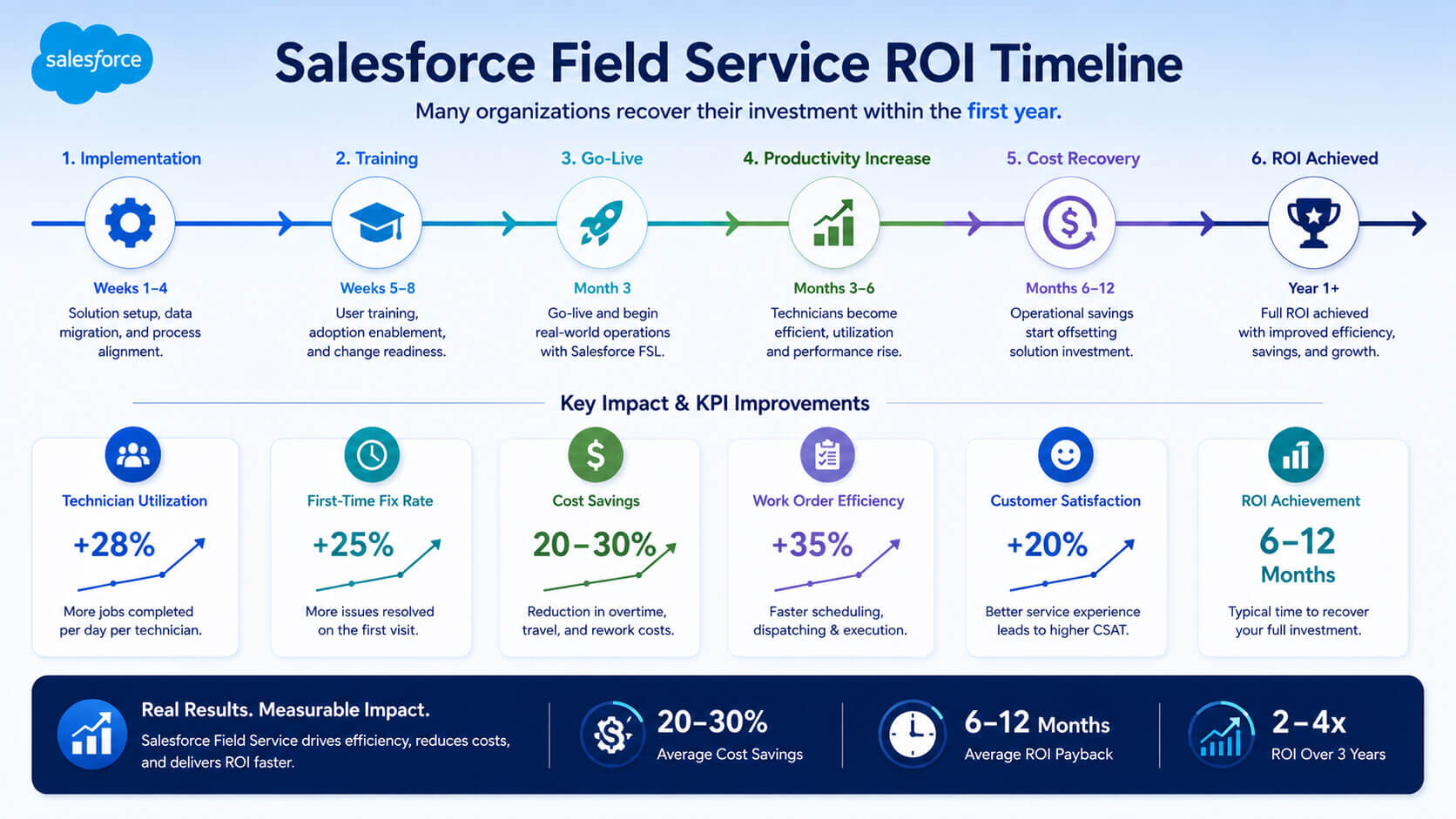
A regional HVAC and maintenance company with 85 field technicians and 12 dispatchers wanted to move off spreadsheets and phone-based dispatching. Here’s how their budgeting process played out.
The process: their IT budget headfirst mapped every role to a license tier — 12 Dispatcher seats, 85 Technician seats, and 20 seasonal Contractor seats for peak summer months — instead of accepting the vendor’s default “one-size” bundle.
The mistake they avoided: their first quote from a reseller assumed all 85-field staff needed full Dispatcher-level access. Correcting this single assumption cut the projected annual license cost by roughly 28%.
The result: after a four-month implementation, the company reported a 22% improvement in technician utilization and reached full payback on their software investment in just under ten months — closely matching the industry-wide nine-month benchmark reported by Gartner.
The takeaway: the biggest cost-saving decision wasn’t negotiating a discount — it was correctly matching each employee to the license tier they actually needed.
How to Reduce Salesforce Field Service Lightning Cost Without Losing Value
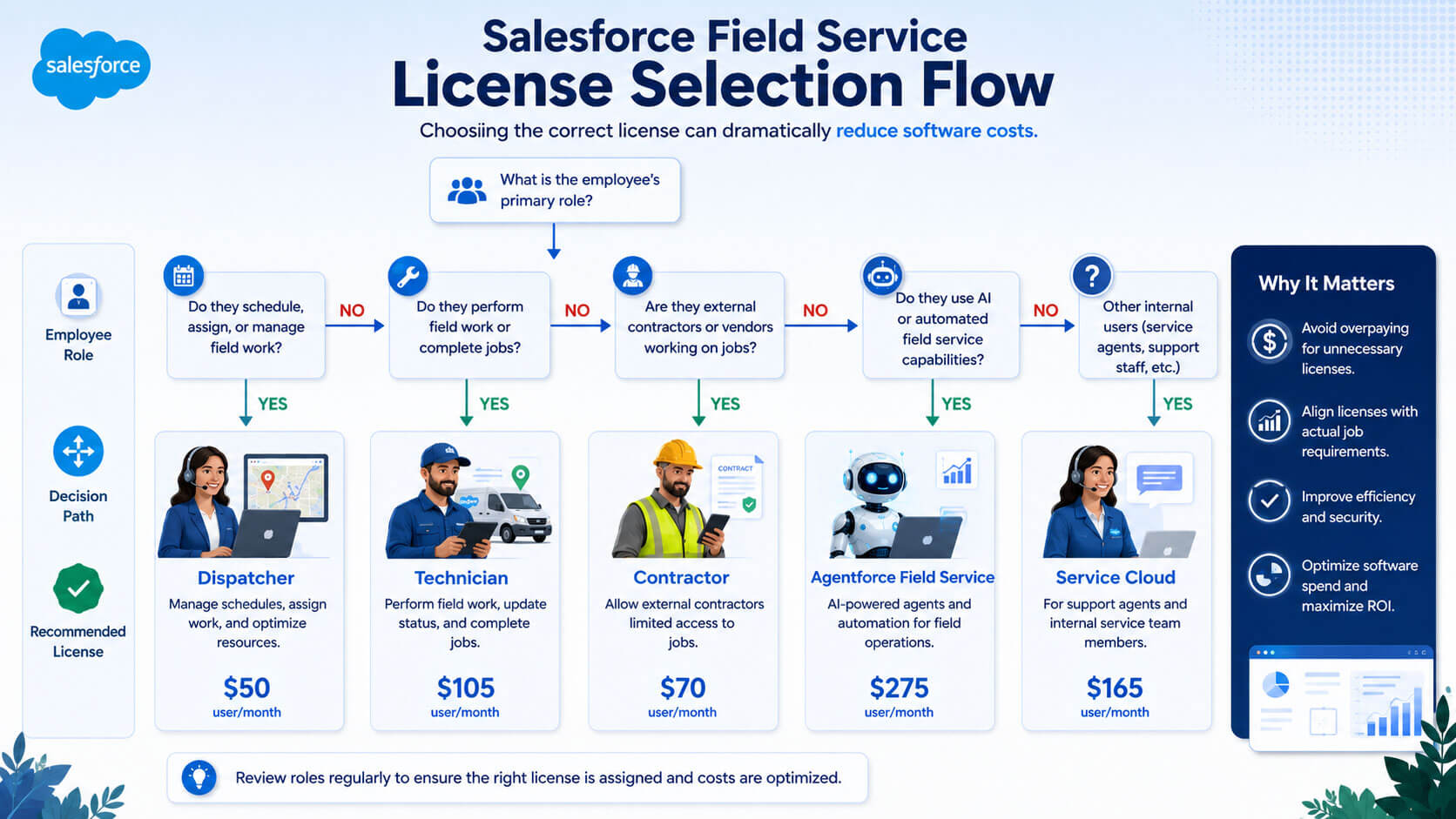
Budget decision-makers don’t need to accept the first quote. These are practical, low-risk ways to bring the number down.
- Audit roles before licensing — map every employee to Dispatcher, Technician, or Contractor based on actual daily tasks, not job titles.
- Right-size the Agent force AI tier — deploy it only to dispatchers managing your most complex territories rather than the whole team.
- Negotiate multi-year terms carefully — longer commitments often reduce per-seat cost but only make sense if your headcount is stable.
- Bundle where it saves money — compare Field Service Plus against buying Service Cloud and Field Service separately for dual-role employees.
- Time renewals with Salesforce’s fiscal year — quotes are often more flexible near quarter-end and year-end close.
- Bring in an independent licensing review — a third-party audit frequently identifies overlapping or unused seats before renewal.
Salesforce Field Service Lightning Pricing vs. Building or Buying Elsewhere
Some organizations weigh Field Service Lightning against smaller, industry-specific field service tools that start at a much lower per-seat price. Those tools can work well for very small teams, but they typically lack the native CRM data connection that Salesforce provides out of the box. For companies already running Sales or Service Cloud, the real comparison isn’t “cheap tool vs. expensive tool” — it’s the added cost of integrating a separate system versus the incremental licensing cost of staying inside one platform.
How NSIQ INFOTECH Helps You Plan and Optimize Your Field Service Lightning Budget
Getting an accurate number for Salesforce Field Service Lightning pricing before you present it to leadership is genuinely difficult without hands-on Salesforce licensing experience. That’s the gap NSIQ INFOTECH’s Salesforce advisory team helps close.
Rather than starting from a vendor quote, NSIQ INFOTECH works with your procurement and IT teams to map your actual workforce dispatchers, technicians, contractors, and seasonal staff against the licensing model that fits, before any contract is signed. That includes reviewing whether Field Service Plus makes sense for dual-role employees, whether the Agent force AI tier is justified for your team size, and where implementation costs are likely to land.
The goal isn’t to sell a bigger deployment it’s to help budget owners walk into a renewal or new purchase with a number they can defend, backed by a realistic view of both license cost and expected payback.
Getting Budget Approval: A Framework for CFOs and IT Budget Heads
Use this simple framework when presenting Salesforce Field Service Lightning cost to leadership or a procurement committee.
- Start with role-based headcount, not total employee count, so licensing maps to real usage.
- Separate one-time implementation cost from recurring annual license cost in your presentation.
- Include a payback estimate using your own utilization numbers, not industry averages alone.
- Flag the mandatory Service Cloud base cost explicitly, so it’s never a surprise later in the approval chain.
- Attach a review date at 90 days post-launch to confirm license counts still match actual usage.
Conclusion: Turning Salesforce Field Service Lightning Pricing into a Confident Decision
Salesforce Field Service Lightning pricing isn’t complicated because Salesforce is trying to hide something — it’s complicated because the platform supports so many different field service roles and workflows. Once you separate the mandatory Service Cloud base cost, the core Dispatcher and Technician licenses, the Contractor tiers, and the optional AI layer, the number becomes something you can actually model and defend.
The organizations that get the best value aren’t the ones who negotiate the steepest discount. They’re the ones who map their workforce accurately, budget for implementation and training up front, and revisit their license mix after go-live. That’s how a line item turns into a business case leadership approves.
Ready to Build a Defensible Salesforce Field Service Lightning Budget?
If you’re preparing a business case, renewal, or new purchase and want a clear, role-by-role breakdown of your expected Salesforce Field Service Lightning cost, NSIQ INFOTECH’s Salesforce advisory team can help you build one before you go to your next budget meeting.
Talk to our Salesforce licensing experts today and get a cost breakdown built around your actual team, not a generic quote.
FAQs
What is the average Salesforce Field Service Lightning pricing per user?
At list price, Dispatcher and Technician licenses run about $175 per user per month, plus a mandatory Service Cloud base license at roughly $165 per user per month.
Is Salesforce Field Service Lightning a standalone product?
No. Field Service Lightning sits on top of Service Cloud, so every organization must hold at least one Service Cloud license before adding field service licenses.
What’s the difference between Dispatcher and Technician licenses?
Both are priced the same at list rate, but Dispatchers get full access to the scheduling board and optimization engine, while Technicians use the mobile app with more limited functionality.
How much does the Contractor license cost?
Contractor licenses list at around $55 per user per month, while Contractor Plus, which adds enhanced data access, runs closer to $80 per user per month.
What is Agent force 1 Field Service, and is it worth the cost?
It’s Salesforce’s AI-powered tier, priced around $650 per user per month. It’s usually worth it only for a smaller group of dispatchers managing complex scheduling, not the entire field team.
Does Salesforce Field Service Lightning pricing include implementation?
No. Implementation, customization, and training are separate costs, usually delivered through a Salesforce partner, and should be budgeted independently of license fees.
How long does it take to see ROI on Salesforce Field Service Lightning?
Industry survey data from Gartner suggests most field service management deployments reach ROI within roughly nine months, though this varies by team size and adoption speed.
Can smaller companies negotiate Salesforce Field Service Lightning cost?
Yes. Multi-year terms, bundling with Field Service Plus, and timing renewals near Salesforce’s fiscal quarter-end can all create room for negotiation.
What is Field Service Plus, and how does it affect pricing?
Field Service Plus Bundles Service Cloud functionality into a single per-user license, which can be more economical for employees who need both case management and field service access.
Do seasonal or contract workers need full licenses?
Not necessarily. Salesforce’s Contractor and Contractor Plus tiers are designed specifically for seasonal or third-party field workers who need constrained, lower-cost access.
What hidden costs should CFOs watch for beyond license fees?
Implementation, the scheduling optimization add-on, training, change management, and third-party integrations are the most underestimated costs.
Is Salesforce Field Service Lightning cost the same across all editions?
No. Pricing varies by edition (Enterprise vs. Unlimited) and can also shift based on region, negotiated discounts, and contract length.
How do I estimate total field service lightning cost for my team?
Map every employee to the correct license tier based on their actual role, add the mandatory Service Cloud base cost, then layer in one-time implementation and training costs.
Should procurement teams request a role-based quote instead of a flat quote?
Yes. A role-based quote broken down by Dispatcher, Technician, and Contractor headcount is far easier to audit and negotiate than a single bundled number.
Where can I find official, up-to-date Salesforce Field Service Lightning pricing?
Salesforce publishes current list pricing on its official Field Service pricing page, though final contract pricing should always be confirmed directly with a Salesforce representative.