
Introduction
If you manage field operations – whether you’re an Operations Head, COO, or Field Director – you already know the pain.
- Technicians missing appointments
- Dispatchers juggling spreadsheets
- Parts not where they need to be
- Customers calling in frustrated
Salesforce Field Service was built to fix exactly this.
In this guide, we’ll break down:
- What Salesforce Field Service Lightning actually is
- How it works in the real world
- Which industries benefit most from it
- What you need to know before implementing it
No fluff, just the practical information you need to make informed decisions.
What Is Salesforce Field Service Lightning?
Salesforce Field Service – often called FSL or SFDC Field Service Lightning – is a field service management solution built natively on the Salesforce platform.
It connects:
- Your customers
- Your back-office teams
- Your field technicians
inside one unified system.
Think of it as the command center for everything that happens outside your office walls.
FSL gives operations teams the ability to:
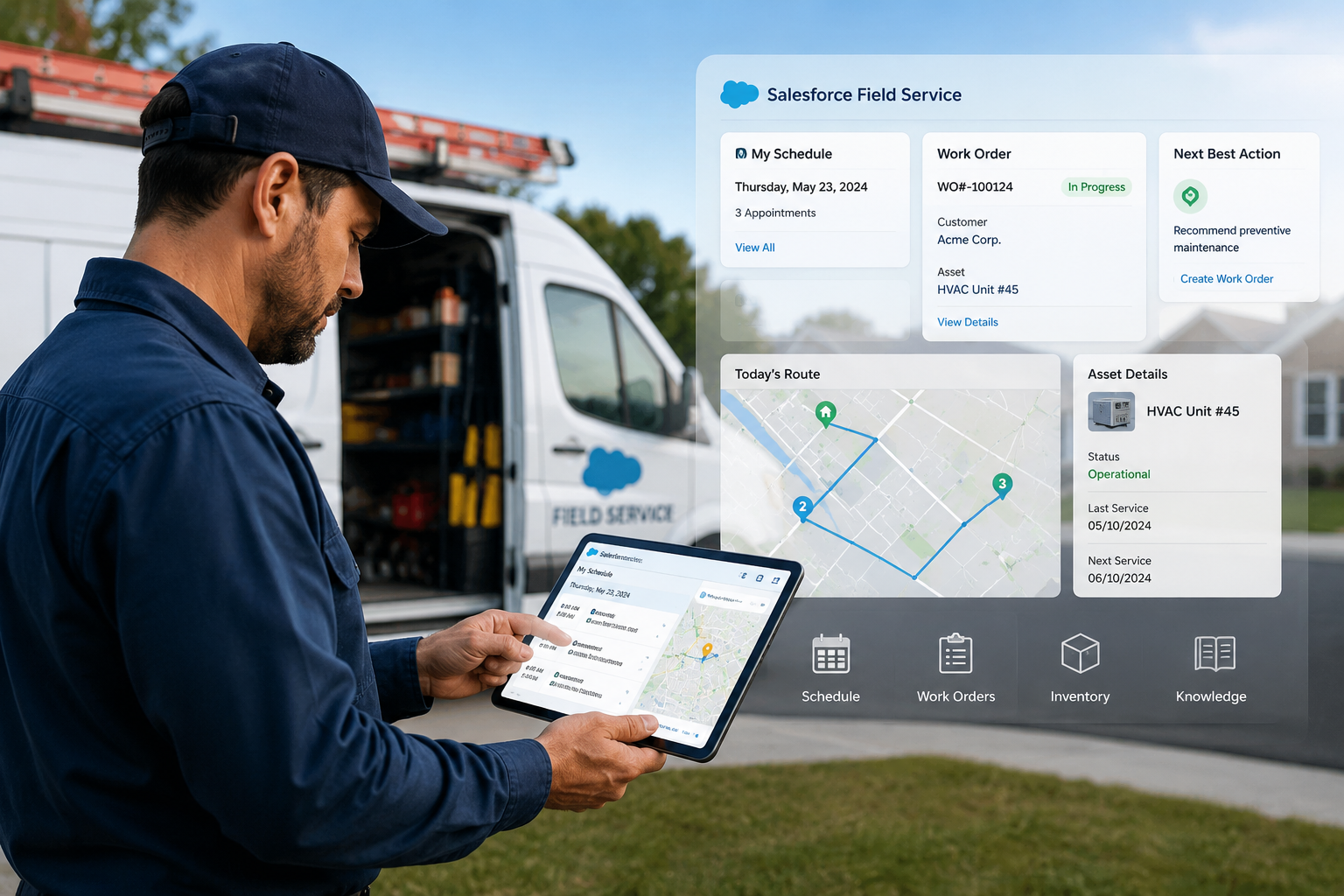
- Schedule work orders
- Dispatch the right technician based on skill and location
- Track assets
- Manage inventory
- Give customers real-time updates
It is not a standalone app. It lives inside Salesforce CRM, which means it pulls from the same customer data your sales and support teams already use. That context is what makes it powerful.
According to Salesforce research:
Companies using Field Service have seen:
- 26% increase in customer satisfaction
- 31% improvement in technician productivity
Those are major operational gains when managing hundreds of service calls every day.
How Does Salesforce Field Service Lightning Work?
Understanding FSL becomes easier when you think of it in three layers:
- Dispatcher Layer
- Technician Layer
- Customer Layer
Each group gets a dedicated experience, but all are connected to the same real-time Salesforce data.
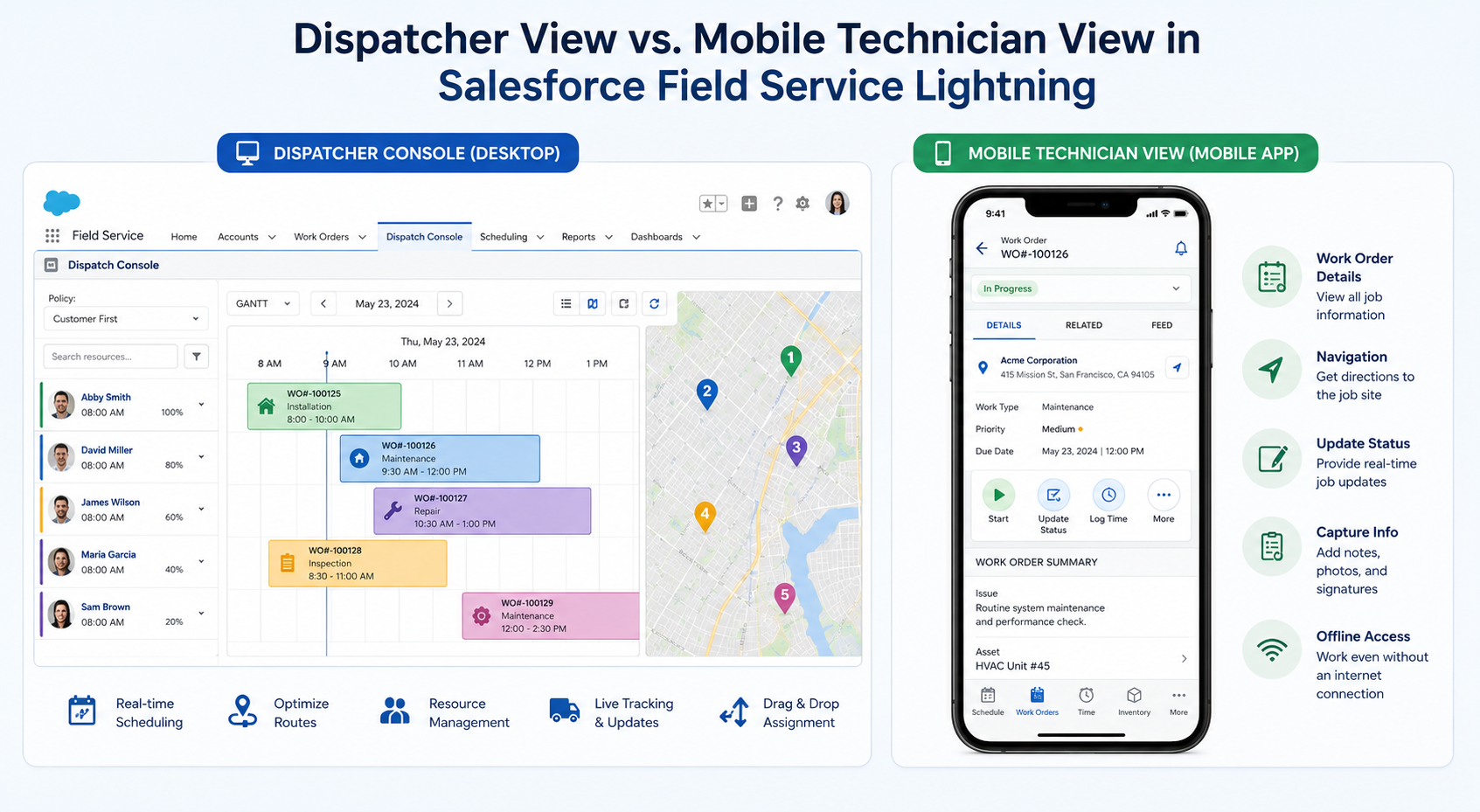
The Dispatcher Console
Dispatchers are essentially the air traffic controllers of field operations.
In FSL, dispatchers get access to a drag-and-drop scheduling console showing:
- Technician availability
- Current location
- Active jobs
- Workload
- Skills and certifications
- Parts availability
The system doesn’t just show who is free. It intelligently recommends the best technician for the job.
Routing Factors Include:
- Skill set and certifications
- Current location and proximity
- Workload and capacity
- Inventory availability
This transforms dispatching from a manual spreadsheet process into intelligent automation.
The Mobile Technician App
Technicians receive jobs directly through the FSL mobile application available on:
- iOS
- Android
One of the biggest strengths of the app is its offline capability.
This is critical for environments like:
- Manufacturing plants
- Utility substations
- Remote healthcare facilities
- Rural telecom sites
Technicians Can:
- View scheduled jobs with full customer history
- Access step-by-step work instructions
- Log parts used and update inventory
- Capture customer signatures
- Upload site photos
- Mark jobs complete
Even without internet access.
Once connectivity returns, the data syncs automatically.
The Customer Experience Layer
Customers receive:
- Real-time appointment confirmations
- Technician arrival notifications
- Self-service tracking portals
- Live status updates
This drastically reduces support calls asking:
“Where is my technician?”
Customers experience a modern service journey similar to tracking a food delivery or ride-sharing app.
Intelligent Scheduling and Optimization
FSL’s Optimization Engine uses AI to automatically:
- Schedule jobs
- Re-route technicians
- Handle emergency work orders
- Optimize travel paths
Example:
If one technician’s job runs overtime, FSL can automatically reassign future appointments to avoid delays.
This is a massive improvement over manual scheduling systems that rely heavily on dispatcher memory and whiteboards.
Field Service Lightning Inventory Management
Inventory management is one of the most powerful and often underutilized FSL capabilities.
Field Service Lightning Inventory Management tracks parts and tools across:
- Warehouses
- Service vehicles
- Technician inventory
- Distribution hubs
Before assigning a technician to a job, FSL verifies whether the required parts are available.
If not, the system can:
- Trigger inventory transfer requests
- Route technicians to pickup locations
- Reassign the work order
This eliminates the dreaded scenario:
“We need to reschedule because the technician doesn’t have the part.”
For industries like telecom and manufacturing, this feature alone can justify the investment.
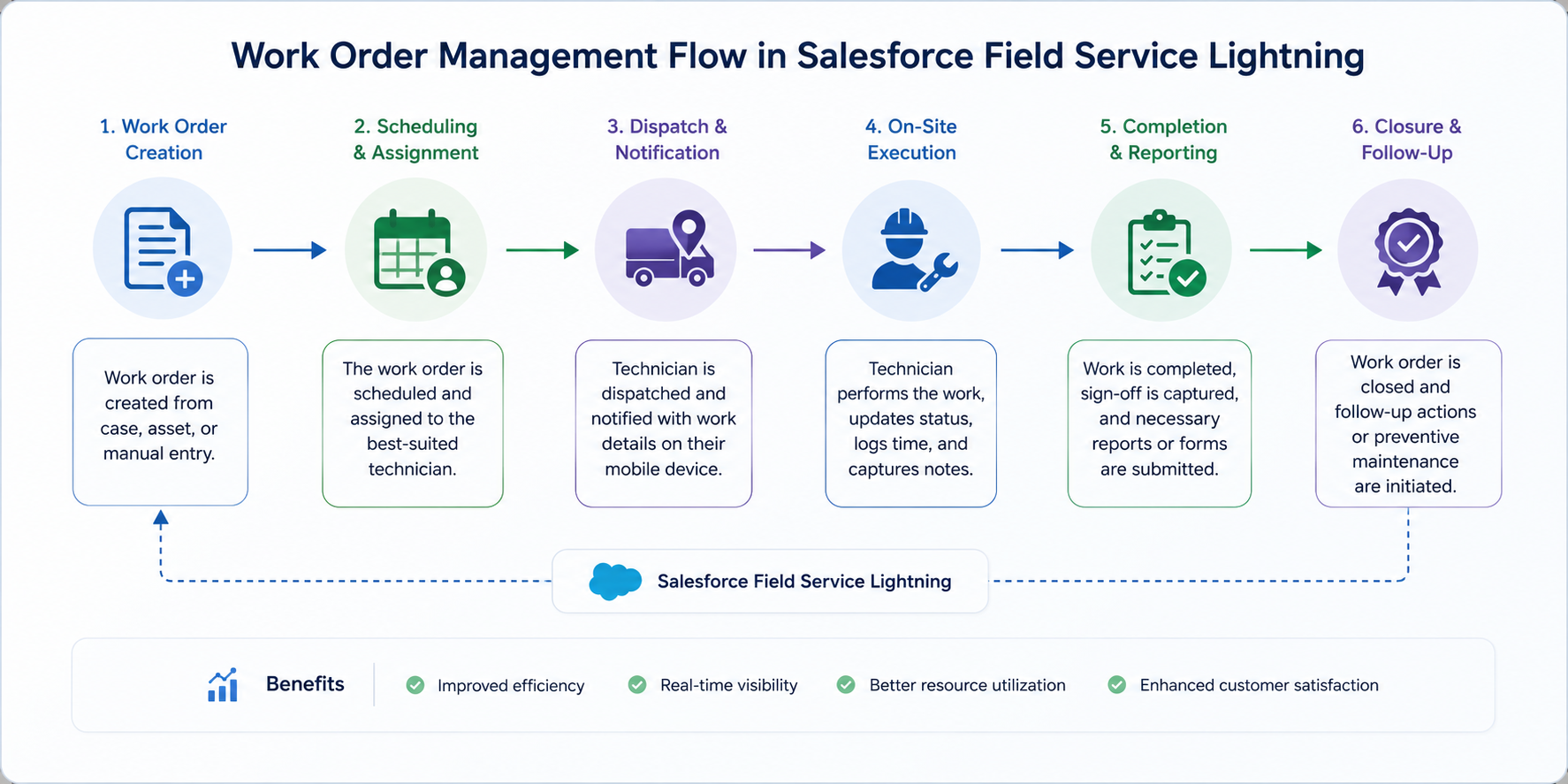
Work Order Management
FSL gives complete visibility across the full service lifecycle:
Service Request → Dispatch → On-Site Work → Completion → Invoice
Everything is tracked in Salesforce.
Work orders can include:
- Compliance documents
- Safety procedures
- Checklists
- Photos
- Attachments
- Signatures
This is especially valuable in regulated industries like:
- Utilities
- Healthcare
- Energy
where auditability matters.
Asset and Equipment Tracking
FSL includes full asset management capabilities.
- Maintenance history
- Warranty status
- Service frequency
- Installed equipment records
This allows businesses to shift from reactive maintenance to predictive service models.
The result:
- Reduced downtime
- Fewer emergency repairs
- Better customer satisfaction
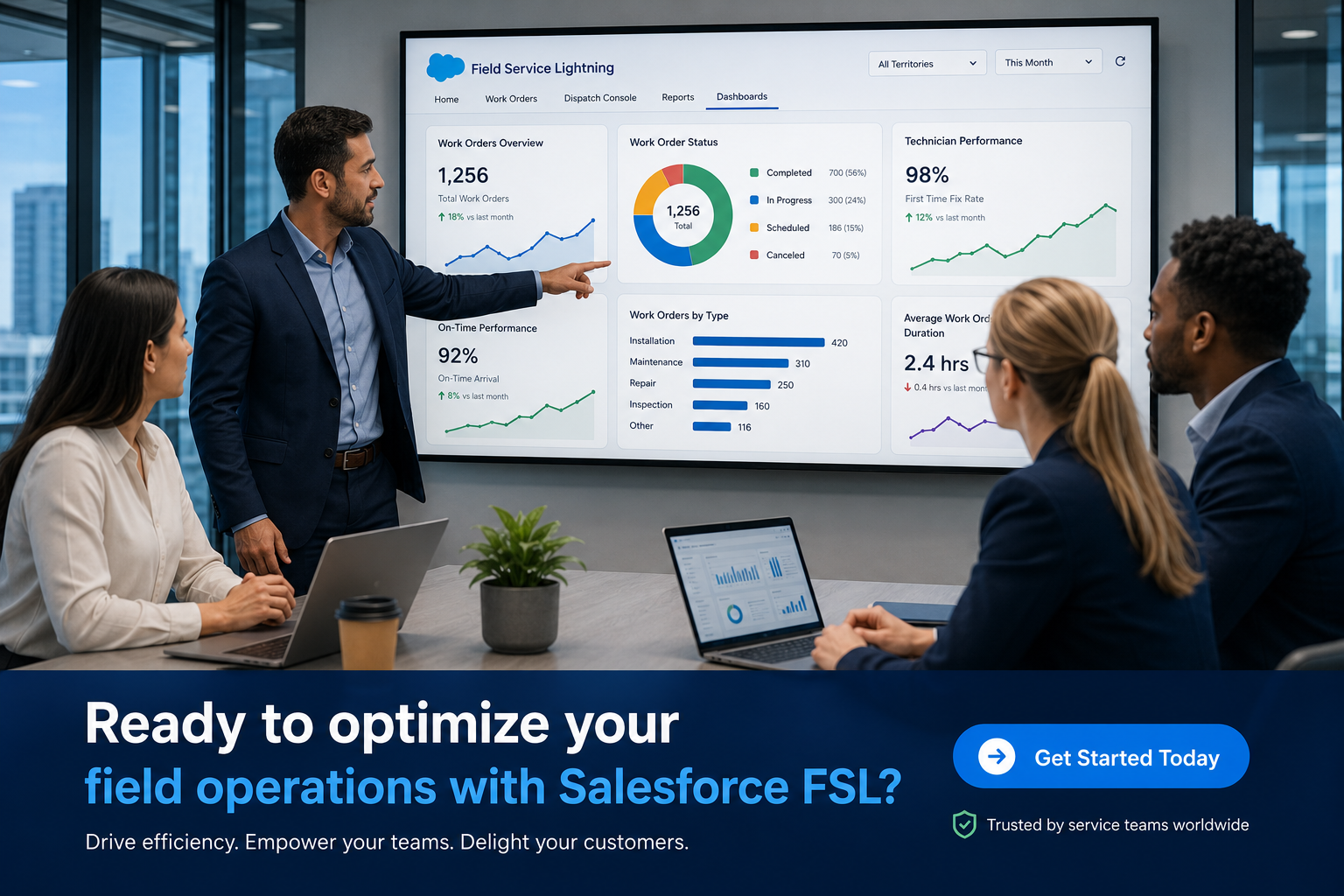
Real-Time Reporting and Analytics
FSL integrates with Salesforce analytics and Einstein AI tools.
Operations leaders gain dashboards for:
- First-time fix rates
- Technician utilization
- Mean time to resolution
- SLA compliance
- Work order backlog
- Customer satisfaction
According to McKinsey & Company
Data-driven field service operations can reduce service costs by up to:
- 25%
while improving resolution times significantly.
Manufacturing & Equipment
- Preventive maintenance
- Warranty service
- Equipment repair scheduling
- Downtime reduction
Companies managing hundreds of service jobs weekly can reduce scheduling effort from hours to minutes.
Utilities & Energy
Utility companies rely on FSL for:
- Crew scheduling
- Compliance management
- Safety tracking
- Real-time technician monitoring
GPS tracking keeps operations accountable and transparent.
Telecommunications
Telecom providers handle massive field service volumes daily.
FSL helps telecom operations teams:
- Reduce repeat visits
- Improve installation scheduling
- Optimize technician routing
- Deliver accurate appointment windows
Healthcare & Life Sciences
Healthcare organizations use FSL to service critical medical equipment.
Because downtime can impact patient care, predictive maintenance and inventory visibility become extremely important.
FSL helps ensure:
- Technicians arrive prepared
- Compliance records are maintained
- Service interruptions are minimized
Property Management & Facilities
Facilities management teams use FSL for:
- Maintenance coordination
- Contractor dispatching
- Asset condition tracking
- Multi-property work order management
Tenants receive real-time service visibility rather than waiting for manual updates.
Infographic-Friendly Summary: How FSL Works End-to-End
Step 1 — Service Request Created
Customer raises an issue via:
- Phone
- Self-service portal
Salesforce automatically generates a service case.
Step 2 — Work Order Generated
The service case converts into a work order.
Required:
- Skills
- Parts
- Time estimates
are attached automatically.
Step 3 — Smart Scheduling
The Optimization Engine identifies the best available technician based on:
- Skills
- Location
- Availability
- Inventory
Step 4 — Technician Dispatched
The technician receives complete job details inside the mobile app including:
- Customer history
- Instructions
- Navigation
- Documentation
Step 5 — Job Completed On-Site
The technician:
- Logs completed work
- Updates inventory
- Captures signatures
- Uploads photos
Everything syncs back into Salesforce in real time.
Step 6 — Feedback & Reporting
Customers receive satisfaction surveys while managers gain updated analytics and SLA reporting automatically.
Common Mistakes to Avoid When Implementing FSL
Skipping Scheduling Optimization Setup
FSL’s AI scheduling depends heavily on correct configuration.
Poorly configured:
- Skills
- Territories
- Availability rules
lead to poor scheduling outcomes.
Ignoring Mobile Adoption
If technicians don’t actively use the mobile app, organizations lose most of the platform value.
Proper:
- Training
- Change management
- Rollout planning
are critical.
Delaying Inventory Integration
Many organizations postpone inventory management setup.
This delays operational improvements significantly.
Integrating inventory from day one improves dispatch accuracy immediately.
Using FSL Without Service Cloud Integration
FSL is most powerful when deeply integrated with:
Salesforce Service Cloud
Disconnected implementations remove valuable customer context.
How NSIQ INFOTECH Helps
NSIQ INFOTECH specializes in implementing and optimizing Salesforce Field Service environments.
Our Services Include:
- Optimization Engine setup
- Dispatcher Console configuration
- Inventory workflow implementation
- Mobile deployment
- Service Cloud integration
- Analytics and dashboard setup
- Ongoing optimization and support
We focus on operational transformation — not just technical setup.
Our clients commonly see measurable improvements in:
- First-time fix rates
- Technician productivity
- Customer satisfaction
within the first 90 days after go-live.
Is Salesforce Field Service Lightning Right for Your Organization?
FSL is a strong fit if:
- You manage more than 10 field technicians
- Dispatching is spreadsheet-based
- Repeat service visits are common
- Technicians frequently lack required parts
- SLA reporting is difficult
- Customer satisfaction is inconsistent
For mid-sized and enterprise operations, FSL delivers clear and measurable ROI.
According to Gartner
Field Service Management is one of the fastest-growing enterprise software categories globally due to rising customer expectations and labor pressures.
Conclusion
Salesforce Field Service is not just another scheduling tool.
It is a complete operational platform for businesses that depend on field execution.
From:
- Intelligent dispatching
- Mobile-first technician experiences
- Inventory visibility
- Real-time analytics
- Predictive maintenance
FSL enables organizations to move from reactive firefriting to proactive, data-driven service operations.
The companies modernizing field service today are not simply cutting costs.
They are building long-term competitive advantages through:
- Better customer experiences
- Faster resolution times
- Smarter operations
If your organization is still relying on spreadsheets, disconnected systems, or manual dispatching processes, the gap between your current operations and what FSL can deliver is significant — and growing every year as customer expectations continue to rise.
Frequently Asked Questions (FAQs)
Q. 1: What is Salesforce Field Service Lightning?
Salesforce Field Service Lightning (FSL) is a field service management platform built on Salesforce that connects dispatchers, field technicians, and customers in real time to streamline scheduling, work orders, inventory, and reporting.
Q. 2: How is FSL different from Salesforce Service Cloud?
Salesforce Service Cloud manages customer support cases and interactions. Field Service Lightning extends that by adding scheduling, dispatch, mobile technician tools, and on-site work management — all connected to the same customer record.
Q. 3: What does SFDC Field Service Lightning mean?
SFDC is a common abbreviation for Salesforce.com (the company). So “SFDC Field Service Lightning” simply refers to Salesforce’s Field Service Lightning product, distinguishing it from third-party field service management tools.
Q. 4: Can FSL work offline?
Yes. The FSL mobile app for technicians supports offline mode, allowing them to view job details, complete work orders, and log parts usage even without an internet connection. Data syncs when connectivity is restored.
Q. 5: How does field service lightning inventory management work?
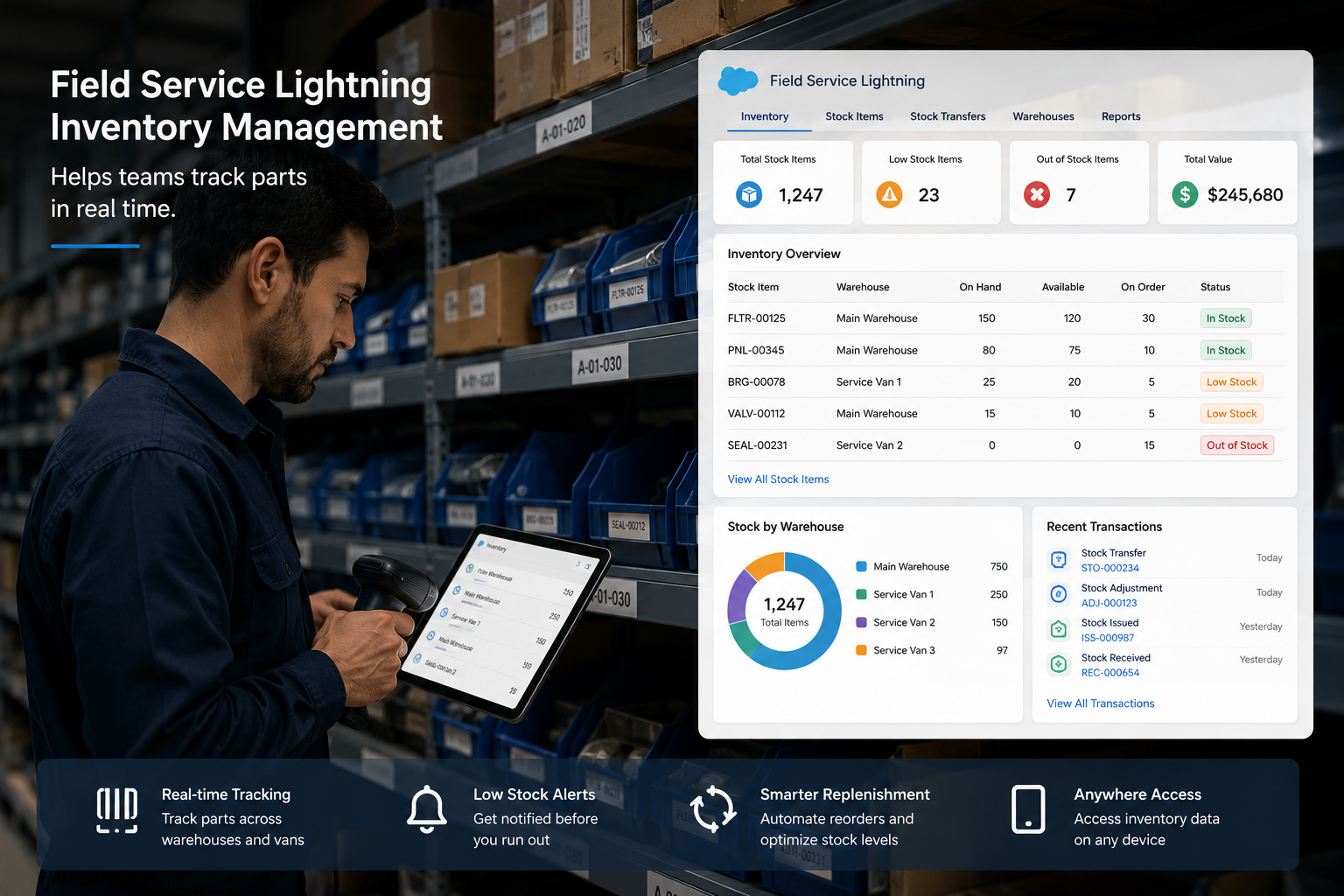
FSL tracks parts and materials across warehouses, vehicles, and technician stock. When a job is assigned, it checks part availability, can auto-request transfers, and updates inventory in real time when a technician uses parts on-site.
Q. 6: Is Salesforce Field Service Lightning suitable for small businesses?
FSL is generally designed for mid-to-large operations. Small businesses with just a few technicians may find lighter tools more cost-effective. However, if you’re growing rapidly or need Salesforce integration, FSL can scale with you.
Q. 7: How long does a typical FSL implementation take?
A standard FSL implementation takes anywhere from 6 to 16 weeks, depending on the complexity of your scheduling rules, number of technicians, integrations required, and data migration needs.
Q. 8: Does FSL integrate with other Salesforce products?
Yes. FSL integrates natively with Salesforce Service Cloud, Sales Cloud, Einstein Analytics, and Experience Cloud (for customer portals). It also supports integration with ERP systems via MuleSoft or third-party connectors.
Q. 10: Can FSL help reduce repeat service visits?
Absolutely. By ensuring the right technician with the right skills and the right parts reaches the job the first time, FSL directly improves first-time fix rates one of the most important metrics in field service.
Q. 11: What is the Dispatcher Console in FSL?
The Dispatcher Console is a drag-and-drop scheduling interface used by operations teams to manage and optimize technician schedules, view real-time locations, and monitor job statuses throughout the day.
Q. 12: Does FSL support multiple service territories?
Yes. FSL is built for multi-territory operations. You can define service territories geographically, assign technicians to territories, and run optimization within or across territory boundaries.
Q. 13: What mobile devices does the FSL app support?
The Field Service mobile app supports iOS and Android devices, including smartphones and tablets. It is available through the Apple App Store and Google Play Store.
Q. 14: Can FSL track customer assets?
Yes. FSL includes asset management features that allow you to track installed equipment at customer sites, including maintenance history, warranty status, service frequency, and associated work orders.
Q. 15: What industries use SFDC Field Service Lightning most?
FSL is most commonly used in:
- Manufacturing
- Utilities and Energy
- Telecommunications
- Healthcare and Life Sciences
- Property Management and Facilities
These are industries where skilled technicians work at customer sites regularly.
Q. 16: How does FSL improve customer satisfaction?
FSL improves customer satisfaction by:
- Reducing wait times
- Providing accurate appointment windows
- Sending real-time arrival notifications
- Increasing first-time fix rates
- Giving customers self-service visibility into service requests