Introduction
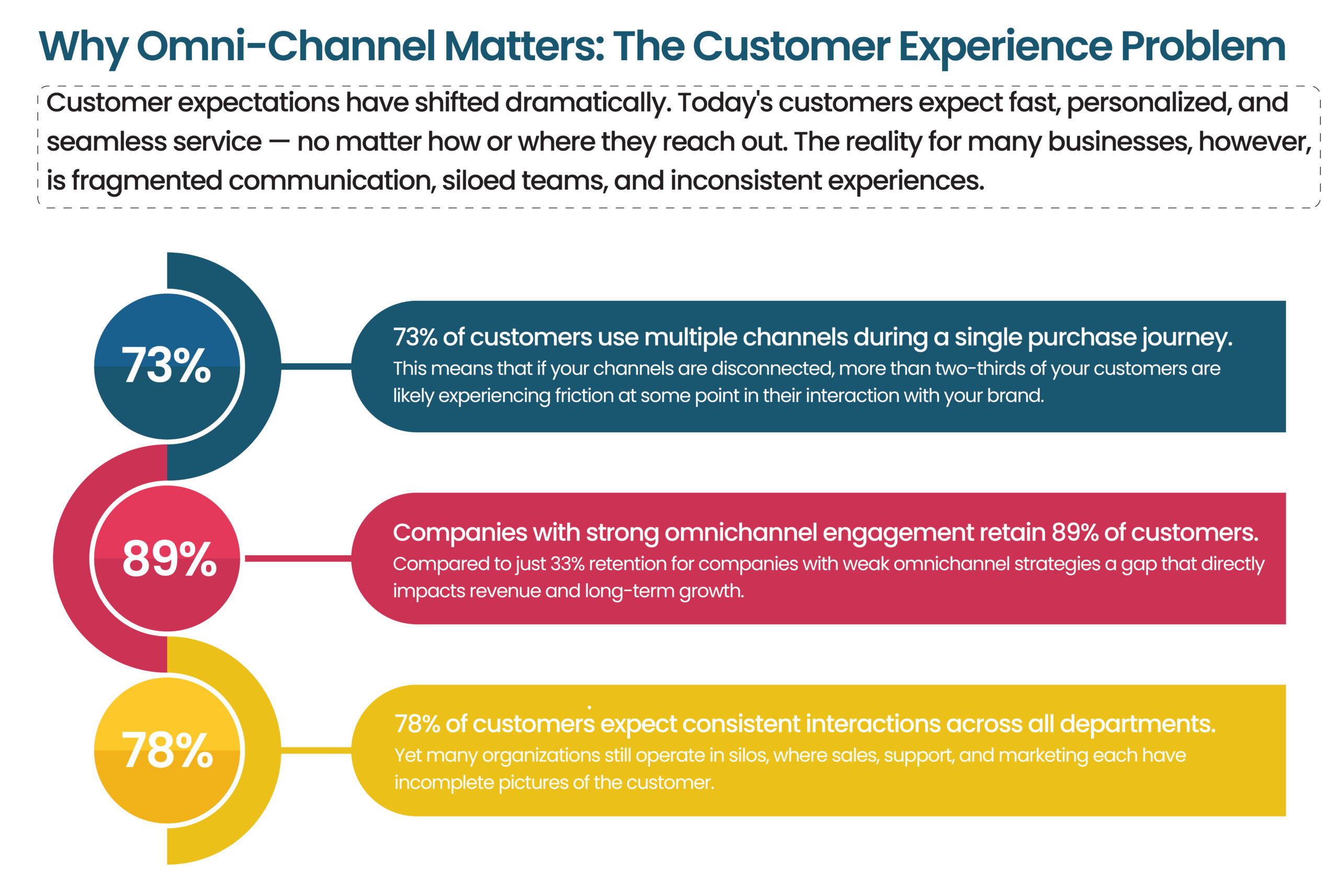
Think about the last time you contacted a company for support. You sent an email, didn’t hear back, then called — only to repeat your entire story to a new agent who had no idea you had already reached out. Frustrating, right?
Now imagine the opposite: the agent picks up your call, already knows your issue, and resolves it in under three minutes. That is exactly what Salesforce Omni-Channel is designed to deliver.
In this blog, we’ll break down:
- What Salesforce Omni-Channel is
- How it works
- Why it matters
- Real-world business results
Whether you’re a CX Head, VP of Operations, or CMO, this guide is built for you.
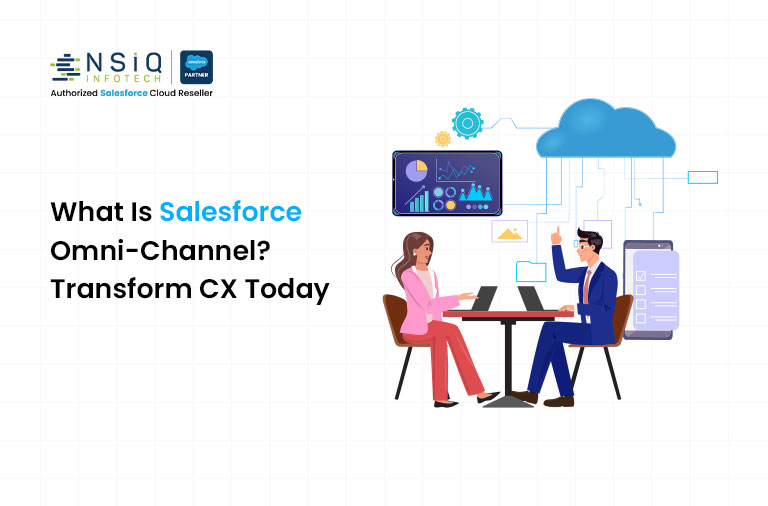
1. What Is Omni-Channel in Salesforce?
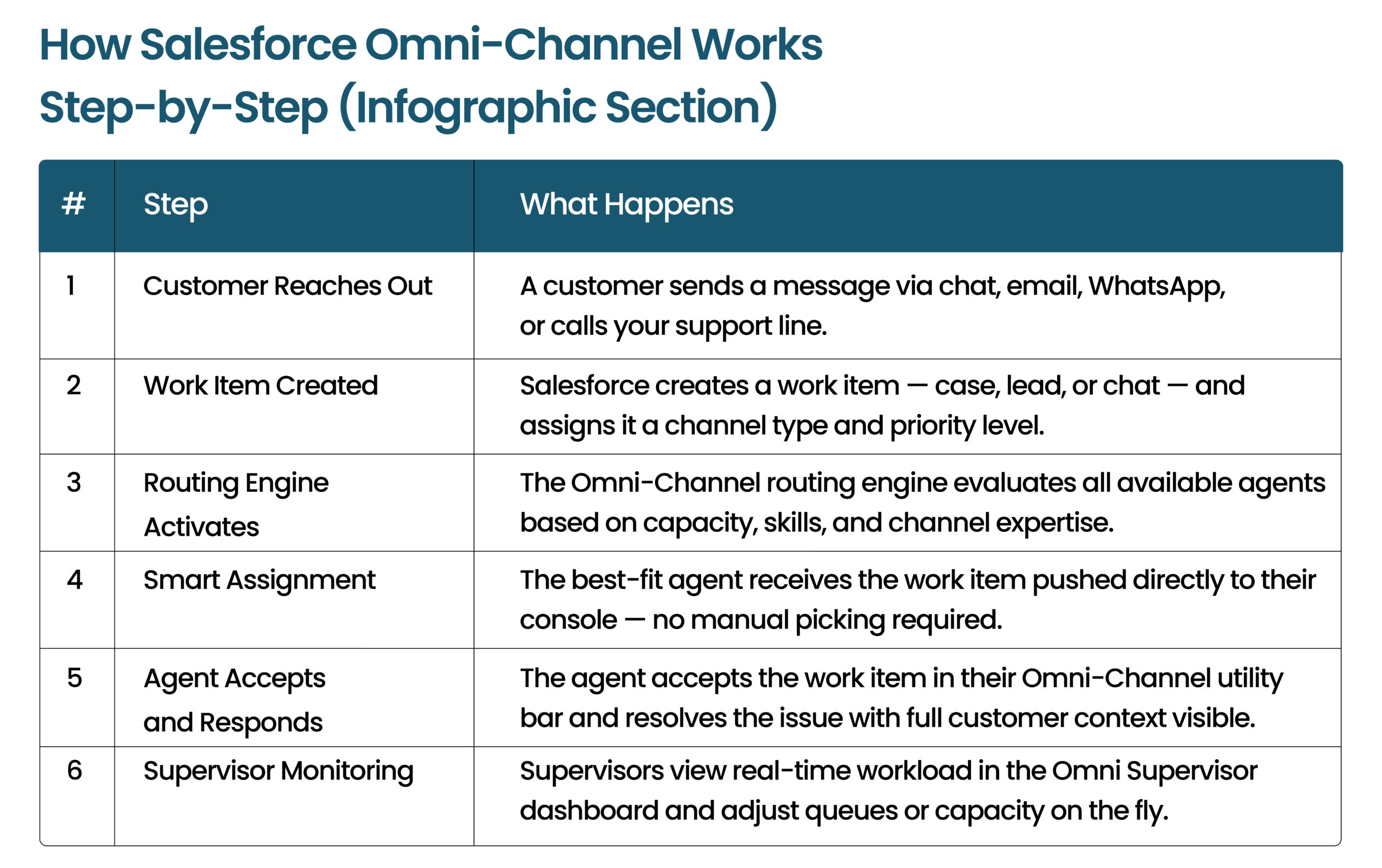
Salesforce Omni-Channel is a customer service routing and workload management tool built into Salesforce Service Cloud.
It allows businesses to connect with customers across multiple channels:
- Phone
- Live Chat
- Social Media
- SMS
—all from a single platform.
But the real power is intelligent routing.
Omni-Channel automatically assigns:
- Cases
- Chats
- Calls
- Leads
to the right agent based on:
- Availability
- Skill set
- Workload
No manual distribution. No dropped requests.
Simple Analogy
Think of Omni-Channel as a smart traffic controller for customer requests.
It knows which roads (agents) are busy and which are free — then routes every customer to the fastest possible path.
Key Components
Presence Statuses
Agents define availability such as:
- Available for Chat
- On Break
- Offline
Routing Configurations
Rules define how work gets distributed:
- Skill-based
- Queue-based
- Priority-based
Queues
Virtual waiting areas for incoming work items.
Service Channels
Configured communication channels such as:
- Chat
- Phone
- Social
Omni-Channel Utility Bar
Agent-facing console widget where work appears in real time.
4. Types of Routing in Salesforce Omni-Channel
Queue-Based Routing
Work items go to a shared queue and get assigned based on availability.
Best for teams starting with Omni-Channel.
Skills-Based Routing
Cases are matched based on expertise.
Example
- Billing issue → Finance-trained agent
- Technical issue → Product specialist
Real-World Example
A telecom company implemented skills-based routing for 600+ agents.
Results:
- 22% reduction in average handle time
- 18-point increase in customer satisfaction
External Routing
Supports third-party telephony and routing systems using:
- Service Cloud Voice
- Telephony integrations
6. Key Benefits for CX Leaders
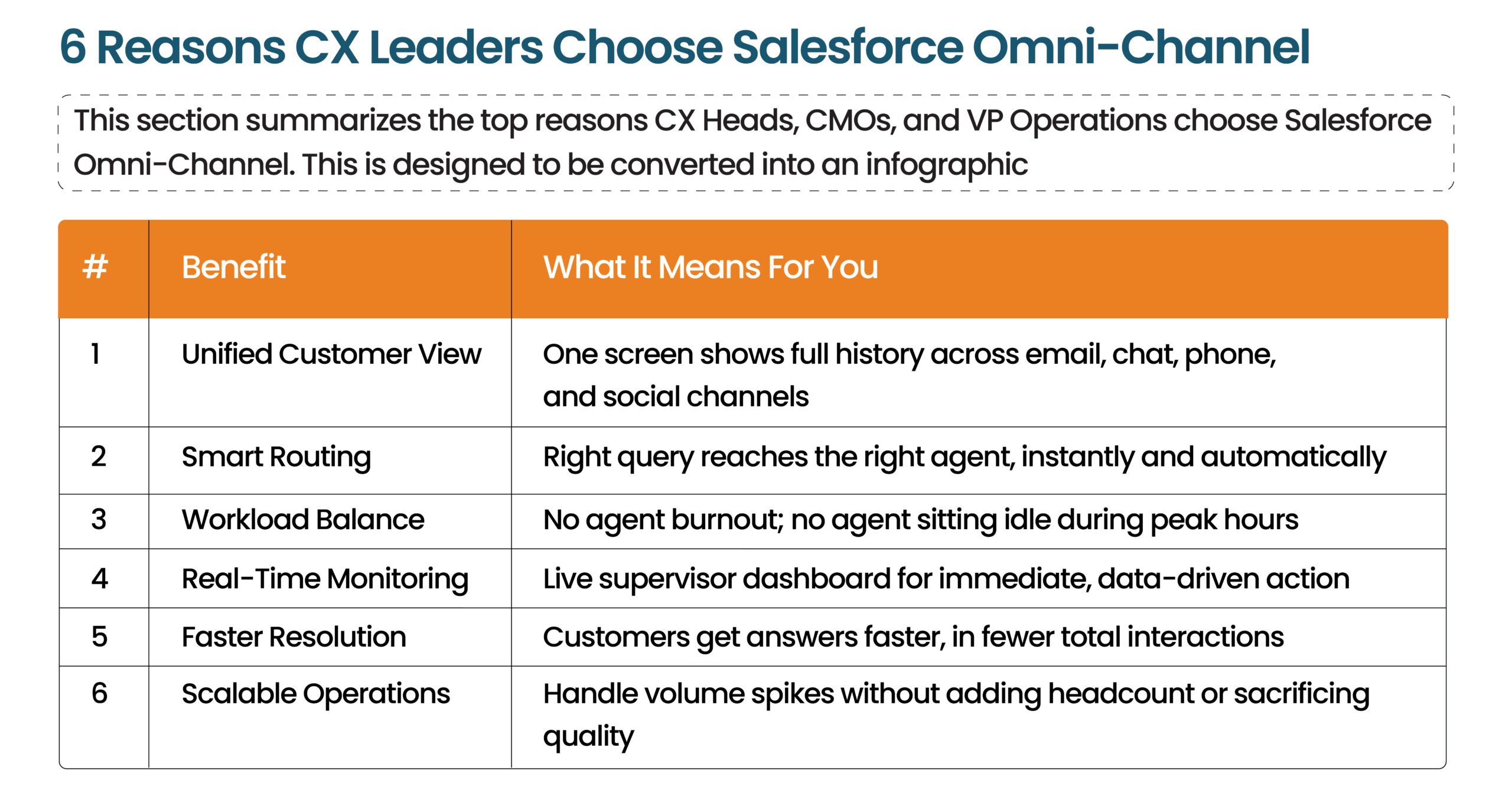
Faster Response Times
Auto-routing reduces delays significantly.
Many companies report:
- 30–40% faster response times
Balanced Agent Workloads
Prevents:
- Agent burnout
- Uneven workload distribution
Higher First-Contact Resolution
Right customer reaches the right expert immediately.
Real-Time Visibility
Supervisors can monitor:
- Queue depth
- Agent availability
- Channel volume
live in real time.
Seamless Customer Experience
Customers never repeat themselves because agents see complete history across channels.
Mini Case Study
A financial services company implemented Omni-Channel for 300 support agents.
Results in 90 Days
- CSAT increased from 71% → 84%
- Agent utilization improved by 27%
without adding headcount.
8. Industries Where Omni-Channel Creates Major Impact
Financial Services & Banking
Supports:
- Account queries
- Loan applications
- Fraud alerts
inside one unified customer record.
Healthcare & Insurance
Routes:
- Clinical queries
- Billing issues
- Policy support
to specialized teams while maintaining compliance.
E-Commerce & Retail
Handles massive support spikes during:
- Sales events
- Holiday seasons
without sacrificing response quality.
Telecommunications
Routes:
- Network issues
- Device troubleshooting
- Billing complaints
to correct teams instantly.
9. How NSIQ INFOTECH Helps
NSIQ INFOTECH helps businesses implement Salesforce Omni-Channel successfully.
Our Services Include
- Omni-Channel configuration
- Skills-based routing setup
- Supervisor dashboard implementation
- Telephony integration
- Ongoing optimization & support
We focus on improving CX metrics within the first 60 days.
10. 5 Actionable Tips for CX Leaders
Tip 1 — Start with Highest-Volume Channel
Begin with email, chat, or phone first.
Tip 2 — Define Realistic Presence Statuses
Use meaningful statuses such as:
- Available for Chat
- Training
- After-Call Work
Tip 3 — Set Realistic Capacity Limits
Avoid overloading agents initially.
Tip 4 — Use Omni Supervisor Daily
Monitor queues proactively, not reactively.
Tip 5 — Measure the Right Metrics
Track:
- Average Handle Time (AHT)
- First Contact Resolution (FCR)
- Queue Wait Time
- Agent Utilization
What is Omni-Channel in Salesforce?
A routing feature that automatically assigns customer interactions to the best available agent.
How does Omni-Channel improve customer experience?
It creates consistent, fast, personalized support across channels.
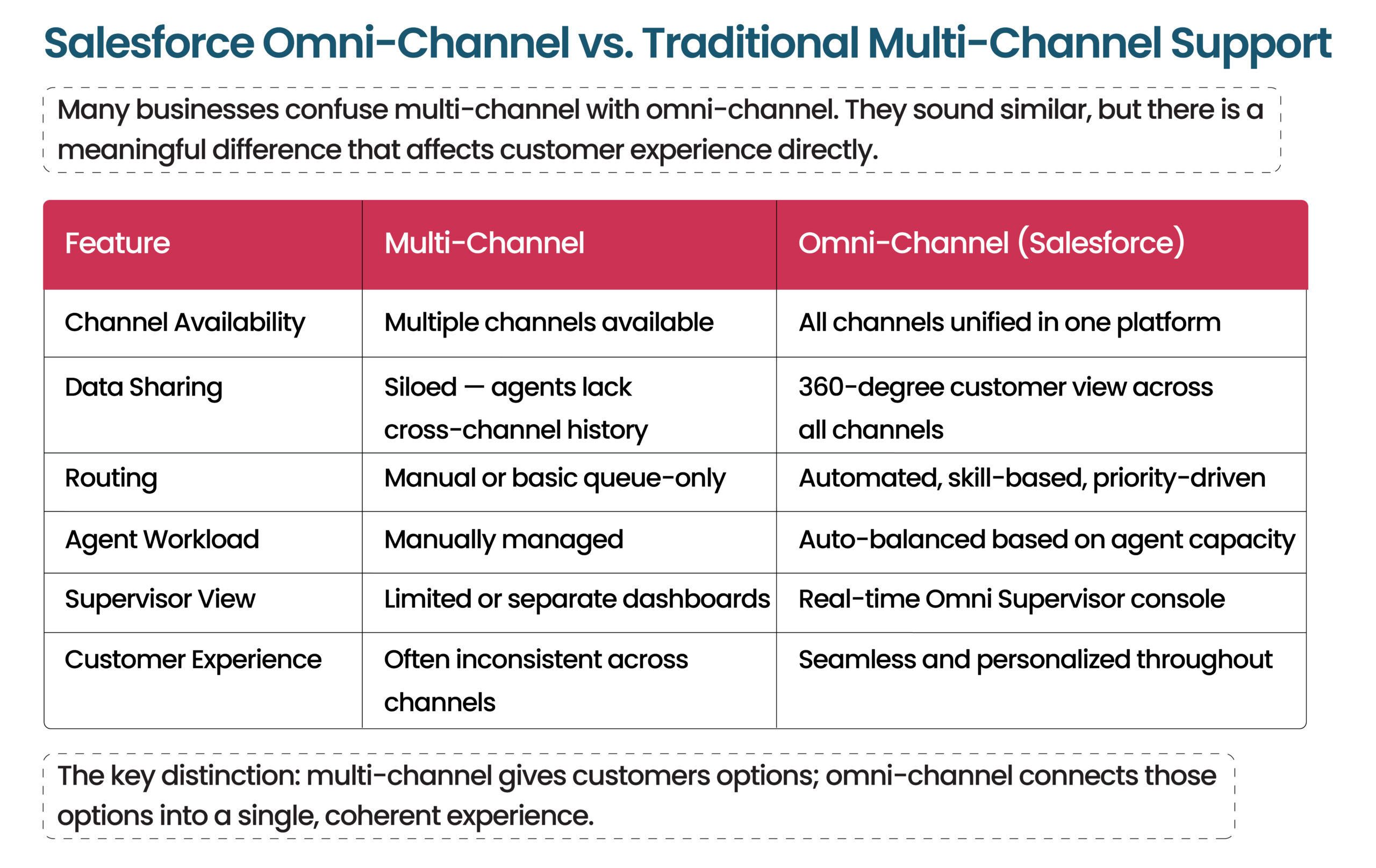
Is Omni-Channel the same as multi-channel?
No. Omni-channel connects channels together into one experience.
What routing methods are available?
- Queue-based
- Skills-based
- External routing
Which Salesforce product includes Omni-Channel?
Salesforce Service Cloud
Can it handle phone calls?
Yes, using Service Cloud Voice integrations.
How does it reduce burnout?
By balancing workloads automatically.
What is Omni Supervisor?
A real-time dashboard for managers and supervisors.
How long does implementation take?
- Basic setup: 2–4 weeks
- Advanced setup: 6–12 weeks
Does it support WhatsApp and social media?
Yes, using Digital Engagement integrations.
Conclusion
Customer experience is no longer optional it is the battleground where businesses win or lose loyalty.
Salesforce Omni-Channel gives organizations the infrastructure to deliver:
- Faster support
- Better routing
- Full customer visibility
- Seamless omnichannel experiences
without increasing operational chaos or agent burnout.
Whether you are building a new support operation or optimizing an existing setup, Omni-Channel helps create smarter, scalable customer experiences.