
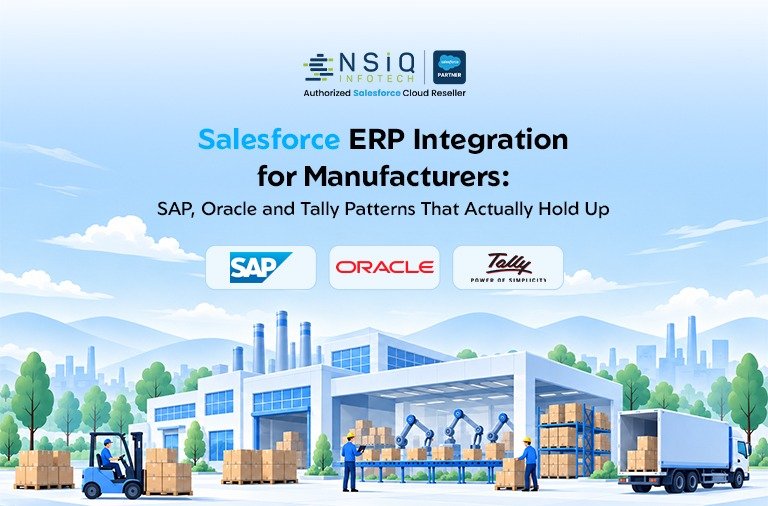
A manufacturer can have a strong CRM, a reliable ERP, a capable accounting system and an experienced operations team, yet still struggle to answer one basic customer question:
“What is happening with my order?”
Usually, the problem is not that any one system is failing. Salesforce may contain the customer relationship and sales activity, while SAP, Oracle or TallyPrime manages orders, inventory, finance and fulfilment. A warehouse system may know what has shipped, while another application may hold production information.
The difficulty starts when those systems do not exchange information reliably.
In this guide, we look at practical Salesforce ERP integration patterns for SAP S/4HANA, Oracle ERP platforms and TallyPrime. The focus is not simply on connecting systems, but on deciding what data should move, which system owns it, how frequently it should move and what happens when an integration fails.
For manufacturers, that distinction matters. A technically successful integration can still create business problems if it produces duplicate orders, outdated inventory information or conflicting customer records.
What Is Salesforce ERP Integration?
Salesforce ERP integration connects Salesforce with an ERP or accounting platform so that selected business information can move between systems according to defined rules.
Salesforce commonly supports customer-facing processes such as:
-
- Leads
- Accounts
- Contacts
- Opportunities
- Sales activities
- Customer service
- Sales pipeline
- Partner relationships
The ERP or accounting platform generally manages areas such as:
-
- Product master data
- Inventory
- Sales orders
- Procurement
- Manufacturing
- Warehousing
- Invoicing
- Payments
- Financial accounting
- Fulfilment
The goal is not to turn Salesforce into another ERP.
The goal is to let each system continue doing the work it was designed for while giving employees access to the information they actually need.
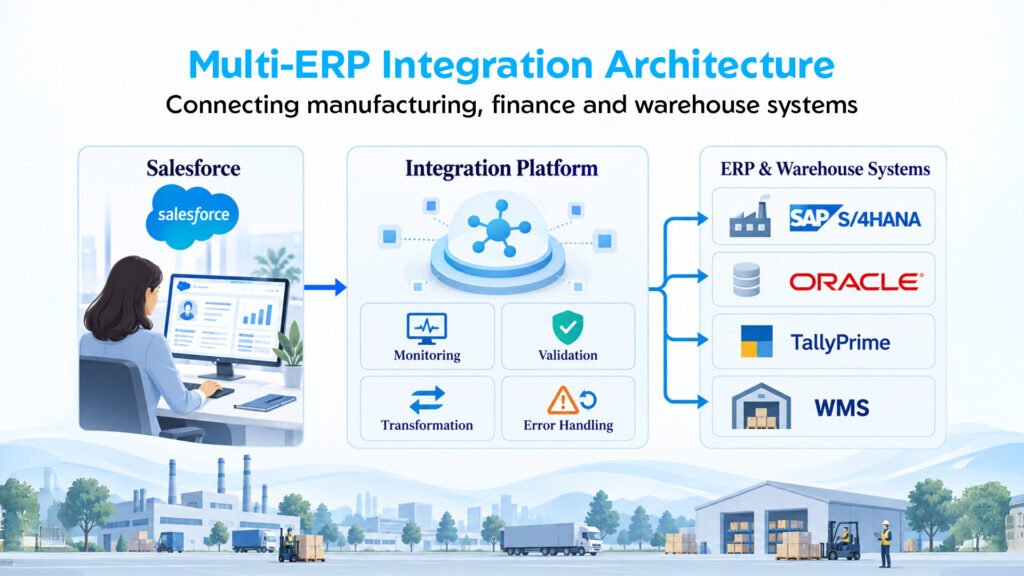
A typical manufacturing flow could look like:
Salesforce
Customer → Opportunity → Quote → Order
↓
Integration Layer
Validation → Transformation → Routing → Monitoring
↓
SAP / Oracle / TallyPrime
Order → Inventory → Fulfilment → Invoice
↓
Salesforce
Order Status → Shipment → Customer Service
The important part is not the arrows. It is the business responsibility behind them.
Someone needs to decide where the customer is mastered, where the product is maintained, when an opportunity becomes an order and which system has the final say when information conflicts.
Why CRM and ERP Integration Matters in Manufacturing
Manufacturing sales do not stop when an opportunity is marked as won.
A customer order can trigger a chain of activities:
Order → Inventory Check → Production → Warehouse → Shipment → Invoice → Payment
Different teams may own different stages of that process, and each team may use a different application.
Consider a salesperson who receives an order for 500 units.
The opportunity is in Salesforce, but the salesperson still needs answers to questions such as:
- Is the product available?
- Has the customer been approved for the requested payment terms?
- Is the quoted price still valid?
- When can the order be shipped?
- Has production started?
- Has the shipment left the warehouse?
- Has the invoice been generated?
- Has the customer paid?
If those answers are spread across Salesforce, ERP, accounting software and spreadsheets, people become the integration layer.
That is where problems begin.
Employees spend time checking multiple systems, copying information, calling other departments and maintaining spreadsheets. Even worse, decisions may be made using information that is already out of date.
A well-designed CRM ERP integration reduces that manual handoff.
Sales teams do not need to become ERP experts. Finance teams do not need to become Salesforce administrators. Operations teams do not need another spreadsheet simply because the CRM cannot show order status.
The First Decision: Which System Owns the Data?
Before discussing APIs, middleware or connectors, answer a more basic question:
Who owns the data?
This is one of the most important decisions in an ERP integration project.
A manufacturer might define ownership like this:
| Business Data | System of Record |
| Lead | Salesforce |
| Opportunity | Salesforce |
| Sales activity | Salesforce |
| Customer master | ERP |
| Product master | ERP |
| Inventory | ERP |
| Sales order | ERP |
| Invoice | ERP |
| Payment | ERP / Finance |
| Customer service case | Salesforce |
| Shipment status | ERP / WMS |
This is only an example. The correct ownership model depends on the company’s processes and existing systems.
The important thing is to make the ownership explicit.
Consider a customer called ABC Industries.
Salesforce might contain:
ABC Industries Pvt. Ltd.
The ERP might contain:
ABC Industries Private Limited
And TallyPrime might contain:
ABC INDUSTRIES
Are these three customers or one?
An API cannot answer that question.
The business data model has to answer it.
Salesforce SAP Integration: The S/4HANA Manufacturing Pattern
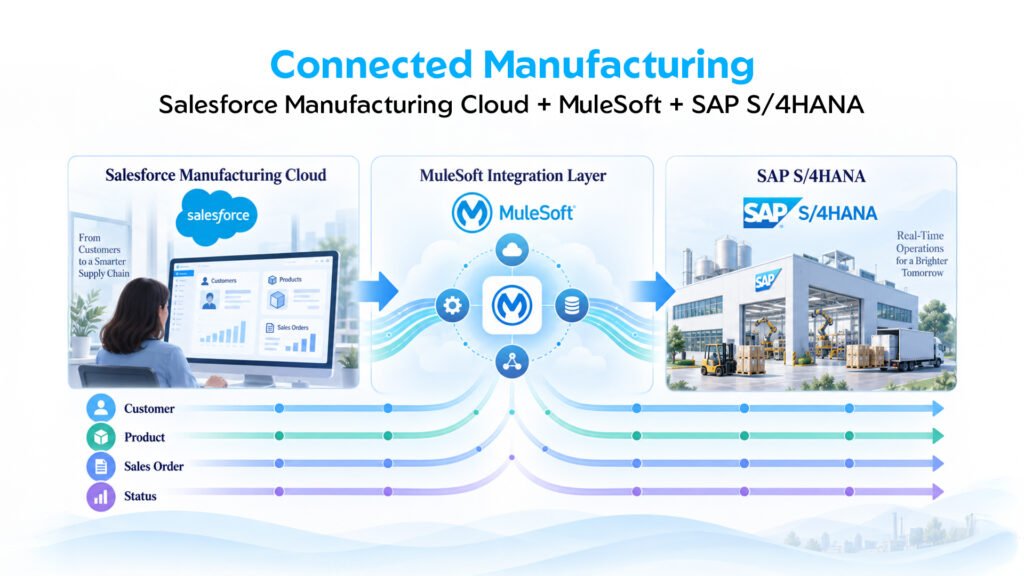
For larger manufacturers, Salesforce SAP integration can connect the customer-facing sales process with SAP’s operational and financial processes.
One important clarification is necessary here: the Salesforce manufacturing integration assets discussed in this context are for SAP S/4HANA scenarios, not a generic statement that every SAP product or deployment uses the same integration template.
Salesforce currently provides MuleSoft Direct integration assets for Manufacturing Cloud that include customer synchronization, product synchronization and sales-order synchronization with SAP. These integration applications can also be extended for customer-specific requirements.
A practical flow could look like this:
SAP S/4HANA
Customer Master
↓
Salesforce
Customer available to sales team
↓
Opportunity created
↓
Product and pricing information validated
↓
Opportunity reaches the appropriate approval stage
↓
Salesforce → MuleSoft / Integration Layer
Order submitted
↓
SAP S/4HANA
Sales order created
↓
Inventory / Production / Fulfilment
↓
Order status returned
↓
Salesforce
Salesperson sees the updated status
The salesperson no longer needs to send a message to operations asking:
“Has this order been processed?”
The relevant information becomes part of the CRM experience.
What Can Be Synchronized With SAP S/4HANA?
Depending on the business process and architecture, common integration flows can include:
- Customer information
- Product information
- Pricing
- Sales orders
- Order lines
- Inventory information
- Shipment status
- Invoice information
- Returns
- Rebates
Salesforce’s current Manufacturing Cloud integration documentation specifically identifies customer, product and sales-order synchronization as available SAP integration assets.
That does not mean every manufacturer should synchronize every available field.
In fact, doing so can make the integration harder to maintain.
A better starting point is to identify the business processes where information needs to cross the system boundary.
A note about licensing
The SAP integration architecture also needs to be reviewed from a licensing perspective.
Manufacturing Cloud capabilities and MuleSoft integration capabilities are separate considerations, and the exact Salesforce and MuleSoft products required depend on the implementation architecture and existing customer entitlements.
Salesforce’s current documentation states that Manufacturing Cloud integrations are deployed through the customer’s MuleSoft instance and identifies prerequisites for deploying the integration assets.
Therefore, an implementation plan should confirm the required Manufacturing Cloud and MuleSoft licences/subscriptions before the solution is finalized.
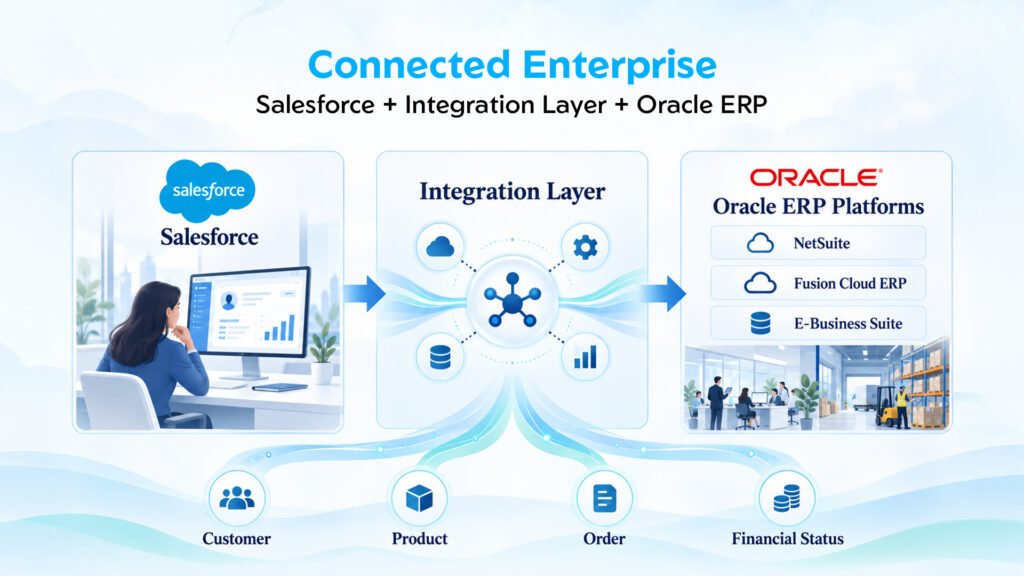
Salesforce Oracle Integration: First Ask Which Oracle Product
“Salesforce Oracle integration” sounds simple until someone asks:
“Which Oracle system?”
That question matters.
A manufacturer may be working with:
- Oracle NetSuite
- Oracle Fusion Cloud ERP
- Oracle E-Business Suite
These products have different architectures, APIs, deployment models and business processes. Oracle’s own documentation maintains separate product documentation for NetSuite, Fusion Cloud Applications and Oracle E-Business Suite.
So the integration design should begin with the actual Oracle environment rather than assuming that one generic Oracle integration pattern will fit every company.
The same principle applies here:
Salesforce should not become a second ERP.
Instead, expose the information required by the people and processes that need it.
For example:
Salesforce
Opportunity approved
↓
Order request
↓
Integration Layer
Validate customer
Validate product
Transform Salesforce data
Apply business rules
↓
Oracle
Create or process order
↓
Inventory / Fulfilment / Finance
↓
Salesforce
Return relevant order and fulfilment status
What Information Usually Moves Between Salesforce and Oracle?
A manufacturer may want to expose information such as:
Customer information
- Customer ID
- Customer name
- Billing address
- Shipping address
- Account status
Product information
- Product code
- Description
- Unit of measure
- Price
- Availability
Order information
- Order number
- Order date
- Order lines
- Quantity
- Order status
- Expected delivery date
Financial information
- Invoice number
- Invoice amount
- Payment status
- Outstanding balance
The important word is relevant.
If the sales team only needs to know whether an invoice has been paid, there may be little value in copying an entire financial data model into Salesforce.
That creates more fields, more mappings and more data to govern.
The better question is:
What information does the Salesforce user need to make the next business decision?
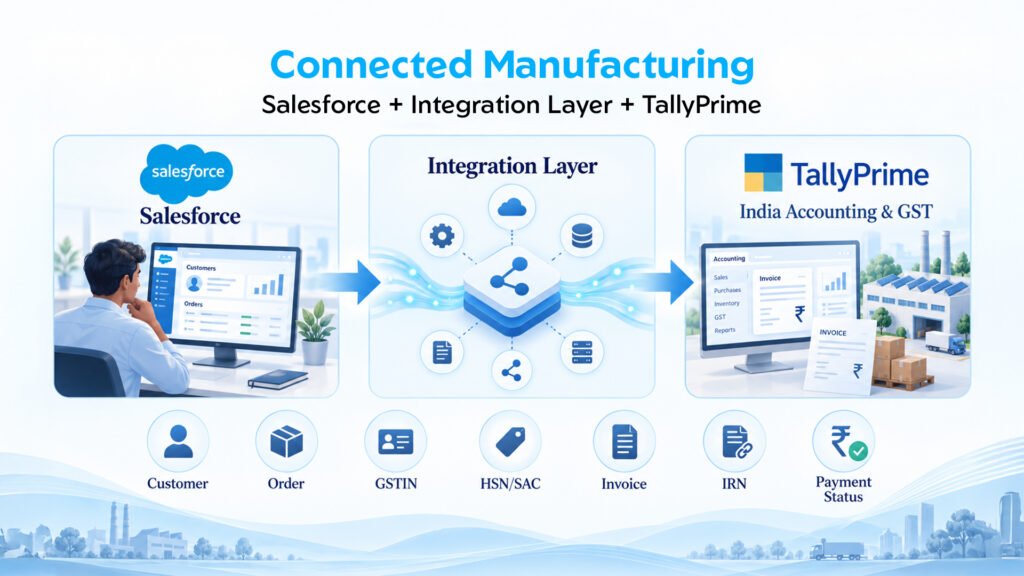
Salesforce TallyPrime Integration: The Indian Manufacturing Context
For many Indian manufacturers, the architecture is different again.
Salesforce may manage sales, customer relationships and service, while TallyPrime remains the accounting and financial system.
That creates a practical requirement for Salesforce Tally integration.
But TallyPrime should not simply be treated as a smaller version of SAP or Oracle.
The implementation needs to consider how TallyPrime is deployed, which transactions need to move, how the accounting team works and whether the business actually requires real-time communication.
TallyPrime supports XML-based integration over HTTP, and newer releases also support native JSON-based data exchange with external applications.
For an Indian manufacturer, however, there is another important layer:
GST compliance.
GSTIN, HSN and e-Invoicing: Why They Matter in a Salesforce-Tally Integration
When Salesforce and TallyPrime are connected, the integration design should not stop at customer name, invoice number and amount.
Indian GST requirements can introduce additional data considerations.
Depending on the transaction, relevant information may include:
- GSTIN / GSTIN-UIN
- HSN/SAC
- GST rates
- Place of supply
- Billing address
- Shipping address
- Taxable value
- Tax amounts
- Invoice number
- Invoice date
- e-Invoice status
- IRN
- QR code information
- e-Way Bill information where applicable
TallyPrime’s GST documentation specifically covers GST registration details such as GSTIN and HSN/SAC, while its current e-Invoicing documentation covers IRN generation and related transaction information.
This creates an important design consideration.
Suppose a sales representative creates an order in Salesforce.
The Salesforce record may contain the customer, products, quantities and commercial information. But the accounting transaction in TallyPrime may require additional tax and statutory information before an invoice can be processed correctly.
The integration should therefore define which system owns each GST-related field.
For example:
| Information | Possible Owner |
| Customer relationship | Salesforce |
| Customer GSTIN | ERP / TallyPrime |
| Product description | ERP / TallyPrime |
| HSN/SAC | TallyPrime / ERP |
| GST rate | TallyPrime / ERP |
| Sales order | Salesforce → ERP |
| Invoice | TallyPrime |
| IRN | TallyPrime / e-Invoice process |
| Payment status | TallyPrime → Salesforce |
The exact ownership should be confirmed with the finance and tax teams before development.
TallyPrime also supports validation of GSTIN/UIN information and GST-related master data, which makes master-data quality particularly important in an integration project.
Three Practical Salesforce-TallyPrime Integration Patterns
Pattern 1: Salesforce to TallyPrime
Suppose the sales process is completed in Salesforce.
The approved transaction can move through an integration layer and reach TallyPrime.
Salesforce
Approved customer/order
↓
Integration Layer
Validation and transformation
↓
TallyPrime
Accounting transaction
This reduces manual re-entry and gives the finance team a structured transaction to process.
Pattern 2: TallyPrime to Salesforce
The reverse direction can be equally useful.
Suppose finance creates an invoice in TallyPrime.
Selected information can be returned to Salesforce:
TallyPrime
Invoice created
↓
Integration Layer
↓
Salesforce Account
Invoice status displayed
Now the salesperson can answer a customer’s invoice-related question without opening TallyPrime for every enquiry.
Pattern 3: Controlled Batch Synchronization
Not everything needs to move instantly.
A manufacturer may only need:
- Daily invoice information
- Outstanding amounts
- Payment status
- Daily sales summary
In that situation, a scheduled synchronization may be perfectly reasonable.
TallyPrime supports HTTP-based XML integration as well as newer JSON-based integration approaches, giving businesses several options for exchanging data with external systems.
The right choice should come from the business requirement.
Not from the assumption that “real-time” automatically means better.
Real-Time vs Batch: What Should Manufacturers Choose?
This is where integration projects can become unnecessarily expensive.
Someone says:
“We need everything in real time.”
But do you?
Consider these examples:
| Information | Potential Approach |
| Inventory availability | Real-time / near real-time |
| Order status | Real-time / near real-time |
| Shipment status | Near real-time |
| Customer master | Event/API-based |
| Product master | Scheduled or event-based |
| Invoice status | Near real-time or batch |
| Historical transactions | Batch |
| Large data migration | Bulk |
| Management reporting | Scheduled |
The better question is not:
“Can we make it real-time?”
It is:
“How quickly does the business need this information to make a decision?”
If a salesperson is promising a delivery date, current inventory may matter immediately.
If management is reviewing yesterday’s revenue every morning, a daily synchronization may be sufficient.
That distinction can save significant development and infrastructure effort.
The Integration Layer Is Where the Real Work Happens
It is tempting to describe integration as:
Salesforce → ERP
Real projects are usually closer to:
Salesforce
↓
Authentication
↓
Validation
↓
Transformation
↓
Business Rules
↓
Routing
↓
ERP
↓
Response
↓
Logging
↓
Monitoring
↓
Salesforce
This is where an integration platform such as MuleSoft can become valuable.
Instead of building multiple disconnected connections:
Salesforce → SAP
Salesforce → Oracle
Salesforce → TallyPrime
Salesforce → WMS
Salesforce → Shipping
a controlled integration layer can provide a common place for transformation, routing, security, monitoring and error management.
Salesforce’s current Manufacturing Cloud integration assets are deployed through MuleSoft, and Salesforce documents the ability to extend the integration applications for business-specific requirements.
Don’t Make Everything an API Just Because APIs Exist
APIs are useful.
They do not, however, fix a bad business process.
Imagine the product master is incorrect.
You can build a technically excellent API that copies the wrong product information between Salesforce and the ERP in milliseconds.
You have not solved the problem.
You have automated it.
That is why a manufacturing integration project should first define:
- Business process
- Data ownership
- Data mapping
- Validation rules
- Integration frequency
- Error handling
- Security
- Monitoring
- Reconciliation
Only after these decisions are clear should the detailed technical design begin.
Data Mapping: The Quiet Part That Can Make or Break the Project
Imagine Salesforce has:
Product Code: PROD-1001
The ERP has:
Material Number: MAT-77821
TallyPrime has:
Stock Item: INDUSTRIAL-PUMP-01
Those records may all represent the same physical product.
The integration needs a reliable way to understand that relationship.
The same problem can occur with:
- Customer IDs
- Product IDs
- Tax codes
- Currency
- Units of measurement
- Payment terms
- Addresses
- Order statuses
- Warehouse codes
This is why a field-level mapping document is so important.
A useful mapping might look like:
| Salesforce | ERP / Tally | Direction | Transformation | Owner |
| Account Name | Customer Name | ERP → Salesforce | Standardize | ERP |
| Product Code | Material / Stock Item | ERP → Salesforce | Lookup | ERP |
| Opportunity | Sales Order | Salesforce → ERP | Business rule | Salesforce |
| Order Status | Order Status | ERP → Salesforce | Status mapping | ERP |
| Invoice No. | Invoice Number | ERP → Salesforce | Direct | ERP |
A simple document like this can prevent a surprising amount of confusion during development and UAT.
Error Handling Is Not Optional
Consider a common production scenario.
A salesperson submits an order.
Salesforce sends it to the ERP.
The ERP rejects it because the product is inactive.
What happens next?
If the answer is:
“Someone will check the integration logs.”
the design is not finished.
A production integration should ideally capture:
- Transaction ID
- Error reason
- Timestamp
- Source system
- Target system
- Payload or reference
- Retry capability
- Duplicate protection
- Alerting
- Ownership
- Resolution status
The business user should be able to understand:
Order failed → Why → Who needs to fix it → Can it be retried?
That is much more useful than simply displaying:
HTTP 400
Idempotency: The Small Technical Concept That Prevents Big Business Problems
Consider another scenario.
Salesforce sends an order to the ERP.
The ERP successfully creates the order.
But the response is lost because of a network problem.
Salesforce thinks the transaction failed.
Someone clicks Retry.
The ERP receives the same order again.
Now there may be two orders.
This is why duplicate protection and idempotent transaction handling matter.
The integration needs a reliable way to answer:
“Has this business transaction already been processed?”
For manufacturers, this is particularly important for:
- Sales orders
- Invoices
- Payments
- Credit notes
- Returns
- Shipment updates
A slightly slower integration that can be trusted is more useful than a very fast integration that occasionally creates duplicate transactions.
Security Should Be Designed Before Go-Live
ERP integrations frequently handle commercially sensitive information.
The architecture should therefore consider:
- Authentication
- Authorization
- API credentials
- Named Credentials
- Certificates
- Encryption
- Least-privilege access
- Audit logs
- Network restrictions where appropriate
- Secret management
- Protection of error logs
Salesforce’s Manufacturing Cloud integration setup includes authentication between Salesforce and MuleSoft, and deployed integration assets can use Salesforce Named Credentials for endpoint authentication.
The basic principle is simple:
Integration credentials should be treated as production security assets, not ordinary configuration values.
What Should Actually Be Integrated?
If you are starting a new project, do not begin by connecting 100 objects.
Start with the processes that matter.
For many manufacturers, an initial phase could include:
1. Customer synchronization
ERP → Salesforce
2. Product synchronization
ERP → Salesforce
3. Opportunity / order flow
Salesforce → ERP
4. Order status
ERP → Salesforce
5. Invoice status
ERP / TallyPrime → Salesforce
6. Shipment status
ERP / WMS → Salesforce
7. Payment information
ERP / TallyPrime → Salesforce
Once those processes are stable, additional areas can be considered:
- Returns
- Warranty
- Rebates
- Credit notes
- Dealer management
- Procurement
- Forecasting
- Production status
- Advanced analytics
A phased approach gives the business an opportunity to prove the architecture before connecting every system in the company.
A Practical Architecture for a Growing Manufacturer
A common high-level architecture could look like this:
SALESFORCE
Customer / Sales / Service
↓
INTEGRATION LAYER
↙ ↓ ↘
SAP S/4HANA ORACLE TALLYPRIME
Inventory Finance Accounting
Orders Orders Invoices
Production Fulfilment Payments
↘ ↓ ↙
SALESFORCE
Status / Visibility / Customer Service
The diagram is simple.
The architecture behind it does not have to be.
The important principle is that each system remains responsible for what it does best, while the integration layer controls how information moves between them.
Five Integration KPIs Worth Monitoring
A manufacturer should not measure integration success only by asking:
“Is the integration live?”
Instead, monitor operational performance.
1. Transaction success rate
What percentage of transactions complete successfully?
2. Failed transactions
How many orders, invoices or updates fail?
3. Average processing time
How long does information take to move between systems?
4. Duplicate transactions
Are duplicate orders or records being created?
5. Reconciliation variance
Do Salesforce and ERP totals match after synchronization?
These measurements turn integration from a one-time IT project into an operational capability.
A Practical Pre-Go-Live Checklist
Before releasing a Salesforce ERP integration into production, ask:
Business
- Is the process documented?
- Is the system of record defined?
- Are business owners identified?
Data
- Are field mappings approved?
- Are duplicate rules defined?
- Are mandatory fields handled?
- Are GST-related fields defined where applicable?
Integration
- Are APIs tested?
- Are transformations validated?
- Are retries implemented?
- Is duplicate protection working?
Security
- Are credentials secured?
- Are permissions limited?
- Are logs protected?
Operations
- Who receives failure alerts?
- Who investigates errors?
- Can failed transactions be replayed?
- Is there a reconciliation process?
Testing
- Positive scenarios?
- Negative scenarios?
- Duplicate scenarios?
- Timeout scenarios?
- ERP unavailable?
- Invalid product?
- Invalid customer?
- Partial failure?
If those questions have clear answers, the project is much closer to production readiness.
What Usually Goes Wrong With Salesforce ERP Integration?
1. Starting with technology instead of the process
The team starts by asking which API or connector to use before understanding the business workflow.
2. Integrating too much
Every ERP field is pushed into Salesforce “just in case.”
That creates unnecessary data, mappings and maintenance.
3. Treating real-time as automatically better
Some processes simply do not need it.
4. Ignoring master data
Bad customer and product data eventually creates bad transactions.
5. Forgetting failure scenarios
The happy path works beautifully.
Then the first ERP outage happens.
6. No reconciliation
The integration says “success,” but nobody checks whether the numbers actually match.
7. No ownership
When something breaks, Salesforce blames ERP, ERP blames middleware and the business waits.
A good integration project defines ownership before the first production transaction.
The Best Integration Architecture Is Not the Most Complicated One
A manufacturer does not get business value because it has 50 APIs.
It gets value when:
Sales knows what is happening.
Operations receives accurate orders.
Finance gets the correct transactions.
Customer service can answer questions.
Management sees reliable information.
That is the real purpose of ERP integration for manufacturing.
Sometimes the answer is a direct API.
Sometimes it is middleware.
Sometimes it is a scheduled batch.
Sometimes it is a combination.
The architecture should follow the business requirement.
Not the other way around.
Final Takeaway
The hardest part of Salesforce ERP integration is rarely connecting Salesforce to SAP, Oracle or TallyPrime.
The difficult part is deciding what should move, when it should move, which system owns it and what happens when something goes wrong.
For SAP environments, Salesforce’s current Manufacturing Cloud integration assets provide a practical starting point for customer, product and sales-order synchronization with SAP, with the relevant assets deployed through MuleSoft.
For Oracle environments, the starting point should be the specific Oracle platform, whether that is NetSuite, Fusion Cloud ERP or E-Business Suite, together with the business processes and integration capabilities involved.
For TallyPrime environments, manufacturers can work with XML-based integration as well as newer native JSON capabilities. TallyPrime also brings Indian GST requirements into the picture, including GSTIN, HSN/SAC and e-Invoicing considerations.
But technology is only part of the story.
A successful integration should give the business something it did not have before:
Trusted information at the point where people need to make decisions.
That is why strong manufacturing integration projects do not begin with:
“Which connector should we buy?”
They begin with:
“What decision are we trying to make faster and with better information?”
Once that question is answered, the right Salesforce, SAP, Oracle or TallyPrime integration pattern becomes much easier to design.
How NSIQ INFOTECH Can Help
ERP integration becomes more valuable when it is designed around the manufacturer’s actual sales, operations and finance processes.
NSIQ INFOTECH provides Salesforce CRM integration services covering ERP, accounting and other business-system integrations, including API-based and MuleSoft integration approaches.
For manufacturers, the integration can be designed around the systems already in place rather than forcing the business to replace them.
If your organization is evaluating Salesforce integration with SAP S/4HANA, Oracle or TallyPrime, NSIQ INFOTECH can help assess the existing architecture, define data ownership, map the required processes and design an integration approach that fits the business.
Have an ERP integration requirement? Talk to NSIQ INFOTECH about your Salesforce environment and the systems you need to connect.
Frequently Asked Questions
What is Salesforce ERP integration?
Salesforce ERP integration connects Salesforce with an ERP or accounting platform so that selected customer, product, order, inventory, invoice and financial information can move between systems according to defined business rules.
Can Salesforce integrate with SAP S/4HANA?
Yes. Salesforce provides Manufacturing Cloud integration assets for SAP covering customer, product and sales-order synchronization through MuleSoft Direct integrations.
Can Salesforce integrate with Oracle?
Yes. Salesforce can be integrated with Oracle environments using appropriate APIs, integration platforms and architecture patterns. The exact approach depends on whether the organization uses NetSuite, Fusion Cloud ERP, E-Business Suite or another Oracle environment.
Can Salesforce integrate with TallyPrime?
Yes. TallyPrime supports XML-based integration and, from Release 7.0, native JSON-based data exchange with external applications.
Can GSTIN and HSN information be included in a Salesforce-TallyPrime integration?
Yes. Where the business process requires it, GST-related information such as GSTIN, HSN/SAC, tax details and e-Invoice information can be considered in the integration design. The exact ownership and synchronization rules should be defined with the finance and tax teams.
Does ERP integration need to be real-time?
No. Real-time or near-real-time integration is useful for time-sensitive information such as inventory and order status. Scheduled or batch synchronization may be more appropriate for reporting, historical data and other less time-sensitive information.
Should all ERP data be stored in Salesforce?
No. Only information required for Salesforce processes needs to be synchronized. Depending on the use case, external access or selective synchronization may be more appropriate than duplicating the entire ERP dataset.
What is the biggest challenge in Salesforce ERP integration?
Data ownership and mapping can be more difficult than the technical connection itself. Organizations need clear rules for which system owns customers, products, orders, invoices and other business records.
Is middleware required for Salesforce ERP integration?
Not always. Smaller integrations may work with direct APIs. Middleware becomes particularly useful when multiple systems, transformations, security requirements, monitoring, retries and error-handling processes need to be managed centrally.