
Is Salesforce an ERP? The Short Answer
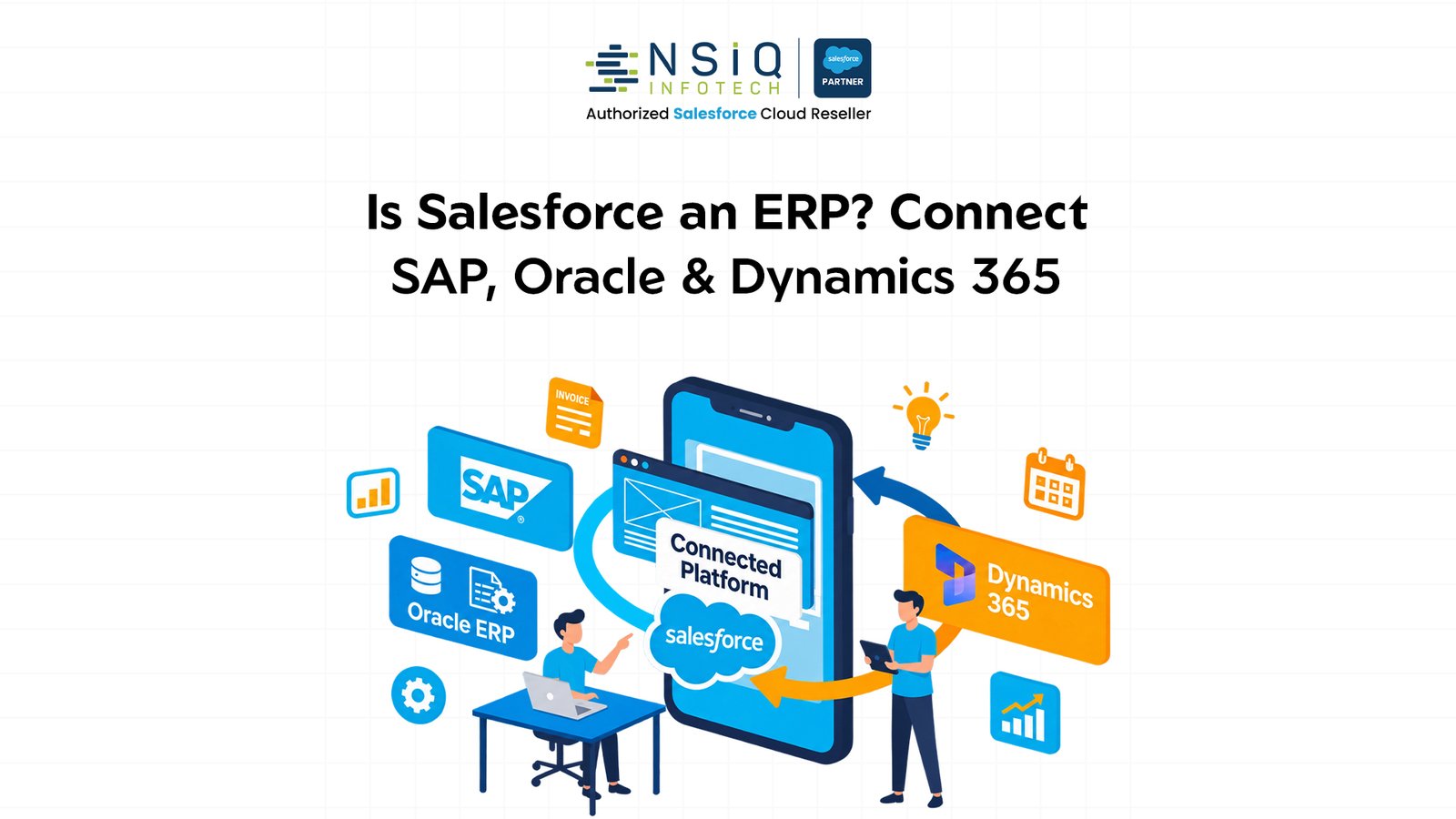
No, Salesforce is not an ERP system. Salesforce is primarily a CRM (Customer Relationship Management) and customer engagement platform designed to help businesses manage customer relationships, sales activities, marketing, quotations, and customer service.
An ERP (Enterprise Resource Planning) system, on the other hand, manages the internal operations of a business, including inventory, procurement, production planning, manufacturing, accounting, finance, and supply chain management.
For manufacturing companies, these systems solve different but equally important business problems.
Think about a manufacturing company that receives an order for 5,000 industrial components.
The sales team needs to manage the customer relationship, prepare a quotation, negotiate pricing, track the opportunity, and communicate with the customer. Salesforce can manage these activities.
However, the operations team needs to check raw material availability, production capacity, manufacturing schedules, inventory, dispatch requirements, and financial records. These activities typically belong in an ERP such as SAP, Oracle, or Microsoft Dynamics 365.
The real business value comes when Salesforce and the ERP work together.
Instead of replacing one system with another, manufacturers should connect Salesforce with their existing ERP to create a continuous flow of information between sales, operations, finance, and customer service.
Why Do Manufacturers Confuse Salesforce With an ERP?
Salesforce has evolved significantly beyond traditional CRM functionality.
With solutions such as Salesforce Manufacturing Cloud, Revenue Cloud capabilities, Sales Cloud, Service Cloud, and industry-specific data models, Salesforce can support several business processes that overlap with traditional ERP workflows.
For example, manufacturers can use Salesforce to:
- Manage long-term customer sales agreements.
- Track customer demand and sales forecasts.
- Manage product catalogs and commercial pricing.
- Generate quotations and manage opportunities.
- Track customer orders and service requests.
- Manage warranties, assets, and customer relationships.
- Give sales teams visibility into inventory and order information through integrations.
These capabilities sometimes make Salesforce appear similar to an ERP.
However, there is an important distinction: managing commercial information about a business transaction is not the same as managing the complete operational execution of that transaction.
For example, Salesforce Manufacturing Cloud supports sales agreements and account-based forecasting. It helps manufacturers improve visibility into customer commitments and coordinate commercial planning.
It does not mean Salesforce replaces the manufacturing ERP responsible for production execution, material requirements planning, procurement, and financial accounting.
A useful way to understand the difference: Salesforce manages the customer-facing business process, while the ERP manages the operational execution behind it.
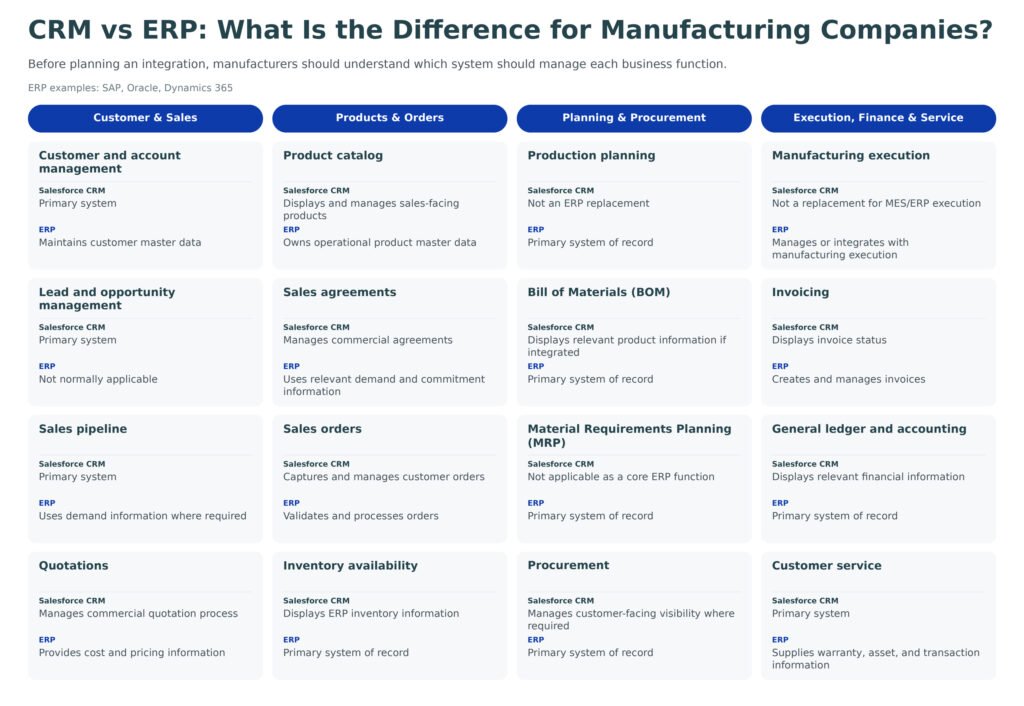
CRM vs ERP: What Is the Difference for Manufacturing Companies?
Before planning an integration, manufacturers should understand which system should manage each business function.
| Business Function | Salesforce CRM | ERP (SAP, Oracle, Dynamics 365) |
| Customer and account management | Primary system | Maintains customer master data |
| Lead and opportunity management | Primary system | Not normally applicable |
| Sales pipeline | Primary system | Uses demand information where required |
| Quotations | Manages commercial quotation process | Provides cost and pricing information |
| Product catalog | Displays and manages sales-facing products | Owns operational product master data |
| Sales agreements | Manages commercial agreements | Uses relevant demand and commitment information |
| Sales orders | Captures and manages customer orders | Validates and processes orders |
| Inventory availability | Displays ERP inventory information | Primary system of record |
| Production planning | Not an ERP replacement | Primary system of record |
| Bill of Materials (BOM) | Displays relevant product information if integrated | Primary system of record |
| Material Requirements Planning (MRP) | Not applicable as a core ERP function | Primary system of record |
| Procurement | Manages customer-facing visibility where required | Primary system of record |
| Manufacturing execution | Not a replacement for MES/ERP execution | Manages or integrates with manufacturing execution |
| Invoicing | Displays invoice status | Creates and manages invoices |
| General ledger and accounting | Displays relevant financial information | Primary system of record |
| Customer service | Primary system | Supplies warranty, asset, and transaction information |
The ownership of individual data fields should be finalized during solution design. For example, Salesforce may calculate a customer-specific quote while the ERP remains responsible for the approved base price list and product cost.
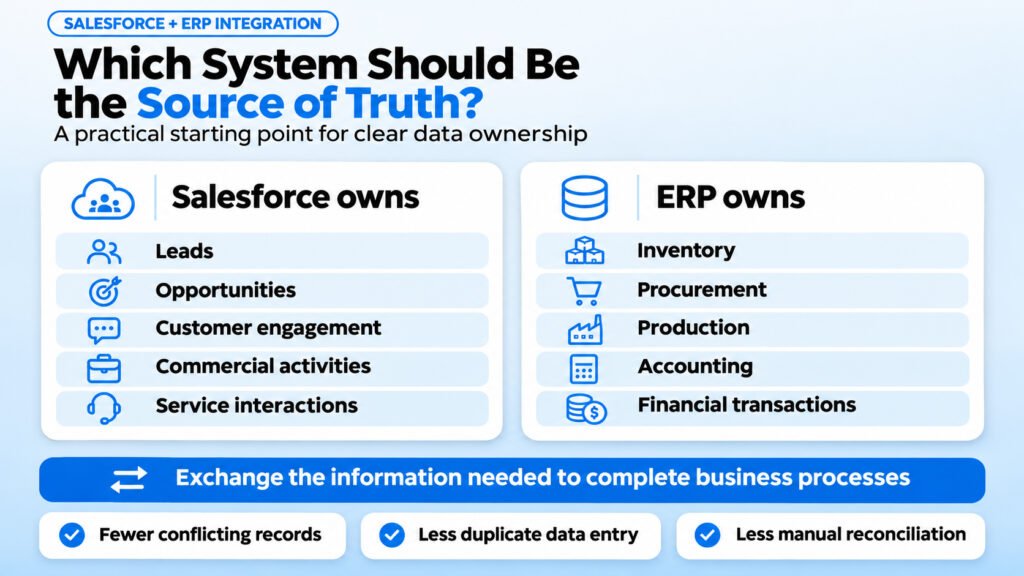
Which System Should Be the Source of Truth?
This is one of the most important decisions in any Salesforce ERP integration project.
A manufacturing company should not allow multiple systems to independently maintain the same critical information without clear ownership rules.
A practical starting point is:
- Salesforce owns leads, opportunities, customer engagement, commercial activities, and service interactions.
- ERP owns inventory, procurement, production, accounting, and financial transactions.
- Both systems exchange the information needed to complete business processes.
This approach reduces conflicting records, duplicate data entry, and unnecessary manual reconciliation.
What Happens When Salesforce and ERP Systems Are Not Connected?
Many manufacturing companies operate Salesforce and their ERP independently.
The sales team works in Salesforce, while the operations and finance teams depend on SAP, Oracle, or Dynamics 365.
When these systems cannot communicate properly, information gets trapped between departments.
Consider a practical example.
A sales representative receives an urgent order from an existing customer. The customer wants 2,000 units delivered within 15 days.
The sales representative prepares a quotation in Salesforce. However, the actual inventory information is available only in the ERP.
The representative contacts the operations team, waits for confirmation, updates the customer, and manually transfers the approved order to the ERP.
During this process, several problems can occur.
1.Sales representatives work with outdated inventory information
The sales team may promise a delivery date without knowing the actual stock availability or production lead time.
2.Orders are entered twice
An order created in Salesforce must be manually entered again into the ERP. This increases the risk of incorrect quantities, pricing, product codes, and delivery details.
3.Pricing discrepancies create confusion
The price quoted to the customer may not match the latest ERP pricing, discount structure, or contract terms.
4.Production planning becomes difficult
Without accurate customer demand and order information, production planners may struggle to prepare realistic manufacturing schedules.
5.Customer service lacks order visibility
When customers ask about delivery status, service representatives may need to contact operations instead of checking the information directly.
6.Finance and sales work with different information
The sales team may see an order as completed while the finance team is still waiting for invoicing or payment confirmation.
These are not simply technology problems. They affect customer experience, operational efficiency, order accuracy, and business profitability.
How Should Salesforce and ERP Integration Work?
A successful Salesforce ERP integration should connect the complete business process, from the first customer interaction to order fulfillment and payment visibility.
Let’s understand this through a manufacturing example.
A customer wants to purchase 5,000 industrial components from a manufacturer.
The following workflow demonstrates how Salesforce and an ERP can work together.
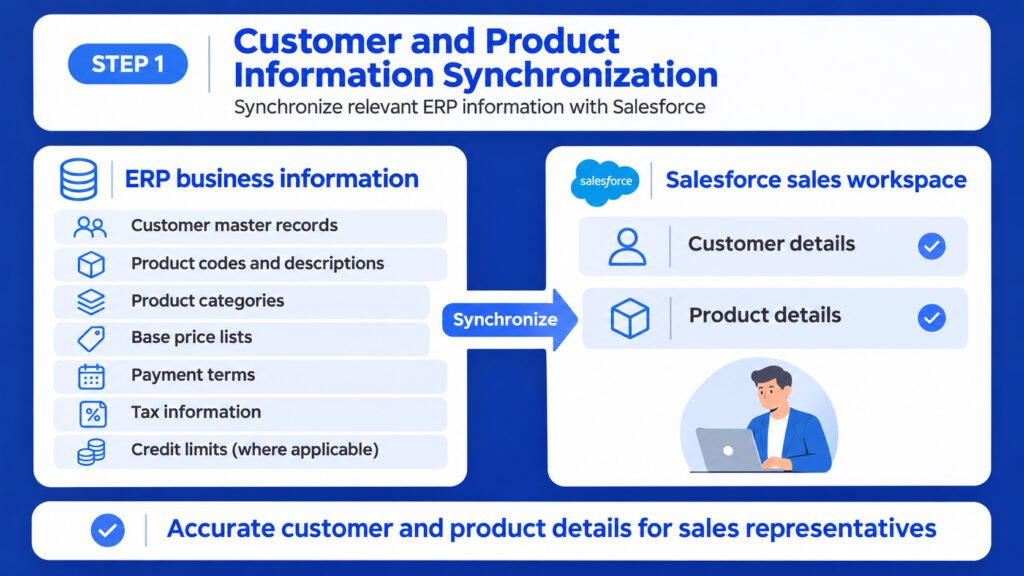
Step 1: Customer and Product Information Synchronization
The ERP contains important business information, including:
- Customer master records.
- Product codes and descriptions.
- Product categories.
- Base price lists.
- Payment terms.
- Tax information.
- Credit limits, where applicable.
Relevant information is synchronized with Salesforce so that sales representatives can work with accurate customer and product details.
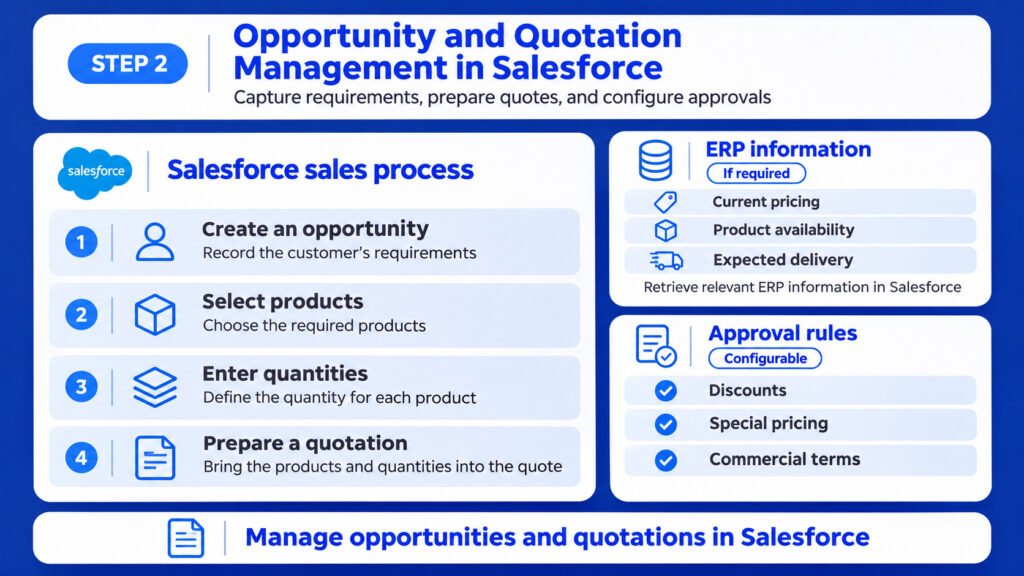
Step 2: Opportunity and Quotation Management in Salesforce
The sales representative creates an opportunity in Salesforce and records the customer’s requirements.
The representative selects the required products, enters quantities, and prepares a quotation.
If required, Salesforce retrieves current pricing, product availability, and expected delivery information from the ERP.
Approval rules can be configured for discounts, special pricing, and commercial terms.
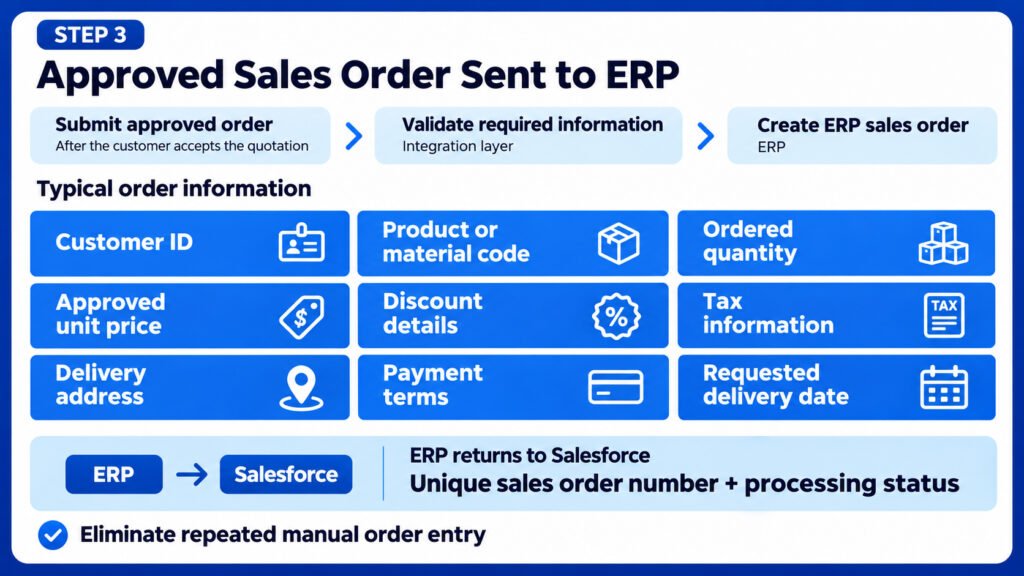
Step 3: Approved Sales Order Sent to ERP
Once the customer accepts the quotation, the approved order is submitted to the ERP.
The integration layer validates the required information before creating the corresponding ERP sales order.
Typical information includes:
- Customer ID.
- Product or material code.
- Ordered quantity.
- Approved unit price.
- Discount details.
- Tax information.
- Delivery address.
- Payment terms.
- Requested delivery date.
The ERP returns a unique sales order number and processing status to Salesforce.
This eliminates the need for repeated manual order entry.
Step 4: Inventory and Production Visibility
The ERP checks inventory availability and determines whether the order can be fulfilled from existing stock.
If inventory is insufficient, the ERP can initiate the appropriate procurement or production planning process.
Salesforce can display relevant information such as:
- Available inventory.
- Confirmed delivery dates.
- Order processing status.
- Expected shipment date.
- Backorder information.
The ERP remains responsible for operational inventory and production records.
Step 5: Shipment and Delivery Updates
When the order is packed and dispatched, the ERP or connected logistics system sends shipment information back to Salesforce.
The sales and service teams can view:
- Shipment reference.
- Dispatch date.
- Transport information.
- Tracking details.
- Expected delivery date.
- Delivery confirmation.
This makes it easier to provide customers with accurate order updates.
Step 6: Invoice and Payment Visibility
After the relevant billing process is completed in the ERP, invoice details and payment status can be made available in Salesforce.
Customer-facing teams can see whether an invoice has been generated, whether payment is pending, and whether the transaction has been settled.
The ERP remains the system of record for financial accounting and the general ledger.
The final result is a connected quote-to-cash process, where customer-facing teams and operational teams work with consistent business information.
Four Types of Data Every Manufacturing ERP Integration Should Support
A good integration is not simply about transferring records between two applications.
It should establish a reliable data exchange model with clear ownership, validation, and error-handling rules.
The four major data categories are:
1.Master Data: ERP to Salesforce
Master data provides the foundation for business transactions.
Typical information includes:
- Customer and account details.
- Product and material information.
- Product categories.
- Price lists.
- Payment terms.
- Tax classifications.
- Customer credit information, where authorized.
The ERP generally acts as the source of truth for operational master data.
2.Commercial Data: Salesforce to ERP
Commercial data represents customer commitments and approved business transactions.
Typical information includes:
- Approved quotations.
- Sales orders.
- Customer purchase order references.
- Sales agreement information.
- Contractual pricing.
- Approved discounts.
- Delivery requirements.
The integration should validate the transaction before creating or updating the corresponding ERP record.
3.Fulfillment Data: ERP to Salesforce
Fulfillment information helps sales and customer service teams understand what is happening after an order is submitted.
This includes:
- Order confirmation.
- Inventory availability.
- Production status.
- Shipment details.
- Delivery confirmation.
- Invoice status.
- Payment status.
Only the information required by Salesforce users should be synchronized.
4.Service and Asset Data: Both Systems
Manufacturing companies often need to connect customer service with operational asset information.
Relevant data includes:
- Installed products.
- Equipment serial numbers.
- Warranty information.
- Service history.
- Maintenance details.
- Return requests.
- Replacement parts.
For example, when a customer raises a warranty claim in Salesforce Service Cloud, the application can retrieve the relevant product, serial number, warranty entitlement, and purchase information from the ERP.
This helps service representatives resolve customer issues without searching multiple systems manually.
Best Ways to Integrate Salesforce With an ERP
There is no single integration architecture that works for every manufacturing company.
The right approach depends on transaction volume, system complexity, existing infrastructure, data requirements, security, and real-time processing needs.
Here are four commonly used integration approaches.
1.Middleware or iPaaS Integration
Middleware provides a central integration layer between Salesforce and one or more ERP systems.
Popular options include:
- MuleSoft.
- Boomi.
- Workato.
Instead of creating multiple independent connections, businesses can manage data transformation, routing, authentication, monitoring, and error handling through an integration platform.
Best suited for:
- Large manufacturing companies.
- Multiple ERP environments.
- Complex business workflows.
- High-volume integrations.
- Multi-location and multi-plant operations.
For example, a manufacturer may use Salesforce, SAP, a warehouse management system, and a logistics application.
Middleware can coordinate information exchange between all these applications.
2.Direct API Integration
Direct API integration connects Salesforce with the ERP using available REST or SOAP APIs.
Salesforce provides APIs that allow external applications to access and exchange business data.
This approach can be suitable when the integration scope is limited and the ERP provides reliable API endpoints.
Best suited for:
- Smaller integration projects.
- A limited number of business processes.
- Straightforward customer or product synchronization.
- Specific order submission workflows.
However, as the number of integration processes increases, direct integrations can become difficult to maintain.
Authentication, API limits, retries, data transformation, and monitoring must be designed properly.
3.Event-Driven Integration
Event-driven integration allows applications to respond to business events instead of continuously checking for changes.
Salesforce supports Platform Events and Change Data Capture.
For example:
- A sales order is approved in Salesforce.
- An event is published.
- The integration platform receives the event.
- The ERP creates or processes the order.
- The ERP sends the processing result back.
- Salesforce updates the order status.
This approach is particularly useful when timely updates are important.
It is important to design event subscriptions, retry mechanisms, duplicate-event protection, and failure recovery carefully.
4.Data Virtualization Using Salesforce Connect
Sometimes manufacturers do not need to copy ERP data into Salesforce.
They only need to display selected information.
Salesforce Connect can expose supported external data sources within Salesforce through external objects and configured adapters.
For example, a sales representative may want to check:
- Current inventory.
- Product availability.
- Invoice details.
- Customer account balances.
- Delivery status.
Instead of maintaining another copy of every ERP record, Salesforce can access supported external data sources.
This approach is useful for read-oriented scenarios, provided the external system supports the required access pattern and performance expectations.
Which Integration Approach Should Manufacturers Choose?
For many manufacturers, a hybrid architecture is the most practical option.
Use middleware or event-driven integration for important business transactions, APIs for specific operations, and data virtualization for selected read-only information.
The architecture should be selected after reviewing business processes rather than choosing a technology first.
Salesforce Integration With SAP, Oracle, and Microsoft Dynamics 365
Let’s look at how Salesforce can connect with three of the most widely used enterprise platforms.
Salesforce and SAP Integration
SAP is widely used by manufacturing organizations to manage enterprise operations, supply chains, procurement, finance, and production planning.
Salesforce can integrate with SAP S/4HANA and SAP ECC to connect customer-facing processes with operational information.
Common integration scenarios:
- Synchronizing SAP customer master data with Salesforce accounts.
- Displaying SAP product and material information in Salesforce.
- Retrieving inventory availability.
- Sending approved Salesforce sales orders to SAP.
- Synchronizing order confirmations.
- Displaying shipment and invoice status.
- Sharing relevant warranty and asset information.
Common SAP integration technologies:
For SAP S/4HANA, manufacturers can use supported APIs, including OData and other REST-based interfaces where available.
For SAP ECC and traditional SAP environments, BAPIs and IDocs are common integration mechanisms.
The exact interface depends on the SAP version, deployment model, available services, and business process.
SAP’s official API documentation provides information about available interfaces and integration scenarios.
Recommended approach: For complex SAP environments, MuleSoft or another enterprise integration platform can help centralize mapping, orchestration, monitoring, and error handling.
Salesforce and Oracle ERP Integration
Oracle ERP Cloud is used by organizations to manage financials, procurement, project operations, and other enterprise processes.
Salesforce can connect with Oracle Fusion Cloud ERP to exchange relevant commercial and operational data.
Common integration scenarios:
- Customer and account synchronization.
- Product and price information exchange.
- Approved sales order submission.
- Invoice and payment status updates.
- Customer financial information visibility.
- Procurement and fulfillment status exchange.
Oracle provides REST APIs for supported Fusion Cloud business objects.
For Oracle NetSuite, SuiteTalk REST Web Services provides another integration option.
One important technical consideration is that Oracle NetSuite is transitioning away from SOAP web services. Oracle identifies REST web services with OAuth 2.0 as the recommended approach for newly developed integrations.
Recommended approach: Select the integration design based on the specific Oracle product, supported APIs, transaction volume, and security requirements.
Salesforce and Microsoft Dynamics 365 Integration
Microsoft Dynamics 365 provides enterprise applications for business operations, finance, supply chain, and customer engagement.
Salesforce can integrate with Dynamics 365 through supported APIs and integration platforms.
For Dynamics 365 applications built on Microsoft Dataverse, the Dataverse Web API provides an OData-based REST interface.
Common integration scenarios:
- Customer and account synchronization.
- Product and pricing information exchange.
- Quotation and order integration.
- Inventory and warehouse information visibility.
- Invoice and payment status updates.
- Customer service and asset information exchange.
Recommended approach: Use Dataverse Web API or the relevant Dynamics application APIs for focused integrations. For more complex environments, use middleware to manage multiple business processes.
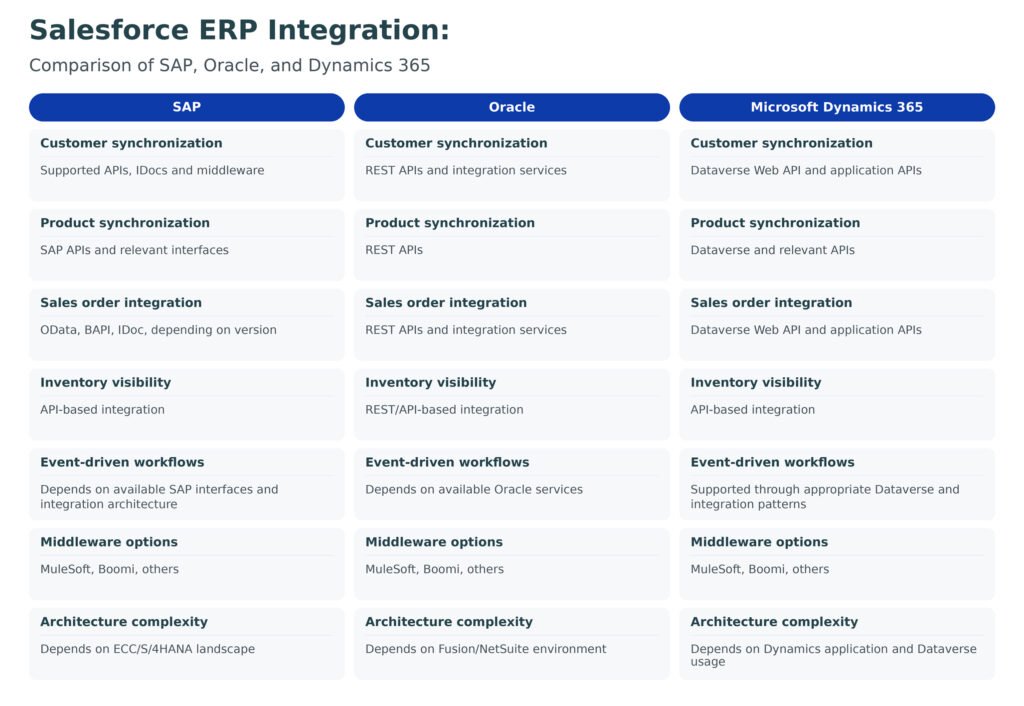
Salesforce ERP Integration: Comparison of SAP, Oracle, and Dynamics 365
| Integration Area | SAP | Oracle | Microsoft Dynamics 365 |
| Customer synchronization | Supported APIs, IDocs and middleware | REST APIs and integration services | Dataverse Web API and application APIs |
| Product synchronization | SAP APIs and relevant interfaces | REST APIs | Dataverse and relevant APIs |
| Sales order integration | OData, BAPI, IDoc, depending on version | REST APIs and integration services | Dataverse Web API and application APIs |
| Inventory visibility | API-based integration | REST/API-based integration | API-based integration |
| Event-driven workflows | Depends on available SAP interfaces and integration architecture | Depends on available Oracle services | Supported through appropriate Dataverse and integration patterns |
| Middleware options | MuleSoft, Boomi, others | MuleSoft, Boomi, others | MuleSoft, Boomi, others |
| Architecture complexity | Depends on ECC/S/4HANA landscape | Depends on Fusion/NetSuite environment | Depends on Dynamics application and Dataverse usage |
The comparison is architectural rather than a claim that one platform is always easier or better.
The final integration design should be validated against the specific product version, licensing, API availability, and deployment environment.
Common Mistakes to Avoid During Salesforce ERP Integration
Even when the right technologies are selected, integration projects can fail because of poor business-process design.
Here are some mistakes manufacturers should avoid.
1.Not defining the system of record
Decide which system owns each important business field before development begins.
For example, if both Salesforce and SAP can independently update the same inventory quantity, conflicting values can appear.
2.Synchronizing unnecessary data
Not every ERP record needs to be available in Salesforce.
Synchronize the information that supports specific sales, service, and operational workflows.
3.Ignoring failed transactions
Suppose an approved order is submitted from Salesforce, but the ERP rejects it because the customer account is inactive.
The integration must capture the error, notify the responsible team, and provide a controlled retry or correction process.
4.Not handling duplicate transactions
A timeout can occur after an ERP has successfully created an order but before Salesforce receives the confirmation.
If the integration simply retries without checking the original transaction, it may create duplicate orders.
Use unique external references and idempotency controls wherever supported.
5.Underestimating manufacturing product complexity
Manufacturing products often have configurable attributes, product variants, units of measure, BOM structures, and complex pricing rules.
These requirements need detailed data mapping and validation.
6.Ignoring security and permissions
Customer, financial, and commercial information should only be accessible to authorized users.
Use secure authentication, appropriate permissions, encrypted communication, and controlled access to external data.
7.Skipping business-process testing
Testing should cover more than successful transactions.
Manufacturers should test:
- Invalid customer records.
- Incorrect product codes.
- Insufficient inventory.
- Duplicate order submissions.
- Price mismatches.
- ERP downtime.
- API timeouts.
- Partial transaction failures.
- Cancelled and modified orders.
- Failed invoice synchronization.
A production-ready integration must handle both normal and exceptional business scenarios.
What Should Manufacturers Consider Before Starting an ERP Integration Project?
Before starting development, the business and technical teams should agree on the integration scope.
A practical project assessment should cover the following areas.
| Assessment Area | Key Questions |
| Business processes | Which processes should connect Salesforce and ERP? |
| System ownership | Which application owns customer, product, pricing, inventory, and order data? |
| Integration direction | Which records move from Salesforce to ERP and vice versa? |
| Data frequency | Does the business need real-time, near-real-time, or scheduled synchronization? |
| Transaction volume | How many records and transactions are processed daily? |
| Security | What authentication, access, and data-protection controls are required? |
| Error handling | Who receives failed transaction alerts and resolves them? |
| Reporting | Which teams need dashboards and cross-system visibility? |
| Testing | How will business exceptions and integration failures be validated? |
| Scalability | Will the architecture support additional plants, warehouses, and applications? |
Starting with these questions helps prevent unnecessary development and expensive changes later.
Frequently Asked Questions About Salesforce and ERP Integration
1.Is Salesforce an ERP system?
No. Salesforce is primarily a CRM and customer engagement platform. It manages customer relationships, sales, quotations, agreements, and service processes. ERP systems manage operational processes such as inventory, production, procurement, finance, and accounting.
2.Can Salesforce replace SAP or Oracle for manufacturing?
No. Salesforce is not a complete replacement for SAP or Oracle ERP in a traditional manufacturing environment. It does not replace core ERP capabilities such as material requirements planning, production execution, procurement, and general ledger accounting.
3.What is the difference between Salesforce CRM and ERP?
CRM focuses on customer relationships and commercial activities. ERP focuses on internal business operations and financial transactions.
For manufacturers, Salesforce can manage the customer-facing sales and service experience, while SAP, Oracle, or Dynamics manages operational execution.
4.Which system should manage product pricing: Salesforce or ERP?
There is no universal rule, but the ERP commonly owns base product prices, product costs, and approved price lists. Salesforce can manage commercial quotations, customer-specific discounts, and approval workflows.
The important requirement is to define one authoritative owner for each pricing field.
5.How do sales orders move from Salesforce to ERP?
Once a quotation or order is approved in Salesforce, an integration process validates the information and submits it to the ERP through an API or middleware.
The ERP creates or processes the order and returns its reference number and status to Salesforce.
6.What are the biggest challenges in Salesforce ERP integration?
The most common challenges include data ownership, product and pricing complexity, inconsistent customer records, API limitations, security, duplicate transactions, and error recovery.
Addressing these issues during architecture and business-process design significantly reduces implementation risks.
Final Thoughts: Salesforce and ERP Should Work Together, Not Compete
The question should not be whether Salesforce can replace an ERP.
The more important question is how manufacturers can connect their CRM and ERP systems to give every department access to the information it needs.
Salesforce provides a strong platform for customer engagement, sales management, commercial operations, and customer service.
SAP, Oracle, and Microsoft Dynamics 365 provide the operational and financial capabilities that manufacturers depend on to run their businesses.
When these systems are properly integrated, manufacturers can reduce manual data entry, improve order visibility, make better customer commitments, and connect sales activities with actual operational capabilities.
The objective is simple: one connected business process, with the right system managing the right information.
If your manufacturing business is planning to connect Salesforce with SAP, Oracle, or Microsoft Dynamics 365, begin with a clear integration strategy, define data ownership, and build the architecture around real business requirements.