
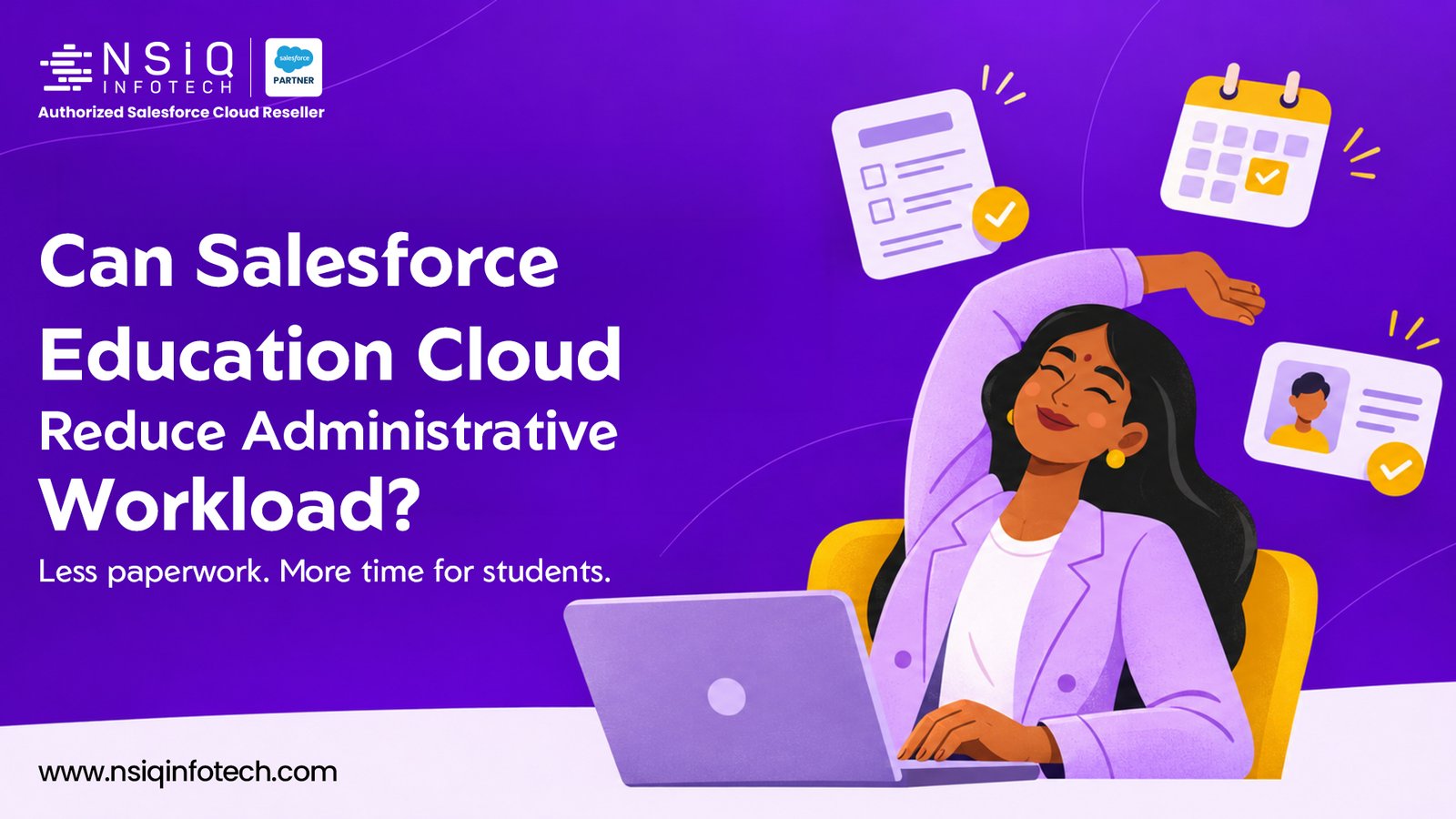
Can Salesforce Education Cloud Reduce Administrative Workload for Mid-Size Institutions?
Yes. Salesforce Education Cloud can significantly reduce administrative workload for mid-size educational institutions by connecting student information, automating repetitive processes, streamlining admissions, and giving administrative teams a centralized view of institutional activities. Instead of relying on spreadsheets, lengthy email conversations, paper-based forms, and disconnected applications, institutions can bring many of their essential administrative workflows together on one platform.
However, the real benefit is not simply reducing the number of administrative tasks. It is helping staff spend less time managing information and more time supporting students, coordinating academic activities, and improving institutional operations.
For mid-size colleges, universities, and educational organizations, this distinction matters. They often manage growing student populations and increasingly complex administrative responsibilities without having the same operational resources as larger institutions.
Salesforce Education Cloud offers a way to address this challenge through connected data, workflow automation, and education-focused capabilities.
Let’s explore where it makes a difference, which processes can be improved, and what institutions should consider before implementing it.
Why Administrative Workload Becomes a Challenge for Mid-Size Institutions
Running an educational institution involves much more than teaching and academic planning. Behind every student experience, there are several administrative processes that need continuous attention.
Consider a mid-size college managing admissions, registrations, academic records, fee-related enquiries, student support requests, and communication with parents and students.
Each department may have its own process for handling information. The admissions team maintains applicant details, the registrar manages academic records, finance handles payment-related information, and student support teams respond to individual concerns.
The problem begins when these departments operate independently.
A student’s information might be available in an admission spreadsheet, partially stored in an ERP system, and discussed through email. When another department needs that information, someone has to locate it, verify it, and share it again.
This creates several operational difficulties:
- Repeated data entry: Staff enter the same student information into multiple systems.
- Manual follow-ups: Employees spend time reminding students about missing documents, pending applications, and important deadlines.
- Limited visibility: Department heads struggle to understand the current status of activities across teams.
- Delayed responses: Student enquiries move between departments before reaching the right person.
- Reporting difficulties: Preparing management reports often requires collecting and consolidating information manually.
- Process dependency: Important activities sometimes depend on individual employees remembering what needs to happen next.
These issues may appear manageable when student numbers are small. As an institution grows, however, the administrative effort increases.
Hiring additional employees is not always the most practical solution. Improving how existing teams manage their work can be a much more sustainable approach.
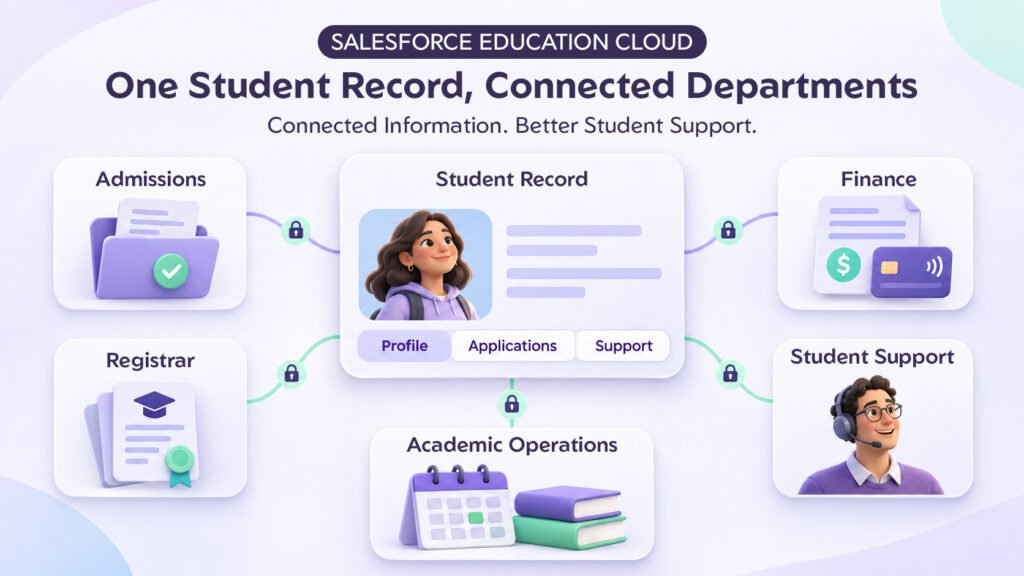
Centralizing Student Information Across Departments
One of the biggest opportunities to reduce administrative effort is to eliminate scattered student information.
In many institutions, student details are maintained across different departmental systems. Even when the information exists digitally, employees may not have access to a complete and updated picture.
Salesforce Education Cloud addresses this challenge through its education-focused data foundation and connected student records.
An institution can bring relevant information together, including:
- Student contact information and personal details.
- Admission and application history.
- Enrollment information.
- Academic and program-related details.
- Student relationships and emergency contacts.
- Previous interactions with administrative departments.
- Student support activities and cases.
For example, imagine a student contacting the registrar’s office to ask about an enrollment issue.
Instead of asking the student to explain the entire situation again, an authorized staff member can review the available student information and previous interactions from a centralized record.
This reduces unnecessary communication and helps departments respond with better context.
The practical benefit: Employees spend less time searching for information, while students receive more consistent responses from different departments.
Automating the Admissions Process
Admissions is one of the most administration-intensive activities in an educational institution.
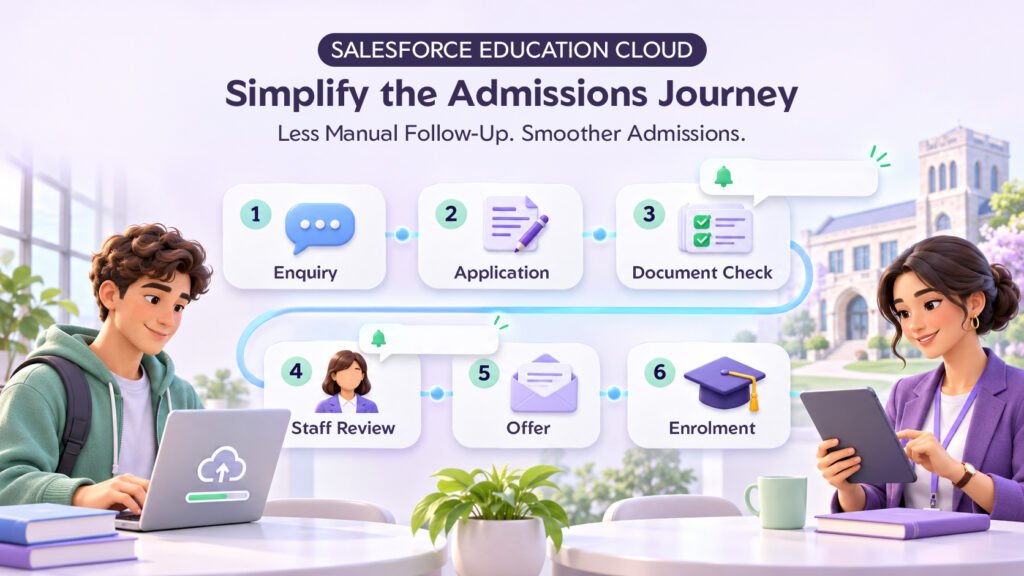
From the first enquiry to final enrollment, applicants must move through several stages. They may need to submit documents, complete application forms, attend counselling sessions, respond to admission offers, and meet specific deadlines.
When these activities are managed manually, admissions teams can spend a considerable amount of time tracking application progress.
Salesforce Education Cloud provides recruitment and admissions capabilities that help institutions organize and manage these activities.
For example, an institution can establish workflows for:
- Capturing enquiries from different channels.
- Managing prospective student information.
- Tracking application progress.
- Maintaining document checklists.
- Assigning applications to appropriate staff members.
- Sending reminders for pending requirements.
- Managing admission-related communication.
- Monitoring applicants through enrollment stages.
Consider a student who submits an application but forgets to upload an important supporting document.
In a manual process, an admissions employee may need to identify the missing document, contact the applicant, and remember to follow up later.
With an appropriately configured workflow, the system can identify the incomplete requirement and trigger a notification or follow-up task.
Staff members can then focus on reviewing applications and helping applicants rather than repeatedly checking spreadsheets.
The practical benefit: A more organized admissions process, fewer missed follow-ups, and better visibility into application progress.
Simplifying Academic Operations and Registrar Responsibilities
Registrars and academic administration teams are responsible for maintaining accurate academic information and coordinating several activities throughout the academic year.
These responsibilities may include:
- Managing academic programs and courses.
- Maintaining course prerequisites.
- Coordinating academic schedules.
- Managing student enrollment information.
- Supporting registration activities.
- Tracking academic progress.
- Maintaining learning-related records.
Salesforce Education Cloud includes Academic Operations capabilities designed to help institutions manage learning-related structures and processes.
For instance, the Learning Wizard helps staff create and schedule courses, programs, and customized academic offerings. The Program Plan Builder supports the creation and management of academic program plans.
These capabilities help establish connected academic information instead of maintaining separate, disconnected records for every activity.
Imagine a college introducing a new academic program.
The academic team needs to define the program, organize its courses, establish prerequisites, and make the relevant information available to other departments.
When these details are managed through a connected platform, the institution can reduce repeated data handling and improve coordination between academic administration and admissions teams.
The practical benefit: Better-organized academic information and less manual coordination between departments.
Reducing Manual Student Support and Enquiry Management
Student enquiries are a regular part of institutional administration.
Students may contact the college regarding:
- Admission status.
- Enrollment confirmation.
- Academic schedules.
- Examination-related information.
- Document requirements.
- Administrative approvals.
- General student services.
The challenge is not always the number of enquiries. It is how efficiently the institution handles them.
When enquiries arrive through emails, phone calls, website forms, and in-person visits, tracking their status becomes difficult.
Some requests may remain unanswered, while others may be forwarded between departments several times.
Salesforce Education Cloud supports case management and student support workflows that help institutions organize requests, assign responsibilities, and track progress.
For example, when a student submits an enquiry through an online portal, the system can create a case and route it to the appropriate department based on predefined rules.
The assigned employee can review the request, update its status, communicate with the student, and maintain a record of the interaction.
If another department needs to participate, the request can be coordinated without losing its history.
This creates greater accountability and makes it easier for managers to identify unresolved requests.
The practical benefit: Fewer lost enquiries, clearer ownership, and more organized student support.
Automating Routine Administrative Tasks and Approvals
Not every administrative process requires a complex software solution. Sometimes, the biggest improvement comes from automating small, repetitive activities that employees perform every day.
Examples include:
- Assigning incoming requests.
- Sending document submission reminders.
- Creating follow-up tasks.
- Notifying employees about pending approvals.
- Updating application statuses.
- Triggering actions when specific conditions are met.
- Generating standard documents.
- Escalating requests that remain unresolved.
Salesforce provides tools such as Flow Builder, OmniStudio, Action Plans, and Business Rules Engine to support different types of automation.
For example, an institution could configure an approval workflow for a student document request.
Once the student submits the request, the system can create the required administrative task, assign it to the responsible employee, notify the relevant approver, and update the request when a decision is recorded.
The exact workflow depends on institutional policies and implementation requirements.
The important point is that employees no longer need to remember every individual step or repeatedly check whether someone has completed an action.
The practical benefit: Reduced repetitive work, more consistent processes, and better control over administrative activities.
Giving Management Better Visibility Through Reports and Dashboards
For COOs and Heads of Administration, one of the biggest challenges is understanding what is happening across departments without constantly requesting updates.
How many applications are pending?
Which departments have unresolved student requests?
How many applicants have completed their documentation?
Are admissions activities progressing according to the institution’s targets?
When information is maintained in separate spreadsheets and applications, answering these questions can take considerable time.
Salesforce provides reporting and dashboard capabilities that allow institutions to monitor relevant operational information.
Depending on the implementation, management dashboards can display:
- Total applications received.
- Applications awaiting review.
- Admission conversion across different stages.
- Pending documentation.
- Student support cases.
- Department-wise workload.
- Outstanding administrative tasks.
- Trends in student enquiries.
For example, a COO could review a dashboard to identify whether one department is handling significantly more unresolved requests than others.
Rather than waiting for a manually prepared report, management can use available operational information to identify areas that need attention.
It is important to remember that dashboards are only as useful as the underlying data. Institutions must establish proper data entry practices, ownership, and reporting definitions.
The practical benefit: Better operational visibility and more informed administrative decisions.
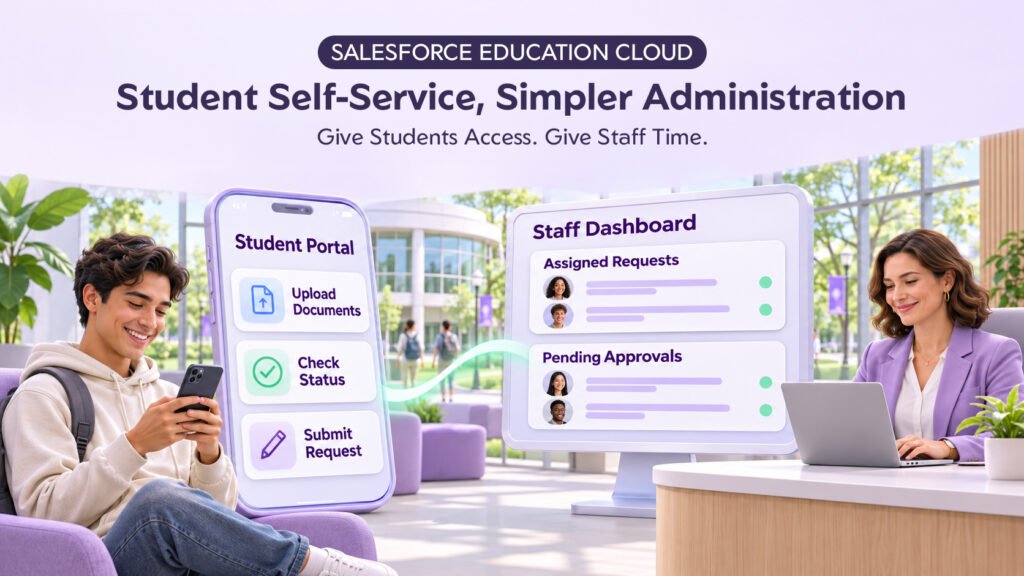
Supporting Student Self-Service Through Digital Portals
Administrative workload is often increased by requests that students could complete themselves if the institution provided the right digital access.
Students may need to:
- Submit applications.
- Upload supporting documents.
- Check application progress.
- Submit service requests.
- Schedule appointments.
- View relevant institutional updates.
When every activity requires an email or physical visit, administrative teams become the first point of contact for even the simplest requests.
Salesforce Experience Cloud can support secure digital portals through which institutions provide access to relevant services and information.
For example, an applicant could use an online portal to submit documents and review application-related updates.
An enrolled student could access permitted services and submit an administrative request without having to visit the registrar’s office.
The institution can configure portal experiences according to user roles, permissions, and internal policies.
This does not mean every administrative interaction should become self-service. Certain requests require personal assistance, verification, or approval.
However, moving suitable routine activities online can make a meaningful difference to the workload of administrative teams.
The practical benefit: Fewer routine enquiries and more convenient access to institutional services.
Does Salesforce Education Cloud Make Sense for Mid-Size Institutions?
A common concern among mid-size institutions is whether an enterprise-level platform is appropriate for their operational requirements.
They may assume that such solutions are designed primarily for large universities with extensive IT teams and substantial budgets.
In reality, the suitability of Salesforce Education Cloud depends more on the institution’s processes, growth plans, integration requirements, and implementation approach than on its size alone.
A mid-size institution may benefit from Education Cloud when it experiences:
- Increasing student enrollment.
- Growing administrative complexity.
- Multiple departments working with the same student information.
- Frequent manual follow-ups.
- Difficulty generating accurate management reports.
- A need to improve student engagement.
- Plans to expand programs or campuses.
However, implementing every available capability from the beginning is rarely necessary.
A more practical approach is to identify the processes causing the greatest administrative difficulty and prioritize them.
For example, an institution could begin with recruitment and admissions, followed by student management and administrative case handling.
Academic operations, additional automation, and digital self-service capabilities can be introduced according to business priorities.
This phased approach helps institutions manage implementation complexity and demonstrate value before expanding the solution.
What Should Institutions Consider Before Implementing Salesforce Education Cloud?
Technology alone does not solve administrative problems. The institution must understand its existing processes and determine how those processes should improve.
Before moving forward, decision-makers should evaluate several important areas.
1. Existing administrative processes
Document how admissions, registration, student support, and academic administration currently operate. Identify repetitive activities and unnecessary approval steps.
2. Data quality and migration
Review where student information is currently stored, identify duplicate records, and establish how existing information will be migrated and maintained.
3. Integration requirements
Many institutions already use ERP, accounting, learning management, payment, and student information systems. Determine which systems must exchange information with Salesforce.
4. User roles and permissions
Registrars, faculty members, admissions employees, finance teams, and management should have access appropriate to their responsibilities.
5. Staff adoption and training
Even a well-designed system can struggle if employees do not understand how to use it. Provide practical training and involve departmental representatives during implementation.
6. Implementation priorities and budget
Define the initial scope, expected outcomes, licensing requirements, integration costs, and ongoing maintenance responsibilities.
A clear implementation roadmap is particularly important for mid-size institutions that want to improve operations without disrupting existing academic activities.
Why the Right Salesforce Implementation Partner Matters
Selecting the right platform is only one part of the decision. How it is implemented determines whether the institution receives meaningful operational improvements.
Educational institutions have different academic structures, admission policies, approval requirements, and student service processes.
A solution designed for one institution may not work effectively for another without appropriate configuration.
This is why working with an experienced Salesforce implementation partner is important.
A capable partner should understand both the technology and the operational challenges of educational institutions.
The implementation process should begin with requirement analysis, process mapping, and identifying automation opportunities.
It should then move towards solution design, configuration, integration, testing, training, and ongoing optimization.
At NSIQ Infotech, we understand that successful Salesforce implementation is about more than introducing another business application. It is about building connected processes that help organizations work more efficiently.
For educational institutions evaluating Salesforce Education Cloud, the focus should be on identifying administrative bottlenecks, improving information accessibility, automating repetitive activities, and creating a solution that can support future growth.
The objective is not to digitize every existing process exactly as it is. It is to make those processes simpler, more connected, and easier to manage.
Final Thoughts: Less Administrative Work, More Time for Students
Mid-size educational institutions do not necessarily need larger administrative teams to manage increasing operational complexity. In many cases, they need better ways to connect information, coordinate departments, and manage repetitive activities.
Salesforce Education Cloud provides capabilities that can help institutions improve admissions management, centralize student information, organize academic operations, streamline student support, and automate routine administrative workflows.
The greatest opportunity lies in bringing these improvements together rather than treating each department as an independent operation.
Of course, the results depend on the institution’s requirements, implementation quality, data readiness, and staff adoption.
For decision-makers, the right starting point is to identify where administrative teams are spending the most time on work that could be simplified or automated.
Once those areas are clear, Salesforce Education Cloud can become an important part of a more connected and efficient institutional operating model.
If your institution is exploring ways to reduce administrative workload and improve student management, NSIQ Infotech can help you evaluate your existing processes and identify practical Salesforce solutions aligned with your operational goals.
Frequently Asked Questions (FAQs)
1. Can Salesforce Education Cloud help mid-market organizations reduce administrative burden?
Yes. Salesforce Education Cloud can help mid-market educational organizations reduce administrative burden by centralizing student information, automating admissions workflows, managing student enquiries, and improving coordination between departments. The extent of improvement depends on the institution’s requirements and implementation.
2. Is Salesforce Education Cloud suitable for mid-size colleges and universities?
Yes. It can be suitable for mid-size colleges and universities that want to improve admissions management, student engagement, academic operations, and administrative efficiency. Institutions can prioritize capabilities based on their operational needs and expand over time.
3. Can Salesforce Education Cloud automate the student admission process?
Yes. Its recruitment and admissions capabilities support application management, applicant engagement, application reviews, document-related workflows, and enrollment tracking. Institutions can configure automation to manage reminders, assignments, and other admission-related activities.
4. Can Salesforce Education Cloud integrate with an existing student information system?
Integration possibilities depend on the existing system, available APIs, data structures, and technical requirements. Salesforce can connect with external applications through appropriate integration approaches, allowing institutions to exchange relevant information rather than maintaining unnecessary duplicate records.
5. Does Salesforce Education Cloud support student self-service portals?
Yes. Salesforce Experience Cloud can be used to build secure portals where applicants and students can access relevant information, submit documents, request assistance, and interact with institutional services. Access and functionality can be configured according to institutional requirements.