
If you lead IT or clinical informatics at a health system, someone has probably asked you this in a budget meeting: “Is Salesforce an EHR? And if it isn’t, why are we paying for both?”
It’s a fair question. Salesforce Health Cloud has patient records, care plans, timelines and clinical data. On a demo screen, it can look a lot like an electronic health record. But it plays a very different role.
This guide gives you the direct answer first. Then it explains how Health Cloud fits next to Epic, Oracle Health, Meditech and other EHRs, how the integration actually works, and how to decide whether the pairing makes sense for your organization.
The Quick Answer: Is Salesforce an EHR?
No. Salesforce is not an EHR, and Health Cloud is not designed to replace one.
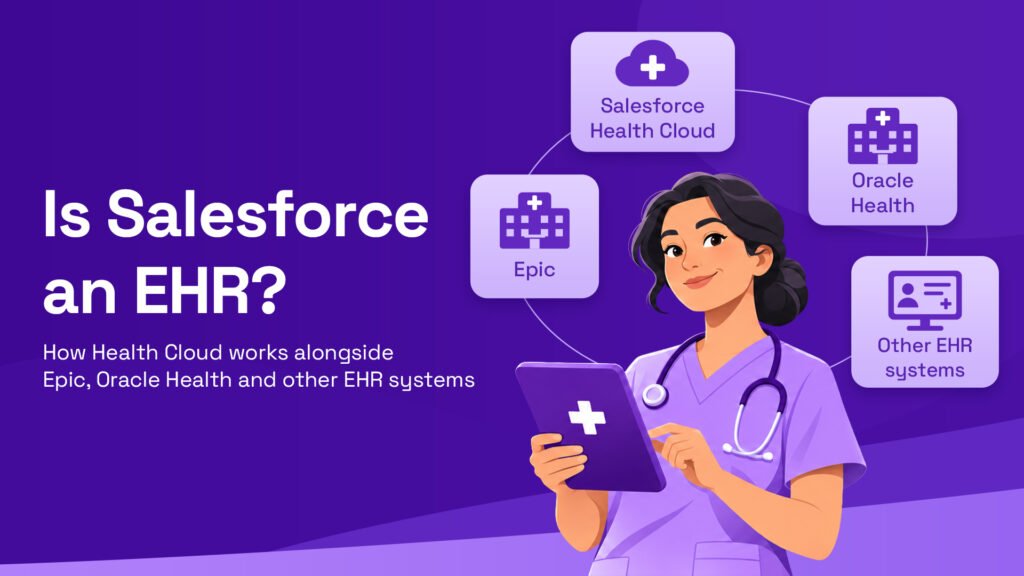
Salesforce says this itself. It describes Health Cloud as the engagement, data aggregation and collaboration solution that complements current EHRs and clinical systems. Its healthcare page also states that Health Cloud complements your EHR instead of replacing it, with built-in FHIR R4, HL7 and two-way EHR integration through MuleSoft Direct for Health.
Here’s the simplest way to think about it:
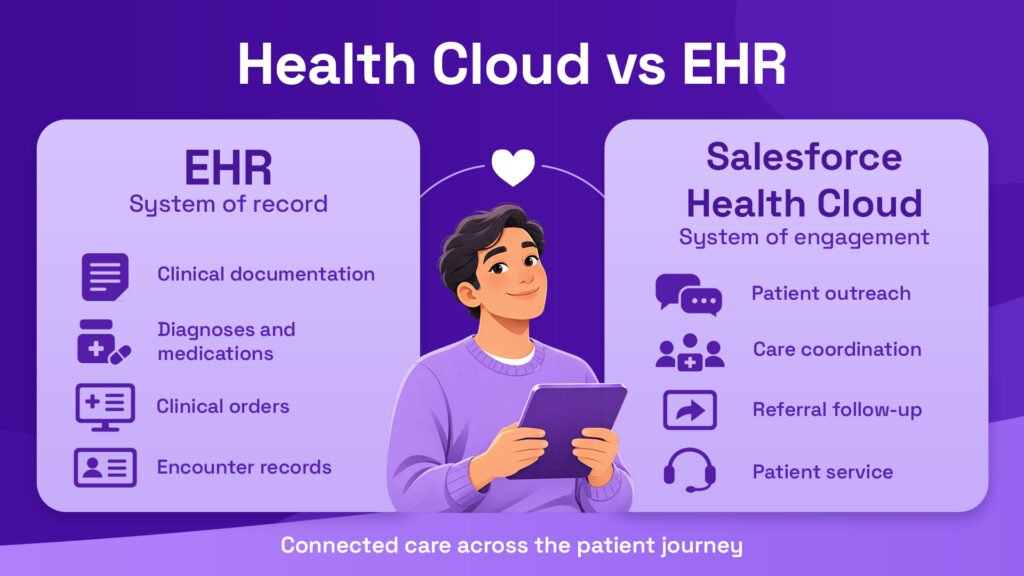
- The EHR is the system of record. It’s where clinicians chart, order, prescribe and bill.
- Health Cloud is the system of engagement. It’s where your teams coordinate care, reach out to patients, manage referrals and run service operations.
- Together, they give you the full picture: what happened clinically, plus everything that happens around the visit.
So if you’re searching for a “Salesforce EHR,” what you most likely need is a Salesforce EHR integration, not an EHR replacement.
What an EHR Does (and Why It Stays the Clinical Record)
An electronic health record is the legal, clinical source of truth for a patient’s care. It’s built around the encounter: the moment a clinician sees, treats and documents a patient.
Core Jobs of an EHR
- Clinical documentation: progress notes, history, assessments and discharge summaries
- Computerized provider order entry (CPOE): labs, imaging, medications and referrals
- E-prescribing and medication administration
- Clinical decision support: alerts, drug interaction checks and order sets
- Revenue cycle: charge capture, coding and claims
- Regulatory reporting: quality measures, certification requirements and audit trails
These functions are heavily regulated and tightly tied to clinical workflows. That’s why EHR replacements take years and cost tens or hundreds of millions of dollars. No CIO wants to rip one out unless they have to.
Where EHRs Fall Short
EHRs are excellent at the encounter. They’re weaker at everything that happens between encounters, such as:
- Personalized outreach and patient campaigns
- Contact center operations across phone, SMS, email and chat
- Referral tracking across networks the EHR doesn’t own
- Coordinating community partners, payers and social services
- Combining data from multiple EHRs after a merger
That gap is exactly where Health Cloud lives.
What Salesforce Health Cloud Actually Does
Health Cloud is Salesforce’s healthcare-specific CRM platform. Salesforce describes it as built on its unified platform with healthcare-specific data models, workflows, interoperability and compliance. In recent branding, Health Cloud sits within Salesforce’s wider Agentforce for Health offering, which adds AI agents on top of the platform.
-
Patient Engagement and Care Coordination
Health Cloud gives care managers, navigators and contact center staff a single patient view. They see demographics, care team members, open referrals, care plans, communication preferences and recent clinical events pulled in from the EHR. From one screen, they can start outreach, schedule follow-ups and track tasks instead of switching between five systems.
-
Data Unification Across Systems
Many health systems run more than one EHR, especially after acquisitions. Health Cloud can pull data from several sources into one patient profile. This matters a lot for population health, where you need to see every patient in a risk group, no matter which hospital’s EHR they’re in.
-
AI Agents for Administrative Work
This is where Health Cloud has moved fastest. In March 2026, Salesforce announced six new Agentforce Health agents with ready-made integrations for providers, payers and public health. One is directly relevant to EHR teams: an EHR Read-Write Agent that supports two-way data exchange with EHRs like athenahealth through MuleSoft connectors, so contact center reps can look up patient data and register new patients on the spot.
The key point for IT leaders: these agents automate service and administrative work. They don’t chart, place orders or replace clinical documentation in the EHR.
Health Cloud vs EHR: A Side-by-Side Comparison
| Area | EHR (Epic, Oracle Health, Meditech) | Salesforce Health Cloud |
| Primary role | System of record | System of engagement |
| Main users | Physicians, nurses, coders | Care managers, contact centers, navigators, marketing |
| Built around | The clinical encounter | The patient relationship over time |
| Clinical charting | Yes | No |
| Orders and e-prescribing | Yes | No |
| Omnichannel outreach | Limited | Yes |
| Referral tracking across networks | Limited to the EHR’s network | Yes, including outside partners |
| Multi-EHR data view | Usually single vendor | Yes, through integration |
| AI focus | Clinical documentation, decision support | Service, access, admin automation |
What This Means in Practice
- Keep clinical workflows in the EHR. Clinicians shouldn’t need to log into Salesforce to treat patients.
- Move relationship workflows to Health Cloud. Outreach, navigation, referrals and service work fit better on a CRM.
- Connect them with clear data rules. Decide which system owns each piece of data before you build anything.
One independent comparison sums up the split nicely: finding at-risk patients across a population and running outreach to them is a CRM problem, not an EHR problem.
How Health Cloud Works Alongside Epic, Oracle Health and Other EHRs
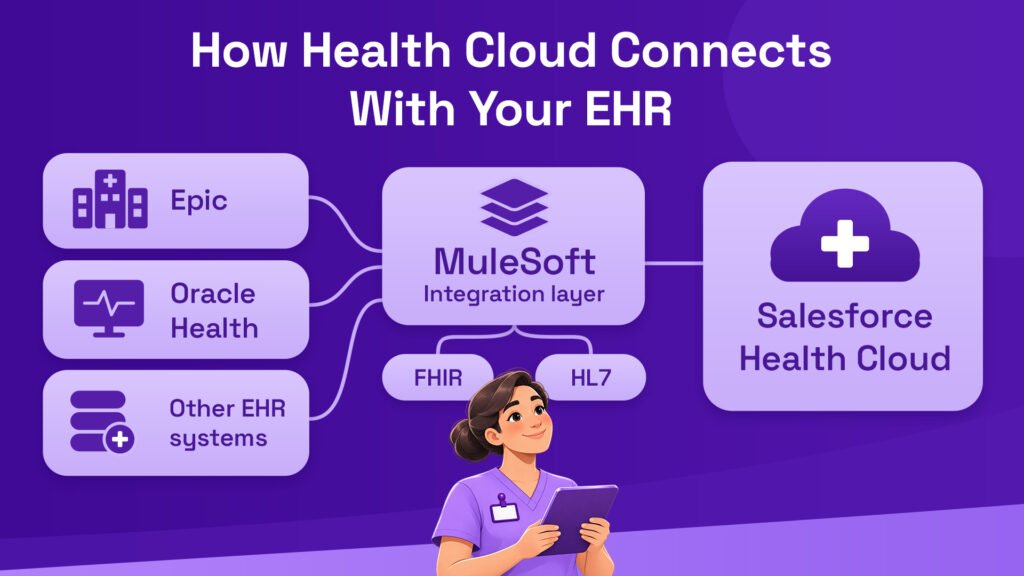
Health Cloud’s value depends almost entirely on how well it connects to your EHR. Here’s how the pieces fit together.
The Integration Layer: FHIR, HL7 and MuleSoft
Most Salesforce EHR integration projects use three building blocks:
- HL7 v2 messages: the older standard most EHRs still use for real-time events like admissions, discharges and transfers (ADT feeds)
- FHIR R4 APIs: the modern standard for reading and writing structured data such as patients, conditions, medications and appointments
- MuleSoft: Salesforce’s integration platform, which translates, routes and governs data between the EHR and Health Cloud
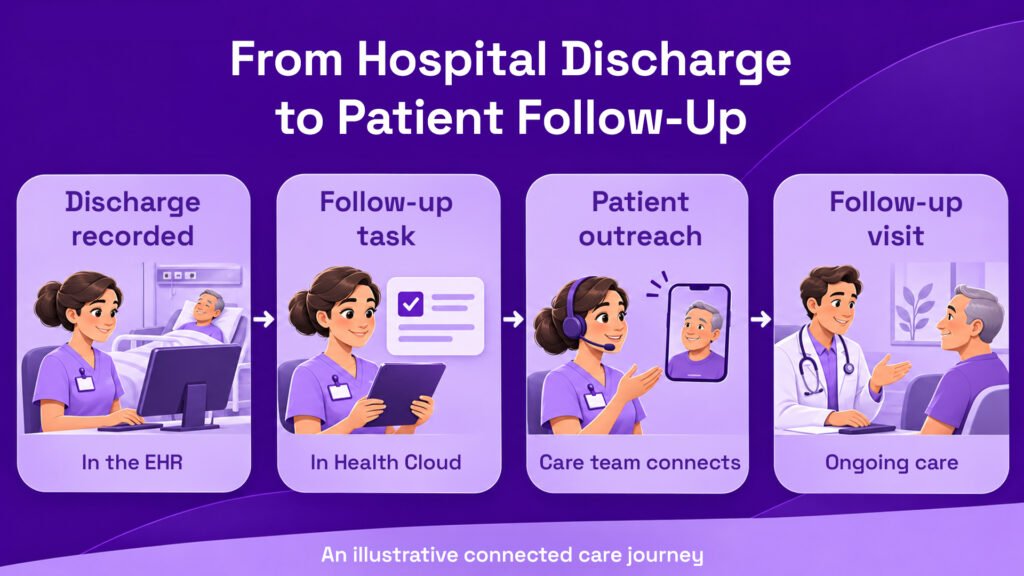
A typical flow looks like this: a patient is discharged in the EHR, an ADT message fires, MuleSoft maps it into Health Cloud, and a care manager gets a task to call the patient within 48 hours.
- Working With Epic
Epic offers FHIR APIs through its developer program. These let Health Cloud read patient demographics, encounters, problems and appointments. Writing data back, such as creating appointments or updating demographics, is possible but needs more governance.
Be realistic about this. One analysis notes that data flows from the EHR into Health Cloud fairly easily, but writing back takes careful API setup and clinical governance approval, and teams should expect some delay and mapping work. Plan for it from day one.
- Working With Oracle Health
Oracle Health (formerly Cerner) also supports FHIR R4 and HL7 interfaces, so the integration pattern is similar to Epic’s. The bigger question for Oracle Health customers is strategic, since many are weighing a future EHR move. In that case, Health Cloud can serve as a stable engagement layer that survives the EHR switch, so your contact center and outreach programs don’t need to be rebuilt.
- Working With Meditech, athenahealth and Others
Smaller and ambulatory EHRs follow the same model. athenahealth is already named in Salesforce’s own EHR agent announcement, and Meditech Expanse supports FHIR APIs. If your organization runs a mix of EHRs, one Health Cloud org is often the easiest way to get a single view across all of them.
Related Read: How MuleSoft Connects Salesforce With Hospital Systems: A Practical Guide
What the Numbers Say
Three data points show why this conversation matters right now.
- Epic’s footprint keeps growing (Source: KLAS Research). Epic’s share of U.S. acute care hospitals rose to 43.7% in 2025, followed by Oracle Health at 21.9%, Meditech at 14.7%, TruBridge at 7.6% and Altera Digital Health at 2.9%. In plain terms, most hospitals you deal with run one of three EHRs, so your engagement layer must connect cleanly to all of them.
- EHR buying has slowed (Source: KLAS Research). The number of hospitals affected by EHR purchase decisions dropped 40% compared with 2024 and nearly 50% compared with 2023. Health systems are trying to get more from the EHR they already own instead of replacing it, which is exactly where a complementary platform fits.
- Administrative waste is still huge (Source: CAQH Index). The 2025 CAQH Index estimates about $21 billion in savings if payers and providers move fully from manual and partly manual transactions to automated electronic workflows. Much of that waste sits in eligibility checks, claims status calls and prior authorizations, the same workflows Health Cloud agents are built to handle.
Real-World Examples and Mini Case Studies
Real Example: MIMIT Health
MIMIT Health is one of the organizations Salesforce highlighted in its 2026 Agentforce Health announcement. Its CEO reported a 459% ROI and $1.5 million in savings, along with higher patient satisfaction and less administrative work. The EHR stayed in place. The gains came from automating the service and admin work around it.
Scenario: Closing Referral Leakage
Illustrative example. A 6-hospital system on Epic finds that about 1 in 4 specialist referrals never turns into a booked appointment. Epic tracks the order, but nobody owns the follow-up.
- The team brings Epic referral orders into Health Cloud through FHIR
- Each referral becomes a tracked case with a navigator and a 7-day booking target
- Automatic SMS reminders go out on day 2 and day 5
- Within two quarters, unbooked referrals drop noticeably, and the recovered specialist visits pay for the project
Scenario: Surviving an EHR Migration
Illustrative example. A regional health system plans to move from Oracle Health to Epic over 30 months. Its contact center, outreach programs and patient preferences already live in Health Cloud.
- During the migration, MuleSoft connects Health Cloud to both EHRs at the same time
- Agents keep one patient view, no matter which hospital has switched
- After go-live, only the integration endpoints change, not the engagement workflows
A 6-Step Plan for Salesforce EHR Integration
Step 1: Define the Use Case First
Start with one measurable problem, such as post-discharge follow-up, referral completion or contact center call time. Avoid “connect everything” projects.
Step 2: Decide Which System Owns Each Data Element
- The EHR owns diagnoses, medications, orders and clinical notes
- Health Cloud owns communication preferences, outreach history and engagement tasks
- Shared data like demographics needs one clear master and a sync rule
Step 3: Choose the Integration Pattern
- Use HL7 ADT feeds for real-time admission and discharge events
- Use FHIR APIs for on-demand reads and controlled writes
- Use MuleSoft to manage mapping, retries, logging and security in one place
Step 4: Lock Down Security and Compliance
- Sign a Business Associate Agreement and confirm which Salesforce services it covers
- Apply minimum-necessary access, so a marketing user never sees clinical notes
- Turn on field-level audit history and encryption where needed
Step 5: Pilot With One Team
Launch with a single care management or contact center team. Record baseline numbers before go-live, such as call time, follow-up rate or no-show rate, so you can prove the results later.
Step 6: Scale and Add AI Agents
Once data flows are stable and trusted, add AI agents for intake, eligibility checks or referral follow-up. Agents are only as good as the data underneath them, so this step comes last, not first.
Related Read: Salesforce Health Cloud Implementation Checklist for Hospitals
Actionable Tips You Can Use Right Now
- Audit your “between visits” workflows. List every process that runs on spreadsheets, sticky notes or shared inboxes. Those are your best Health Cloud candidates.
- Ask your EHR team about API readiness. Check which FHIR resources are switched on in your Epic or Oracle Health instance today.
- Don’t duplicate clinical documentation. If staff are re-typing notes into Salesforce, the design needs to change.
- Bring the CMIO in early. Writing data back to the EHR needs clinical governance, not just IT sign-off.
- Track one metric per use case. One clear number gets budget renewed faster than a dashboard of twenty.
How NSIQ INFOTECH Helps Healthcare Teams Get This Right
At NSIQ INFOTECH, we help health systems, specialty groups and payers implement Salesforce Health Cloud the way it was meant to work: alongside the EHR, not against it.
Our team handles the parts that usually slow projects down:
- Use-case discovery and data ownership mapping
- Health Cloud setup for care management, referrals and contact centers
- MuleSoft and FHIR/HL7 integration with Epic, Oracle Health, Meditech and athenahealth
- Security reviews aligned with HIPAA requirements
- Agentforce for Health setup once your data foundation is ready
The goal is simple. Your clinicians keep working in the EHR they know, and your operations teams get a modern platform that finally connects the dots.
Ready to Connect Health Cloud With Your EHR?
If you’re evaluating Salesforce for a health system that already runs Epic, Oracle Health or another EHR, start with a short conversation. NSIQ INFOTECH can review your current setup, find your highest-value use case and outline an integration plan that fits your timeline.
👉 Book a free consultation with NSIQ INFOTECH today.
Frequently Asked Questions
1. Is Salesforce an EHR?
No. Salesforce Health Cloud is a healthcare CRM and engagement platform. It works alongside your EHR but doesn’t handle clinical charting, orders or e-prescribing.
2. What is the difference in Health Cloud vs EHR?
The EHR is the clinical system of record for patient encounters. Health Cloud manages the patient relationship, outreach, referrals and service work between encounters.
3. Can Health Cloud write data back to the EHR?
Yes, through FHIR APIs, but write-back needs careful setup and clinical governance approval. Most projects start read-only and add write-back later.
4. Who uses Health Cloud in a hospital?
Mostly care managers, patient navigators, contact center agents, patient access teams and marketing. Clinicians usually stay in the EHR.
5. Can Health Cloud connect to multiple EHRs at once?
Yes. This is a common reason health systems choose it, especially after mergers where hospitals run different EHRs.
Conclusion
So, is Salesforce an EHR? No, and that’s exactly the point. Your EHR is built for the clinical encounter. Salesforce Health Cloud is built for everything around it: outreach, navigation, referrals, service and the patient relationship over time.
For CIOs, CMIOs and IT directors, the smart move isn’t choosing one over the other. It’s deciding which system owns what, connecting them through FHIR, HL7 and MuleSoft, and starting with one use case that has a clear number attached. Done well, Health Cloud makes your existing EHR investment more valuable instead of competing with it.
If you’d like help mapping that first use case, the NSIQ INFOTECH team is ready to talk.