What is Salesforce Omni-Channel?
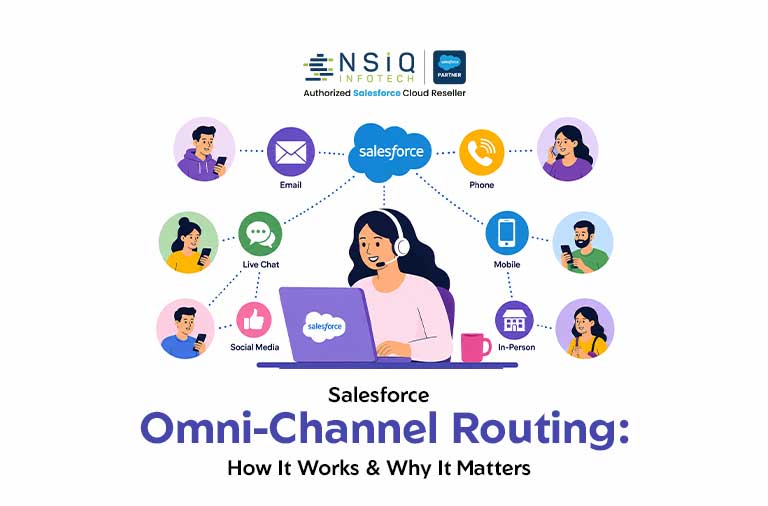
Salesforce Omni-Channel is a real-time routing and work distribution framework built natively into Service Cloud. It automatically pushes incoming work items, cases, chats, voice calls, messaging conversations, and social posts directly to the most qualified and available agent, without manual assignment.
Think of it as the intelligent traffic controller for your support operation. Instead of agents pulling work from a queue, work finds the right agent based on skills, capacity, and priority rules you define.
Omni-Channel CRM Context
Within a broader omni-channel CRM strategy, Salesforce Omni-Channel serves as the operational backbone. It ensures that regardless of which channel a customer uses, their work item is handled consistently, efficiently, and according to predefined service standards.
Channels Supported Out of the Box
How Salesforce Omni-Channel Routing Works
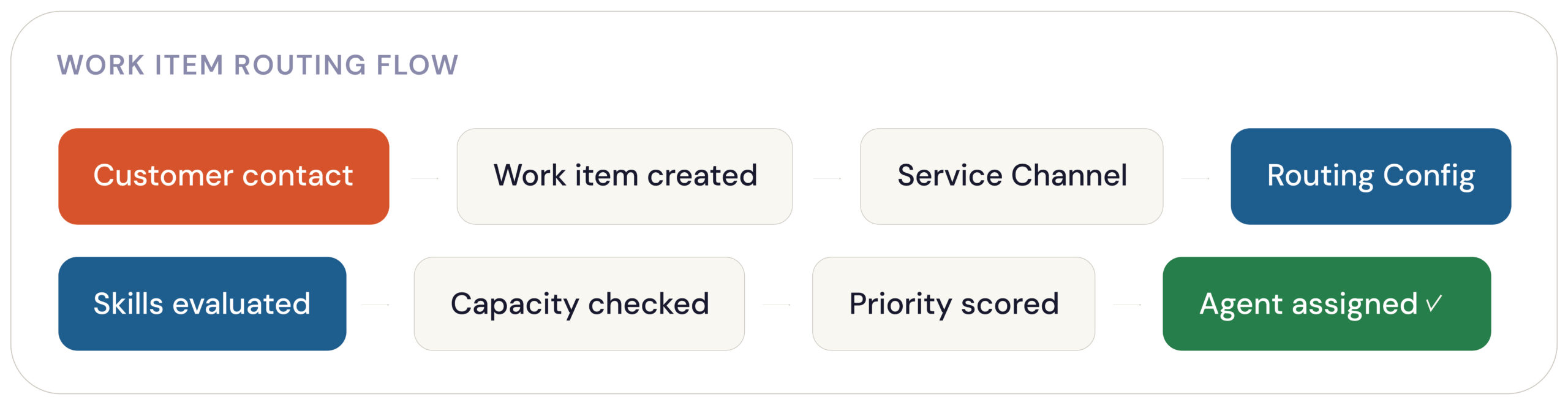
When a work item enters your Salesforce org, Omni-Channel evaluates it against your routing configuration and assigns it in real time.
1. Service Channel Registers the Work
Each channel (Chat, Case, Voice Call, Messaging, etc.) is mapped to a Salesforce object and a Service Channel record that defines how work from that source is tracked and weighted.
2. Routing Configuration Applies Logic
The Routing Configuration determines how priority is calculated and which routing model to use, including:
- Queue-Based Routing
- Skills-Based Routing
- External Routing
3. Agent Availability Is Evaluated
The system evaluates:
- Which agents are online
- Current workload and capacity
- Skill requirements
- Agent proficiency levels
4. Work Is Pushed to the Omni-Channel Widget
Eligible agents receive notifications through the Omni-Channel widget within the Salesforce Service Console and can accept or decline work based on organizational settings.
Routing Models: Which One Fits Your Operation?
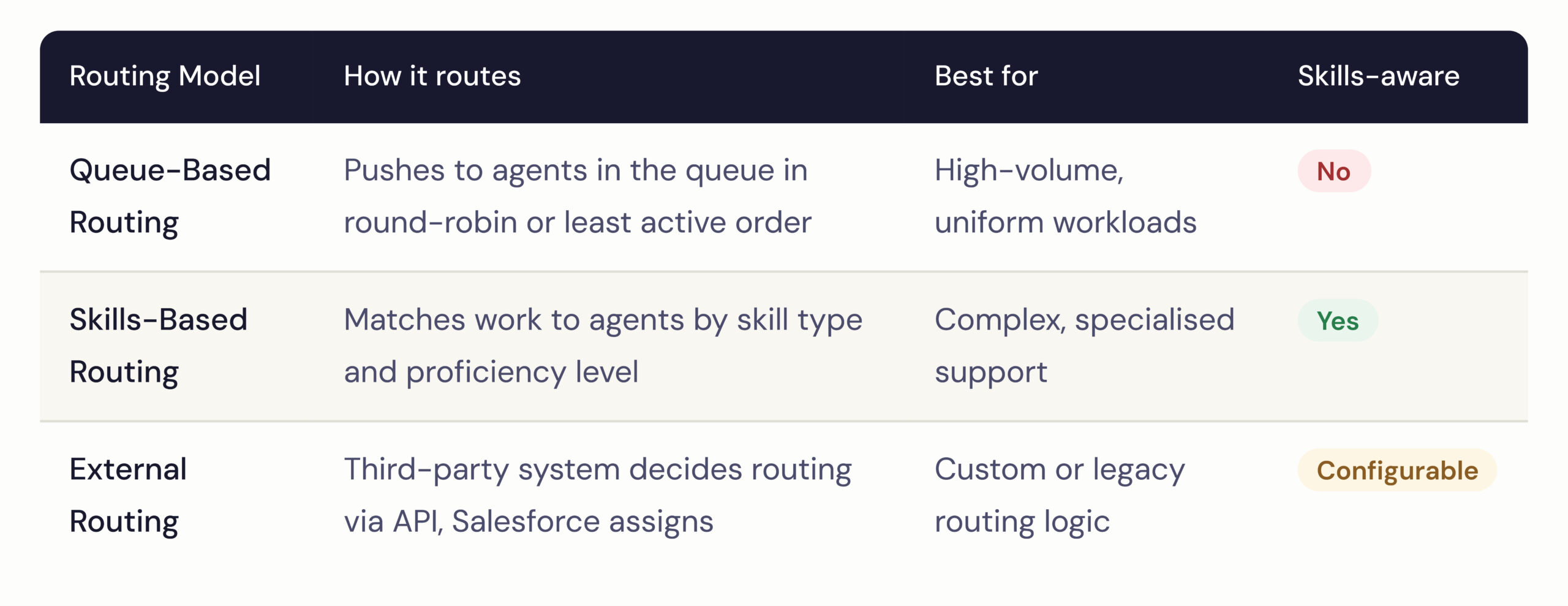
Salesforce provides three primary routing models within the Omni-Channel framework.
Omni-Channel Skills-Based Routing: The Deep Dive
Skills-based routing is one of the most powerful operational capabilities available within Salesforce Omni-Channel.
Instead of routing work to whoever is simply available, the platform routes work to the agent who is both:
- Qualified
- Available
Key Components
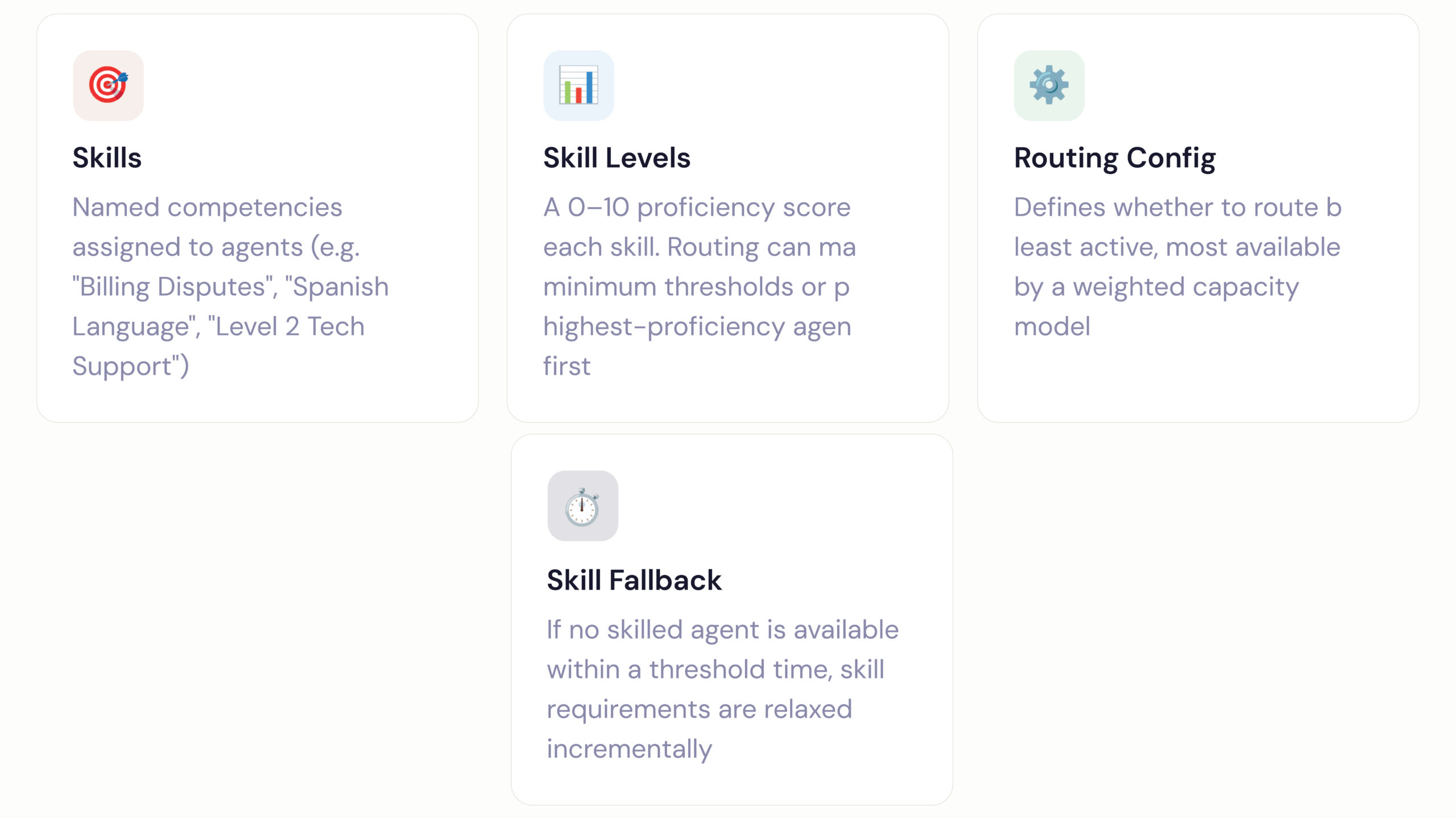
How Skill Matching Works in Practice
Consider a billing dispute case.
The routing engine searches for agents who:
- Possess the “Billing” skill
- Meet the required proficiency level (e.g., Level 5+)
- Are currently online
- Have available capacity
If no qualified agent is available within the configured wait time, Salesforce automatically lowers the required skill threshold (for example, from Level 5 to Level 3), expanding the eligible agent pool while maintaining service-level commitments.
CX Manager Insight
Skills-based routing within a Salesforce Omni-Channel implementation provides valuable operational data.
Organizations can correlate:
- Skill assignments
- Customer Satisfaction (CSAT) scores
- Resolution times
- First Contact Resolution (FCR)
This insight helps leaders identify which skill profiles consistently deliver better outcomes and where additional training investments should be made.
Salesforce Omni-Channel Overview: Setup Steps
Implementing Omni-Channel follows a structured configuration process.
Step 1: Enable Omni-Channel
Navigate to:
Setup → Omni-Channel Settings → Enable Omni-Channel
This activates the framework throughout your Salesforce organization.
Step 2: Create Service Channels
Create separate Service Channels for each work type, such as:
- Case
- Chat
- Messaging Session
- Voice Call
Assign capacity weights based on workload complexity.
Example:
- Chat = 1 Capacity Unit
- Voice Call = 3 Capacity Units
Step 3: Configure Routing Configurations
Define:
- Routing model
- Work priorities
- Overflow handling
- Agent selection criteria
Step 4: Define Skills (For Skills-Based Routing)
Create skill records under:
Setup → Omni-Channel → Skills
Assign skills and proficiency levels to agents through Agent Configuration records.
Step 5: Configure Presence Settings
Presence Configurations determine:
- Which channels agents can support
- Maximum capacity limits
- Available statuses
Examples:
- Available
- Busy
- On Call
- Offline
Step 6: Add the Omni-Channel Widget to Service Console
Using Lightning App Builder, add the Omni-Channel utility to the Service Console so agents can:
- Manage presence status
- Receive work notifications
- Monitor assigned workloads
Step 7: Test Using Omni-Channel Supervisor
Before production rollout, use Omni-Channel Supervisor to monitor:
- Live routing activity
- Agent availability
- Queue backlogs
- Work distribution patterns
Metrics That Matter Post-Implementation
Omni-Channel should be continuously optimized after deployment.
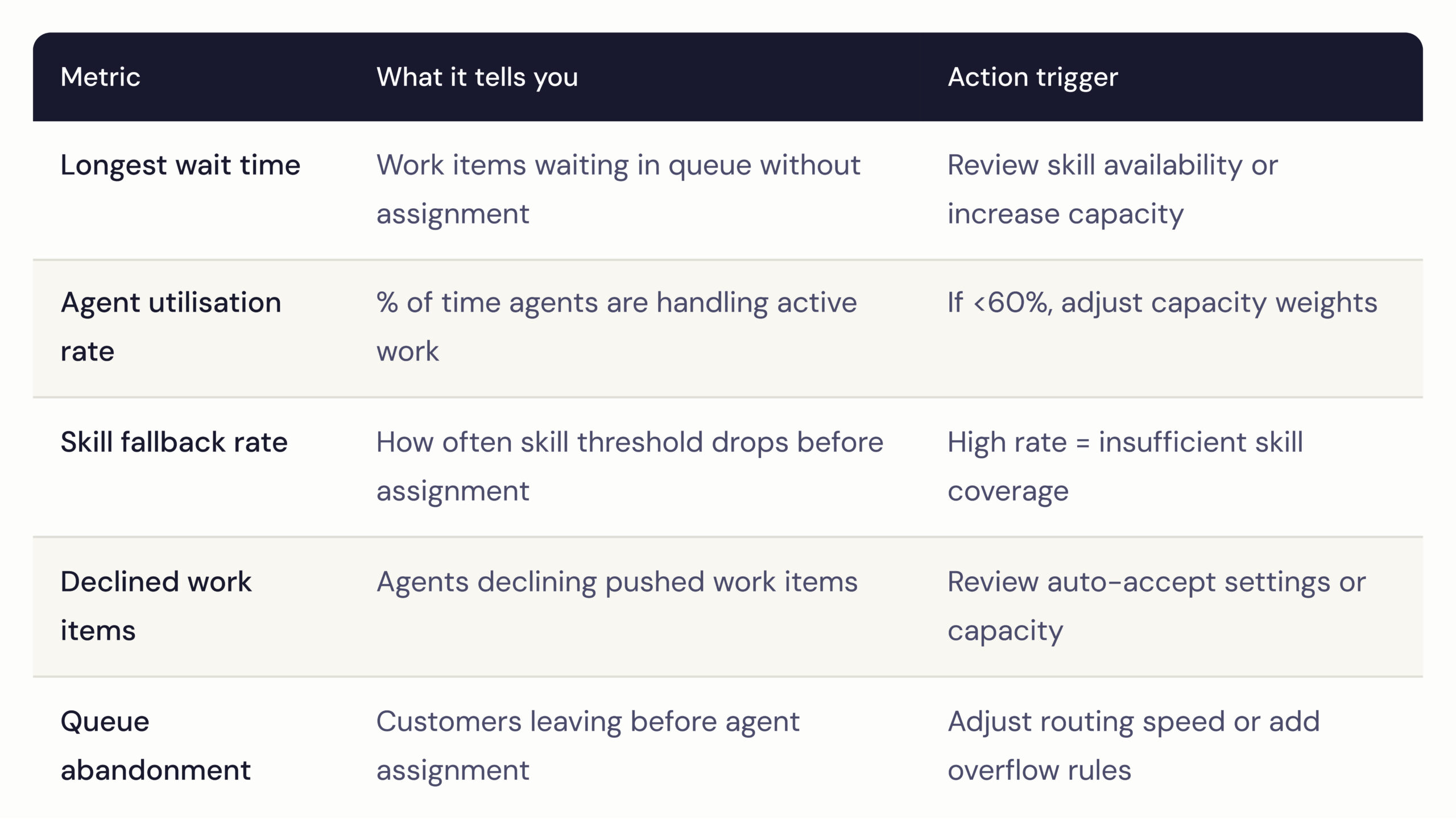
The following performance indicators reveal whether routing configurations are delivering expected outcomes.
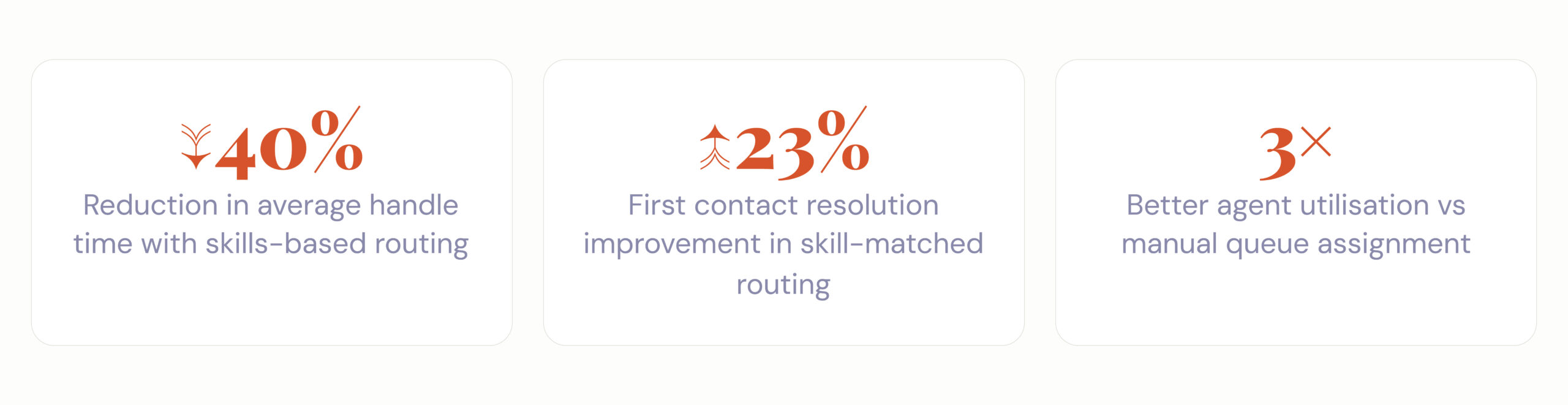
Performance Improvements Commonly Reported
Key Metrics to Track in Omni-Channel Supervisor
Best Practices for Operations & CX Leaders
1. Start with Capacity Planning, Not Skill Lists
Before creating skills, understand:
- Work item categories
- Volume distribution
- Service demand patterns
Routing logic is only as effective as the operational model behind it.
2. Use Capacity Weights Strategically
Different interaction types require different levels of effort.
For example:
- Four simultaneous chats may be manageable.
- One voice call may consume the same capacity as four chats.
Assign capacity weights accordingly.
3. Build Skill Fallback Timers into Your SLAs
If your response SLA is two minutes, configure skill fallback before the SLA threshold is reached.
Example:
- SLA = 2 Minutes
- Skill Fallback = 90 Seconds
This prevents ideal routing logic from negatively impacting customer experience.
4. Audit Presence Statuses Regularly
Unmanaged custom statuses such as:
- BRB
- Lunch
- Away
can create blind spots in routing analytics.
Conduct quarterly audits of Presence Configurations to maintain reporting accuracy.
5. Combine Omni-Channel with Salesforce Einstein
When Salesforce Einstein Classification is enabled, incoming cases can automatically receive:
- Skill assignments
- Categorization
- Routing recommendations
based on historical case patterns.
This eliminates manual tagging and creates a more intelligent Omni-Channel CRM operation.
Conclusion
Salesforce Omni-Channel is far more than a routing engine. It is the operational control center that determines how efficiently customer work reaches the right people at the right time.
Organizations that successfully implement Omni-Channel gain measurable improvements in customer experience, agent productivity, service efficiency, and operational visibility.
Whether you’re managing a growing support team, scaling customer service operations, or modernizing your Service Cloud environment, Salesforce Omni-Channel provides the foundation for intelligent, skills-driven work distribution.
By combining routing intelligence, capacity management, skills-based assignment, and real-time visibility, businesses can transform customer service from a reactive function into a strategic competitive advantage.
How NSIQ INFOTECH Helps You Implement Salesforce Omni-Channel
At NSIQ INFOTECH, we help organizations design and implement Salesforce Omni-Channel solutions that align with business goals, support models, and customer experience strategies.
Our experts assist with:
- Omni-Channel Strategy & Architecture
- Queue-Based Routing Implementation
- Skills-Based Routing Design
- Presence Configuration Setup
- Service Console Optimization
- Omni-Channel Supervisor Analytics
- Salesforce Einstein Integration
- End-to-End Testing & Deployment
Whether you’re implementing Omni-Channel for the first time or optimizing an existing Service Cloud environment, our team ensures a scalable and performance-driven solution.
Q.1: What is Salesforce Omni-Channel?
Salesforce Omni-Channel is a real-time routing and work distribution framework within Service Cloud that automatically assigns customer work items to the most qualified and available agents.
Q.2: What channels are supported by Salesforce Omni-Channel?
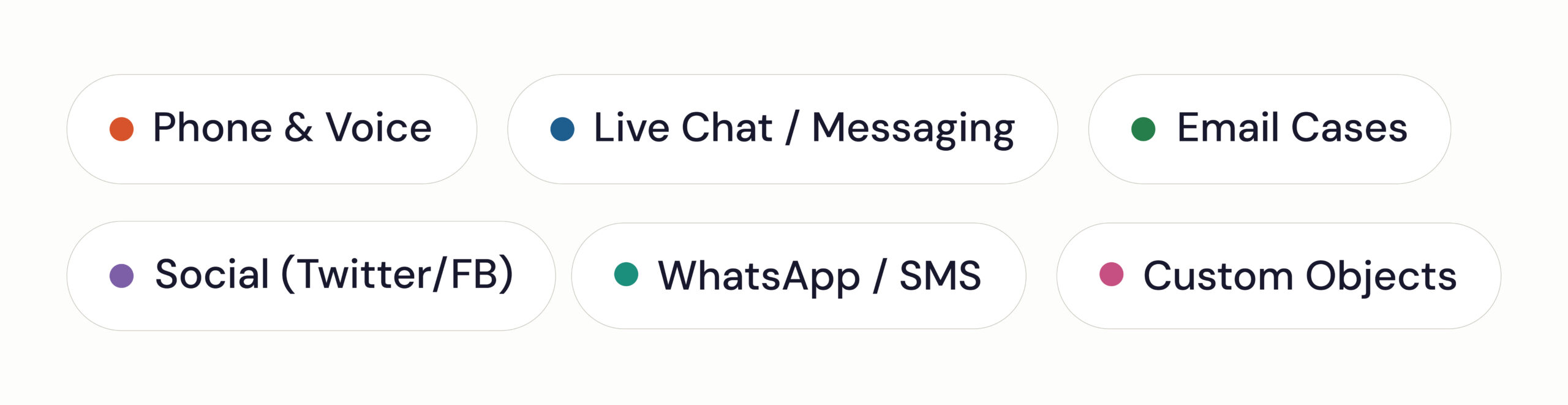
Salesforce Omni-Channel supports phone, voice, live chat, messaging, email cases, social media channels, WhatsApp, SMS, and custom Salesforce objects.
Q.3: What is Skills-Based Routing in Salesforce Omni-Channel?
Skills-Based Routing automatically matches work items with agents who possess the required skills, proficiency levels, and available capacity.
Q.4: How does Omni-Channel improve customer service?
Omni-Channel reduces wait times, improves first-contact resolution, increases agent utilization, and ensures customers are connected with the most qualified agents.
Q.5: Can Salesforce Omni-Channel work with Salesforce Einstein?
Yes. Salesforce Einstein can automatically classify incoming cases and assign routing skills, making Omni-Channel routing more intelligent and efficient.
Q.6: What is Omni-Channel Supervisor?
Omni-Channel Supervisor is a monitoring tool that provides real-time visibility into agent activity, queue performance, routing efficiency, and workload distribution.
Q.7: Is Salesforce Omni-Channel suitable for large enterprises?
Yes. Omni-Channel is highly scalable and supports enterprise-level service operations with advanced routing, skills management, capacity planning, and performance monitoring capabilities.