
Ask a sales leader what next quarter looks like and you will get a number. Ask the head of the supply chain the same question and you will get a different one. Both are working hard, and both are usually “right” about the data they can see. The trouble is that those two numbers rarely meet until it is too late to do much about it.
If that sounds familiar, you are not alone. Many manufacturers are now looking at Salesforce to fix exactly this. One capability does most of the heavy lifting: account-based forecasting. In this guide, we will explain what it is, how it works, where it fits in your planning cycle, and how to roll it out without turning it into a never-ending IT project.
Why Do Sales Forecasts and Production Plans Drift Apart?
Before fixing the gap, it helps to understand where it comes from. It is rarely a people problem. It is a structure problem.
-
The pipeline view misses your biggest revenue
A standard CRM forecast is built around opportunities: a deal, a stage, an amount, a close date. That works well when most revenue comes from new projects.
Most manufacturers do not work that way. A large share of their revenue comes from repeat business with existing customers, buying the same products over months or years. That “run-rate” volume is not a new opportunity, so it often sits outside the CRM forecast, in a spreadsheet or in someone’s head.
-
Production planners need units, not just dollars
A sales forecast usually speaks in revenue. A production plan speaks in units, SKUs, lines and dates. Translating one into the other by hand is slow, and every manual step adds a chance for error.
-
Everyone keeps their own version
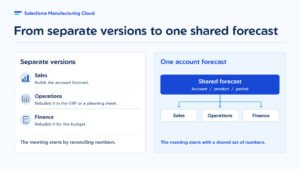
Sales builds a forecast. Operations rebuilds it in the ERP or a planning sheet. Finance rebuilds it again for the budget. By the time the three meet, they are comparing three slightly different stories.
-
What the gap actually costs
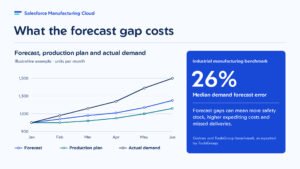
Forecast error is not a theoretical problem. A benchmarking exercise run by Gartner and ToolsGroup, as reported by ToolsGroup, found a median demand forecast error of 26% among industrial manufacturers. In plain terms, the typical industrial plan is off by roughly a quarter. That error flows straight into safety stock, expediting costs and missed deliveries. Gartner has also said that industrial manufacturers can lower forecast error by strengthening collaboration across business areas and improving demand visibility. That is exactly the problem account-based forecasting is designed to address.
[Image: Illustrative example: forecast, production plan and actual demand drifting apart]
What Is Account-Based Forecasting?
Account-based forecasting builds demand projections from the customer account up, instead of relying on the pipeline alone. Salesforce describes it as a way to see run-rate and net-new business together, so sales, operations and finance can work from one forecast instead of competing ones.
The simple version: instead of asking “what do we think we will close?”, you ask “what has each customer committed to, what are they actually ordering, and where is the gap?”
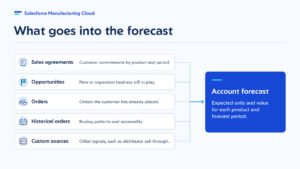
What goes into the forecast
| Input | What it tells you |
| Sales agreements | What the customer has committed to, by product and period |
| Opportunities | New or expansion business still in play |
| Orders | What has actually been placed |
| Historical orders | Buying patterns and seasonality |
| Custom sources | Anything specific to you, such as distributor sell-through |
Why it matters for decision-makers
For a COO, it means capacity decisions are based on commitments, not hunches. For a VP Sales, it means the forecast finally reflects the whole book of business. For supply chain, it means the demand signal arrives already organized by account, product and period.
Where Salesforce Manufacturing Cloud Fits in Your Planning Process
Salesforce Manufacturing Cloud, which Salesforce now brands as Agentforce Manufacturing, is the industry layer built for this way of working. If you are comparing a manufacturing cloud platform against a general-purpose CRM, the difference shows up here. Instead of bolting agreements and forecasting onto a standard setup, the capabilities are designed in from the start.
-
Sales Agreements
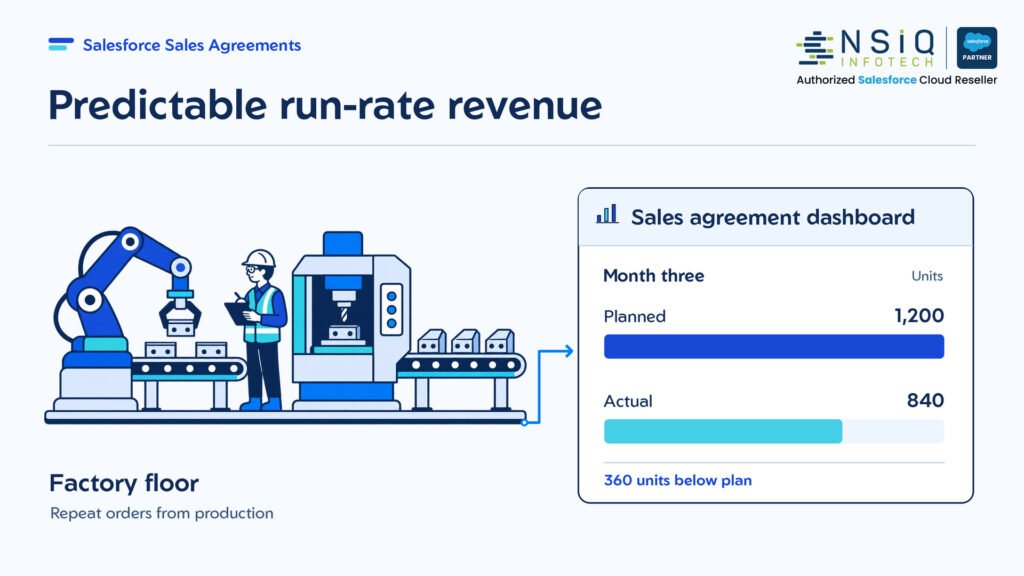
A sales agreement records a negotiated, time-based commitment: products, quantities, prices and renewal terms. Just as important, it tracks planned versus actual performance. You can see at a glance whether an account is running ahead of or behind what it promised.
-
Account Forecasting and Advanced Account Forecasting
This is where agreements, opportunities, orders and history come together into a forecast by account. Because it sits on the same platform as the account record, the people who own the relationship can see and adjust the numbers. That is the heart of account-based forecasting in Salesforce: the forecast lives next to the customer, not in a separate file.
-
One governed source of truth
Sales Operations sets the forecasting logic once. Every team then reads the same output, in units for planning and in value for finance. Arguments about whose spreadsheet is right get replaced by conversations about why a number moved.
How Does Account-Based Forecasting Connect to Sales and Operations Planning?
Sales and operations planning (S&OP) is only as good as the commercial signal feeding it. Many companies run S&OP in a separate planning tool and keep the CRM at arm’s length. That is exactly where numbers start to diverge.
A sales and operations planning CRM approach keeps the demand signal in Salesforce, where account teams maintain it, and pass it into the planning process. Nobody has to chase it.
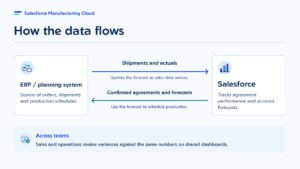
How the data typically flows
- Into Salesforce: shipments and actuals from the ERP, so agreement performance and forecasts update as sales data arrives rather than at month end.
- Out of Salesforce: confirmed agreements and forecasts to the ERP or planning system for production scheduling.
- Across teams: shared dashboards and a regular sales-and-operations review, so variances are discussed against one set of numbers.
What the collaboration loop looks like
Sales explains the commercial reasons behind a movement: a customer pausing orders, a promotion, a lost bid. Operations explains what it means for capacity and materials. Finance sees the revenue effect. This is collaborative planning in practice, and it turns the forecast from a report into a decision tool.
A Realistic Scenario: What Changes in Practice
The example below is illustrative, not a client result. It shows how the process typically changes.
A mid-sized components manufacturer sells to about 40 key accounts. Each month, sales sends a pipeline-based forecast. Operations re-keys it into the ERP, adjusts it based on gut feel and past shipments, and builds the production plan. Large customers on long-term supply contracts are tracked in a separate spreadsheet.
Before:
- Sales forecast, production plan and finance budget are three different files.
- Planners spend the first week of every cycle reconciling numbers.
- A key customer slows its call-offs; nobody sees it for six weeks, and finished goods pile up.
After rolling out account-based forecasting:
- Long-term contracts are loaded as sales agreements with planned quantities by month.
- Orders flow in from the ERP, so planned versus actual is visible per account.
- The same customer’s slowdown shows up as a variance in the first month, and the planner reduces the next run before the stock builds.
Typical improvements teams track here include forecast accuracy by account, time spent on reconciliation, expedited shipments and excess inventory. The right targets depend on your starting point, so measure first and set goals afterwards.
The same problem in Indian manufacturing
Indian auto-component and engineering suppliers face this gap every month. OEM customers send delivery schedules and revised call-offs, often by email or spreadsheet, while production is planned in Tally, SAP Business One or a local ERP. When a schedule changes mid-month, the plant usually finds out late. Loading OEM schedules as sales agreements and comparing them with actual call-offs gives planners the same early warning described above.
Want to see what this would look like for your top accounts? NSIQ Infotech can run a short working session to map your current forecast and production planning process.
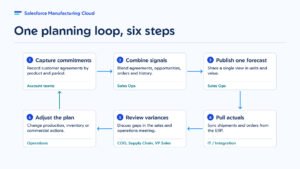
From Disconnected Forecasts to One Planning Loop
| Step | What you do | Who owns it |
| 1. Capture commitments | Record customer agreements by product and period | Account teams |
| 2. Combine signals | Blend agreements, opportunities, orders and history | Sales Ops |
| 3. Publish one forecast | Share a single view in units and value | Sales Ops |
| 4. Pull actuals | Sync shipments and orders from the ERP | IT / Integration |
| 5. Review variances | Discuss gaps in a regular sales-and-ops meeting | COO, Supply Chain, VP Sales |
| 6. Adjust the plan | Change production, inventory or commercial actions | Operations |
Key benefits at a glance:
- One forecast for Sales, Supply Chain and Finance
- Run-rate business included, not just new deals
- Planned versus actual visible by account
- Earlier warning on slowdowns and spikes
- Less time reconciling spreadsheets
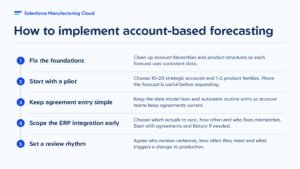
How to Get Started: Step-by-Step Implementation
Technology is rarely the hard part. Rollouts succeed or stall on a handful of practical points.
Step 1: Fix the foundations
Forecasts by account and product are only as good as the data underneath. Clean up account hierarchies and product structures first. This is the single most common cause of delays.
Step 2: Start with a pilot
Pick 10 to 20 strategic accounts and one or two product families. Prove the forecast is useful, then expand. A narrow start builds trust faster than a big-bang launch.
Step 3: Keep agreement entry simple
If account teams find sales agreements painful, they will stop updating them and the forecast will quietly decay. Keep the data model lean and automate what you can.
Step 4: Scope the ERP integration early
Decide which actuals flow in, how often, and who resolves mismatches. You can launch with agreements and history first, then add automated actuals.
Step 5: Set a review rhythm
A forecast nobody reviews is just another report. Agree who looks at variances, how often, and what triggers a production change.
[Image: A phased path to account-based forecasting]
Common mistakes to avoid
- Treating it as a CRM project only. Operations and Finance need a seat at the table from day one.
- Over-customizing early. Start with standard capabilities and add complexity only when there is a clear need.
- Skipping adoption. If account teams do not see how it helps them, data quality drops.
- Chasing a perfect forecast. The goal is a better, shared forecast and faster response, not perfection.
Quick wins you can try this quarter
- Pull your top 20 customers and list which have formal volume commitments.
- Compare last quarter’s sales forecast with actual shipments for those accounts.
- Ask Sales and Operations to name the one number they disagree on most.
How NSIQ Infotech Can Help
Setting up the technology is one thing. Making it fit how your business really plans is another. NSIQ Infotech is a Salesforce consulting and implementation partner, and our approach for manufacturers is deliberately practical.
We start with a short working session to understand how your forecast and production plan are produced today. From there, we design the sales agreement data model, configure account-based forecasting around your product and account structure, connect the ERP data you actually need, and build the dashboards your leadership team will use in S&OP reviews. We recommend the smallest rollout that proves value, so you see results before committing to the full program.
The outcome we aim for is simple: fewer surprises, less reconciliation work and a forecast that Sales, Operations and Finance all trust.
Frequently Asked Questions
-
What is account-based forecasting in Salesforce?
It is a Manufacturing Cloud capability that builds demand forecasts by customer account, combining sales agreements, opportunities, orders and historical data, so sales, operations and finance share one view.
-
How is it different from standard sales forecasting?
Standard forecasting centers on opportunities and close dates. Account-based forecasting also includes run-rate commitments and order history, and supports volume by product and period, which is what production planners need.
-
Does it replace our ERP or planning tool?
No. It supplies the commercial demand signal and a shared forecast. The ERP stays the system for production, inventory and procurement.
-
Do we need ERP integration to start?
Not necessarily. Many teams begin with agreements and historical data and add automated actuals once the process is working. Scope the integration early anyway.
-
What results should we expect?
Measure forecast accuracy by account and product family before and after, along with expedited shipments and excess inventory. Your own baseline is the best benchmark.
Conclusion: Make Your Forecast and Your Plan Tell the Same Story
The gap between sales forecasts and production plans is not inevitable. It comes from fragmented data and handoffs, and both can be fixed. Salesforce Manufacturing Cloud gives you a practical way to forecast from real customer commitments, share one view across teams, and feed that signal into S&OP.
Start small, pick the right accounts, keep the process simple and review it regularly. The payoff is a planning cycle with fewer surprises.
Ready to Align Your Forecast With Your Production Plan?
Talk to NSIQ Infotech about a short Manufacturing Cloud working session. We will review how your forecast and production plan are built today and show where account-based forecasting can close the gap.