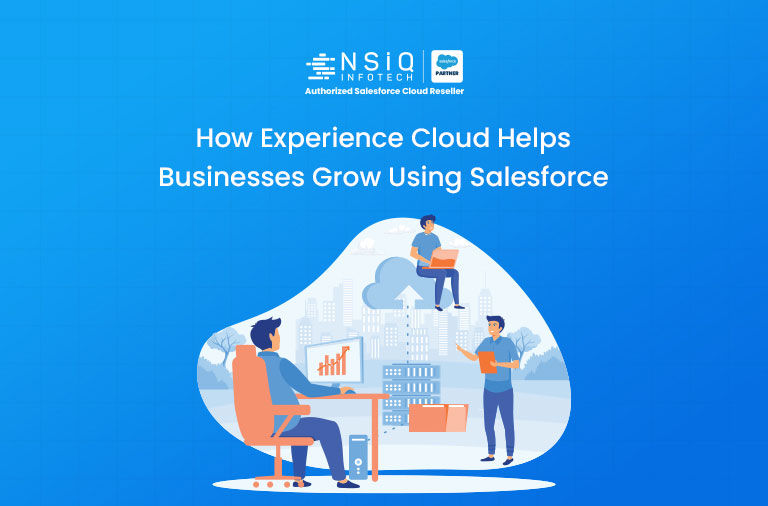
If you have ever struggled to keep your customers, partners, or employees connected, you are not alone. Most growing businesses hit a wall where emails, spreadsheets, and scattered tools just cannot keep up. That is where Salesforce Experience Cloud steps in.
In this guide, we will break down exactly what Salesforce Experience Cloud is, how it works, and why businesses across the world are using it to grow faster, serve customers better, and build stronger relationships with partners and employees.
Salesforce Experience Cloud (formerly known as Community Cloud) is a digital experience platform built on top of Salesforce CRM.
It allows businesses to create branded, connected online spaces — often called:
- Customer portals
- Partner portals
- Employee communities
- Self-service sites
Think of it as your company’s private digital hub. Instead of sending customers to email support or making partners log into multiple systems, you give everyone a single portal where they can:
- Get support
- Share information
- Track orders
- Access resources
- Collaborate in real time
What Changed from Community Cloud to Experience Cloud?
Salesforce rebranded Community Cloud to Experience Cloud in 2021. The change included major upgrades such as:
- More templates for help centres, partner portals, microsites
- Better personalization and branding
- Stronger Salesforce CMS integration
- Improved mobile-first design
- New drag-and-drop Experience Builder tools
Why Businesses Need a Digital Experience Platform in 2026
The way people interact with businesses has changed.
Customers want instant answers.
Partners need live data.
Employees expect self-service tools.
Key Benefits
1. Customer Self-Service
Many customers prefer solving issues themselves instead of waiting for support. Experience Cloud helps build self-service support hubs directly on Salesforce data.
2. Partner Revenue Growth
A Salesforce partner portal gives resellers and distributors access to:
- Deal registration
- Sales tools
- Product documents
- Real-time pipeline data
3. Employee Productivity
Internal employee portals keep teams informed, aligned, and productive — especially remote teams.
Key Features of Salesforce Experience Cloud
1. Experience Builder
A no-code drag-and-drop editor to build branded portals without coding.
2. Salesforce CMS Integration
Manage articles, FAQs, product content, and announcements directly inside Salesforce.
3. Personalization Engine
Show different content based on user type, role, or location.
Examples:
- Wholesale partner → price lists
- Retail customer → order tracking
- Employee → company news
4. Mobile-First Design
Responsive portals that work on mobile, tablet, and desktop.
5. AppExchange Integration
Connect with apps from Salesforce AppExchange including:
- Payment gateways
- Chat tools
- Scheduling apps
6. Audience Segmentation
Serve personalized menus, promotions, and content automatically.
Types of Portals You Can Build
Customer Portal
- Raise tickets
- Track orders
- View account history
- Access help articles
Partner Portal
Give resellers access to:
- Deal registration
- Product catalogues
- Co-marketing materials
- Sales dashboards
Employee Portal (Intranet)
Provide:
- HR policies
- Internal news
- IT support
- Collaboration tools
Help Centre
Public-facing self-service support website.
Account Portal
Let B2B clients:
- View invoices
- Update billing info
- Raise requests
Example 1: E-Commerce Brand
A mid-sized e-commerce company handled 500+ support calls daily.
After launching a customer portal:
- Customers tracked orders themselves
- Returns were self-managed
- FAQ access increased
Result:
Support calls reduced by 40% in 3 months.
Example 2: Manufacturing Company
A manufacturing firm with 120 resellers used email chains for communication.
After partner portal launch:
- Same-day deal registration
- Real-time price lists
- Performance dashboards
Result:
Partner productivity doubled.
Example 3: Financial Services Firm
Built employee intranet for five-city workforce.
Employees completed onboarding, training, and team access online.
Result:
Onboarding time reduced by 30%.
Step 1 – Define Goals
Choose whether portal is for:
- Customers
- Partners
- Employees
Step 2 – Choose Template
Use pre-built Salesforce templates.
Step 3 – Configure with Experience Builder
Customize branding and layout.
Step 4 – Set Access Rules
Profiles, roles, permission sets.
Step 5 – Connect CRM Data
Use:
- Contacts
- Cases
- Opportunities
- Knowledge Articles
Step 6 – Test on Devices
Desktop, mobile, tablet.
Step 7 – Launch & Monitor
Use dashboards and analytics.
Typical Timeline
- Basic portal: 4–8 weeks
- Advanced project: 3–6 months
How NSIQ INFOTECH Helps You Implement Experience Cloud
At NSIQ INFOTECH, we help businesses build and launch Experience Cloud portals that deliver real ROI.
Our Services
- Portal strategy & planning
- Custom Experience Builder development
- CRM integrations
- Security setup
- Post-launch optimization
Whether you are launching your first portal or replacing an old one, we help you do it right.
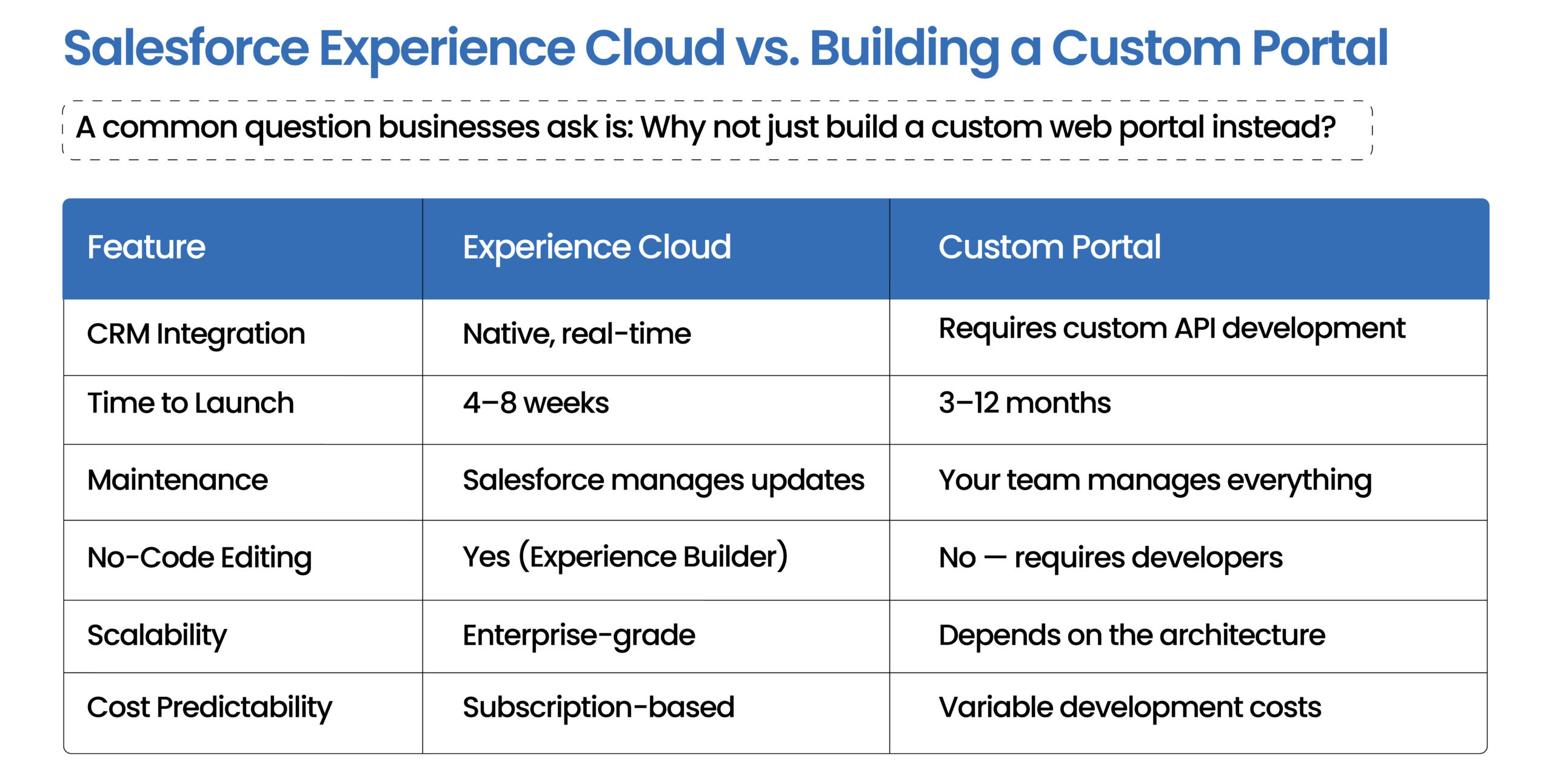
Ready to Transform Customer Experience?
If you are ready to build a smarter connected experience for customers, partners, or employees, Salesforce Experience Cloud is a powerful solution.
NSIQ INFOTECH helps businesses implement Experience Cloud successfully — from planning to go-live.
1. What is Salesforce Experience Cloud used for?
It is used to build portals such as customer support sites, partner portals, employee intranets, and self-service communities.
2. Is Experience Cloud the same as Community Cloud?
Yes. Community Cloud was renamed to Experience Cloud in 2021.
3. How much does Experience Cloud cost?
Pricing depends on edition and number of users.
4. Can I build a portal without coding?
Yes, using Experience Builder.
5. What is a partner portal?
A digital hub for resellers and distributors to register deals and collaborate.
6. Is it mobile-friendly?
Yes, fully responsive.
7. Can it integrate with external systems?
Yes, using APIs, MuleSoft, and AppExchange apps.
8. What is difference between Experience Cloud and Service Cloud?
Salesforce Service Cloud is for support teams. Experience Cloud is for external self-service portals.
9. Is it suitable for small businesses?
Usually best for mid-size and enterprise companies, depending on needs.
10. What security features are included?
- Role-based access
- 2FA
- Encryption
- Compliance tools
Conclusion
Salesforce Experience Cloud is more than a portal builder. It is a strategic growth platform connecting your business with customers, partners, and employees.
From reducing support costs with self-service portals, to boosting partner sales, to improving employee productivity — the use cases are practical and proven.
Businesses winning in today’s digital-first world invest in connected experiences. Experience Cloud gives you the tools to build them faster.
If you are considering Experience Cloud, NSIQ INFOTECH is here to help with design, implementation, and optimization.