
If you run a small or medium-sized business, you’ve probably been there: your support inbox is overflowing, customers are waiting too long for answers, and your team is burning out. The knee-jerk solution? Hire more people. But that’s expensive — and often, it doesn’t even fix the root problem.
The truth is, most customer support problems aren’t caused by a lack of people. They’re caused by a lack of the right tools. That’s exactly where Salesforce Service Cloud comes in.
In this blog, we’ll walk you through 10 real, common customer support problems — the kind that SMB owners and support team leads deal with every day — and explain exactly how Service Cloud solves each one. No fluff, no jargon. Just practical answers.

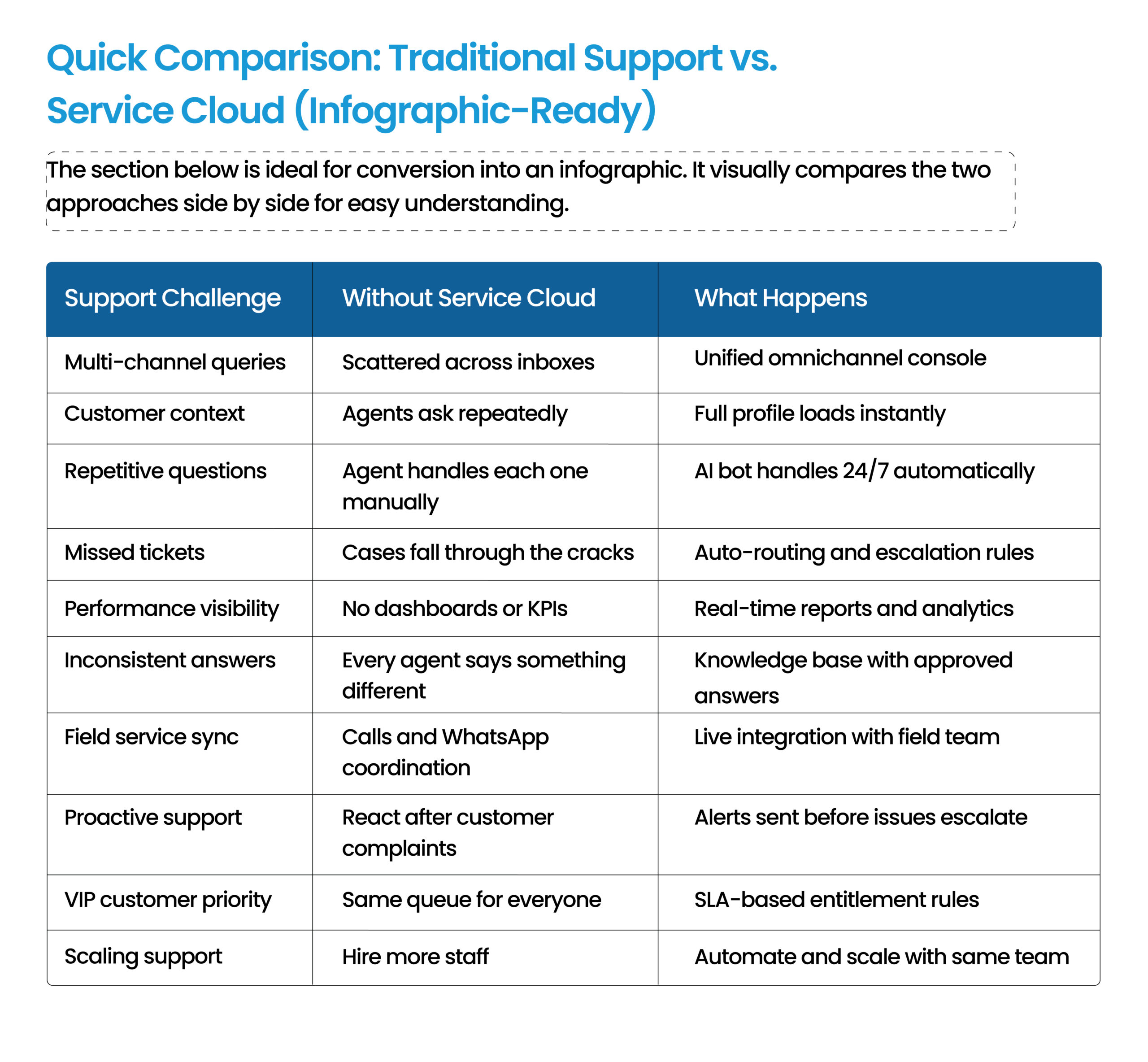
Problem 2: Agents Don’t Know Who the Customer Is When They Call
What’s Happening
Every time a customer calls or emails, your agent has to ask:
- Can you give me your order number?
- What’s the issue again?
It’s frustrating for the customer and wastes time for your team.
How Service Cloud Fixes It
Service Cloud pulls up the full customer profile the moment a case is created — including:
- Past purchases
- Previous support tickets
- Account notes
Agents have complete context before they even say hello.
Actionable Tip
When setting up Service Cloud, configure your agent desktop to show the customer’s case history on the main screen. This alone can reduce average handle time by 20–25%.
Problem 3: Repetitive Questions Are Eating Up Your Team’s Day
What’s Happening
Questions like:
- How do I reset my password?
- What’s your return policy?
- Where’s my order?
These come in dozens of times daily.
How Service Cloud Fixes It
Service Cloud includes:
- Self-service portal
- AI-powered chatbot (Einstein Bot)
Customers get instant answers 24/7, while agents focus on complex issues.
Problem 4: Cases Are Slipping Through the Cracks
What’s Happening
A support ticket comes in Friday afternoon. Nobody picks it up. By Monday, the customer has sent three follow-ups and posted a negative review.
How Service Cloud Fixes It
Service Cloud uses automated case assignment rules. Every ticket is routed to the right person based on:
- Issue type
- Urgency
- Customer tier
No manual sorting. No overlooked tickets.
Actionable Tip
Set escalation rules so if a case hasn’t been responded to within 2 hours, it automatically goes to a supervisor.
Problem 5: Your Team Has No Idea What “Good” Looks Like
What’s Happening
You feel support quality is dropping — but have no dashboards, reports, or KPIs.
How Service Cloud Fixes It
Service Cloud gives real-time dashboards tracking:
- First response time
- Resolution time
- CSAT scores
- Agent productivity
Problem 6: Agents Give Inconsistent Answers
What’s Happening
Customer A gets one answer. Customer B gets another answer to the same question. Trust is damaged.
How Service Cloud Fixes It
Service Cloud includes a built-in Knowledge Base where teams store:
- Approved answers
- Troubleshooting guides
- Templates
Every agent uses the same source of truth.
Actionable Tip
Start with your top 20 most common questions and publish approved answers.
Problem 7: Your Field Service Team Is Disconnected from Support
What’s Happening
Technicians and field teams have no real-time connection with support. Updates happen through calls or WhatsApp.
How Service Cloud Fixes It
Service Cloud integrates with Salesforce Field Service. Agents can:
- See technician availability
- Dispatch jobs
- Update customers in real time
Problem 8: Support Is Reactive, Not Proactive
What’s Happening
You only know there’s a problem when the customer complains.
How Service Cloud Fixes It
Service Cloud can trigger alerts for:
- Subscription expiry
- Warranty ending
- Failed transactions
- Product issues
Your team can reach out first.
Problem 9: It’s Hard to Manage High-Value Customers Differently
What’s Happening
VIP customers expect premium support, but your system treats everyone the same.
How Service Cloud Fixes It
Set up SLAs and entitlement rules based on:
- Customer tier
- Contract value
- Purchase history
Premium customers get faster responses automatically.
Actionable Tip
Create three tiers:
- Standard
- Priority
- Premium
Problem 10: You Can’t Scale Without Hiring More People
What’s Happening
Every time the business grows, support requests grow too. You immediately think: hire more staff.
How Service Cloud Fixes It
Service Cloud scales through:
- Automation
- AI bots
- Self-service portals
- Smart routing
A team of 5 can handle what once required 10.
How NSIQ INFOTECH Helps You Get the Most Out of Salesforce Service Cloud
Implementing Service Cloud is one thing. Making it work for your business is another. That’s where NSIQ INFOTECH comes in.
We help SMBs with:
- Discovery & workflow mapping
- Service Cloud setup
- Routing rules & SLAs
- CRM / ERP / e-commerce integrations
- Team training
- Ongoing optimization

Conclusion
Customer support problems are real — and they cost businesses time, money, and loyalty. But the solution isn’t always hiring more people. It’s using smarter systems.
Salesforce Service Cloud helps businesses do more with less through automation, visibility, and better customer experiences.
If even three or four of these problems sound familiar, it’s time to take Service Cloud seriously. And NSIQ INFOTECH can help you get there faster.

1. What is Salesforce Service Cloud?
A cloud-based customer support platform for managing cases, service requests, and team performance.
2. Is it suitable for small businesses?
Yes. It scales well and offers SMB-friendly pricing options.
3. How is it different from Sales Cloud?
Sales Cloud is for sales. Service Cloud is for customer support.
4. Can it replace our helpdesk tool?
Yes, in most cases.
5. What is omnichannel routing?
Automatic assignment of cases from email, chat, phone, and social channels.
6. Does it work for field service businesses?
Yes, with Salesforce Field Service integration.
7. How does it reduce support costs?
Through automation, self-service, and faster handling times.
8. What is Einstein Bot?
An AI chatbot inside Service Cloud.
9. Can it integrate with ERP or CRM tools?
Yes.
10. How long does implementation take?
Typically 2–12 weeks depending on complexity.