Salesforce Integration: A Practical Guide for Developers

Salesforce Integration: A Practical Guide for Developers
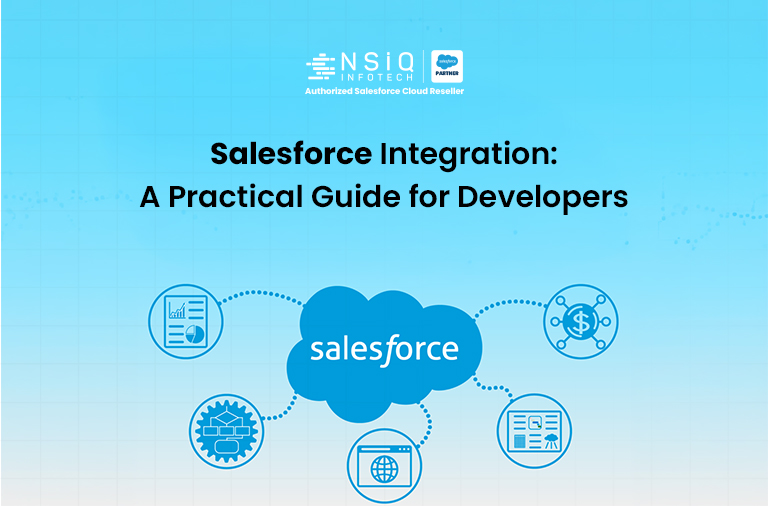
In most real-world projects, Salesforce rarely works in isolation. It typically connects with ERP systems, payment gateways, marketing tools, messaging platforms, or third-party SaaS applications.
That’s where Salesforce API Integration and cloud-based integration architecture become essential.
Integration enables secure, automated data flow between Salesforce and external systems — supporting real-time synchronization, CRM automation, and enterprise system connectivity.
What Is Salesforce Integration?
Salesforce integration is the process of connecting Salesforce with external applications so they can securely exchange data using APIs.
Example Use Cases
When someone submits a website form, a Lead is automatically created in Salesforce using REST API integration.
Salesforce sends notifications via WhatsApp or email through external APIs and automation workflows.
In simple terms:
Salesforce and external systems communicate automatically using secure API-based integration methods within modern enterprise architecture.
Common Types of Salesforce Integration
1. REST API Integration
REST (Representational State Transfer) is the most widely used approach for modern Salesforce API integration and SaaS applications.
It uses standard HTTP methods:
GET
POST
PUT
DELETE
Key Facts About REST
Architectural style: REST
Protocol: HTTP
Common Data Formats: JSON, XML, YAML
Introduced by Roy Fielding (2000)
Popular in microservices and cloud-native systems
REST APIs are lightweight, scalable, and ideal for real-time CRM integration.
2. SOAP API Integration
SOAP (Simple Object Access Protocol) exchanges structured data using XML under strict enterprise standards.
Key Facts About SOAP
Uses XML over HTTP(s) or SMTP
Defined by World Wide Web Consortium (W3C)
Message Structure: Envelope, Header, Body, Fault
Common in legacy enterprise systems
SOAP is preferred when strict compliance, security, and formal contracts (WSDL) are required.
3. Apex Callouts (Outbound Integration)
Salesforce supports outbound integration using Apex HTTP callouts.
Example Apex Callout
Apex callouts are widely used for:
Payment gateway integration
ERP synchronization
Marketing automation tools
WhatsApp API integration
This approach supports scalable cloud-to-cloud integration patterns.
4. Platform Events (Event-Driven Integration)
Salesforce Platform Events allow event-driven communication between systems using a publish–subscribe model.
Instead of traditional API polling, systems react to events in near real-time.
Key Highlights
Introduced: 2017
Architecture: Publish–Subscribe (Event-Driven)
Delivery: Near real-time via Event Bus
Ideal for high-volume synchronization
Platform Events are critical in modern digital transformation strategies and scalable system design.
Authentication Methods in Salesforce Integration
Security is the foundation of any integration architecture.
Common authentication methods include:
Basic Authentication
OAuth 2.0
API Key Authentication
JWT Bearer Token
Among these, OAuth 2.0 is the most widely recommended for secure cloud-based integrations.
Best Practices for Salesforce Integration
Based on real-world enterprise CRM projects, here are essential best practices:
Always use Named Credentials
Never hard-code credentials in Apex
Bulkify your code
Monitor governor limits
Implement proper error handling
Design scalable integration architecture
These practices ensure reliable, secure, and high-performance integrations.
Common Mistakes Developers Make
Avoid these frequent integration errors:
Making callouts directly from triggers
Not handling API failures
Writing non-bulkified Apex
Ignoring governor limits
Missing proper error logging
By avoiding these mistakes, you build scalable and enterprise-ready integration solutions.
Conclusion
Salesforce Integration is a critical component of modern enterprise systems.
Whether using:
REST APIs
SOAP Services
Apex Callouts
Platform Events
Event-driven architecture
The objective remains the same:
Build secure, scalable, high-performance integrations.
Modern businesses depend on:
Real-time data synchronization
Secure API connectivity
Cloud CRM automation
Enterprise system integration
Designing integrations correctly ensures long-term reliability and scalability.
FAQ: Salesforce Integration
1. What is Salesforce Integration?
Salesforce integration is the process of connecting Salesforce with other systems to automatically exchange data using APIs and cloud integration technologies.
2. What is the difference between REST API and SOAP API?
REST API uses JSON and is lightweight and flexible, ideal for modern SaaS and microservices architecture.
SOAP API uses XML and is more structured and suited for enterprise systems requiring strict compliance.
3. What are the different types of API Authentication?
Common methods include:
Basic Authentication
OAuth 2.0
JWT Bearer Token
API Key
Session ID
4. Why are Named Credentials important?
Named Credentials securely store endpoint URLs and authentication details. They eliminate hardcoded credentials and improve secure API integration.
5. What is the use of Remote Site Settings?
Remote Site Settings allow Salesforce to make HTTP callouts to external systems by whitelisting endpoint URLs for outbound integration.

Motivated Salesforce Developer with hands-on experience in Apex, Lightning Web Components (LWC), and Salesforce customization. Passionate about building efficient CRM solutions, enhancing user experience, and continuously learning new technologies to drive business innovation.
related blog