How to Build a 24/7 AI-Powered Support System with Salesforce Service Cloud + Agentforce

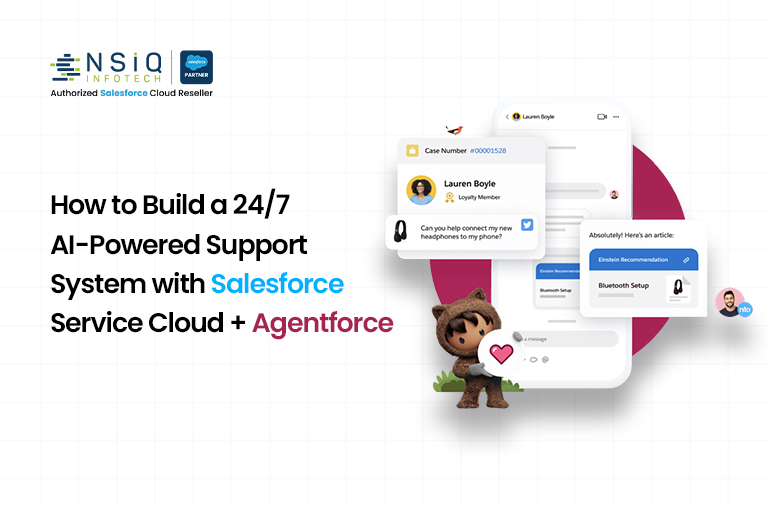
Customer expectations have fundamentally changed. Today’s buyers expect instant, accurate, and personalized support at 2 AM on a Sunday just as much as at 10 AM on a Monday. Traditional support models simply cannot scale to meet this demand. That’s where the combination of Salesforce Service Cloud AI and Agentforce becomes a genuine game-changer.
In this guide, you’ll learn exactly how to build a fully operational 24/7 AI-powered support system using Salesforce Service Cloud automation and the Salesforce Agentforce platform, step by step, with real-world context and actionable tips.
1. Why 24/7 AI Support Is No Longer Optional
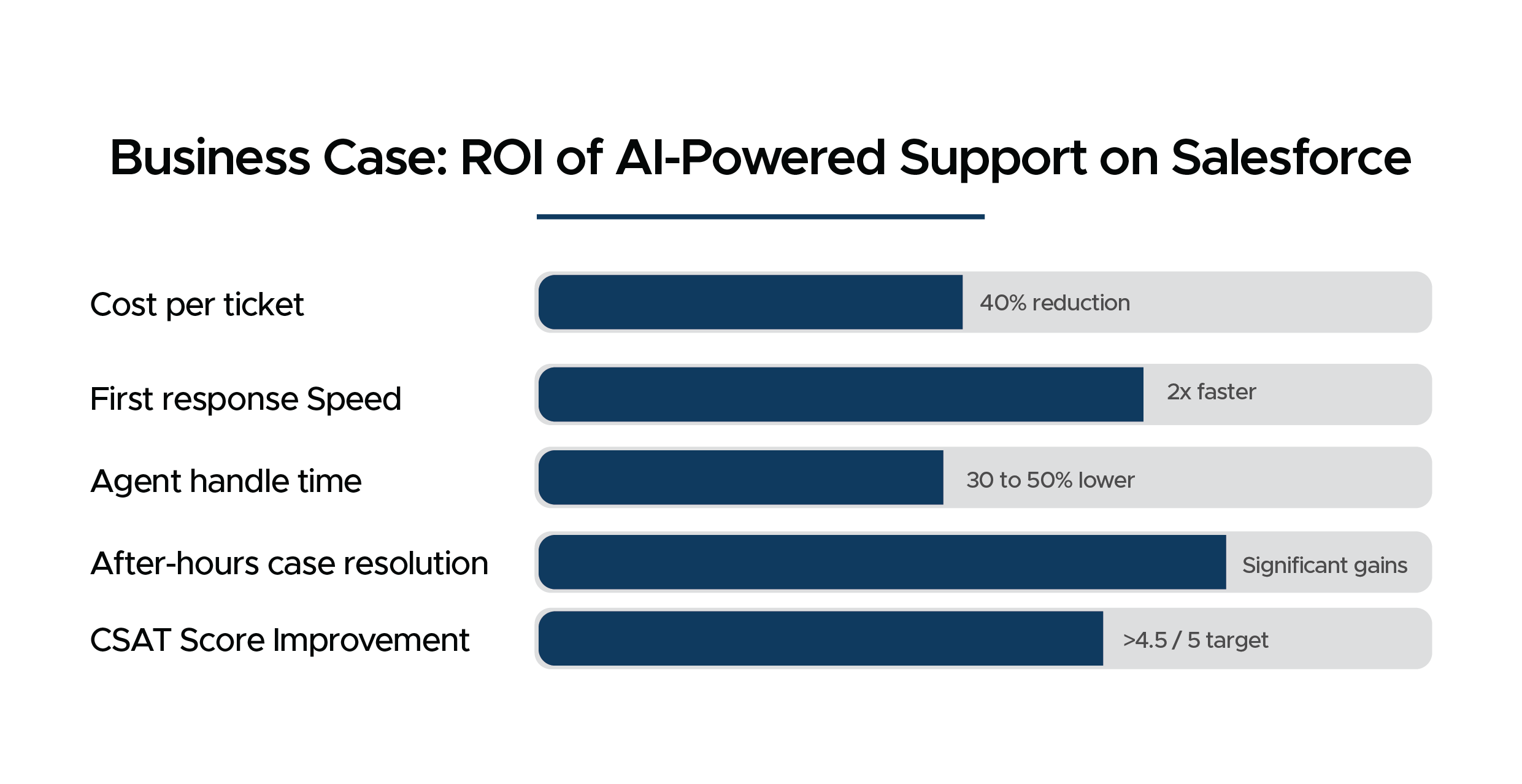
Before diving into the technical setup, it is worth understanding the business case. A Salesforce State of Service report found that over 80% of customers expect an immediate response when they contact support. Companies using AI-powered support see significantly higher CSAT scores and lower cost-per-ticket.
An AI-powered support system built on Salesforce Service Cloud delivers:
- Always-on availability with no more after-hours auto-replies
- Consistent, accurate answers drawn from your own knowledge base
- Instant escalation to human agents with full context preserved
- Dramatic reduction in average handle time
- Unified data across every channel including email, chat, phone, and social
2. Understanding the Stack: Service Cloud AI + Agentforce
Salesforce Service Cloud AI
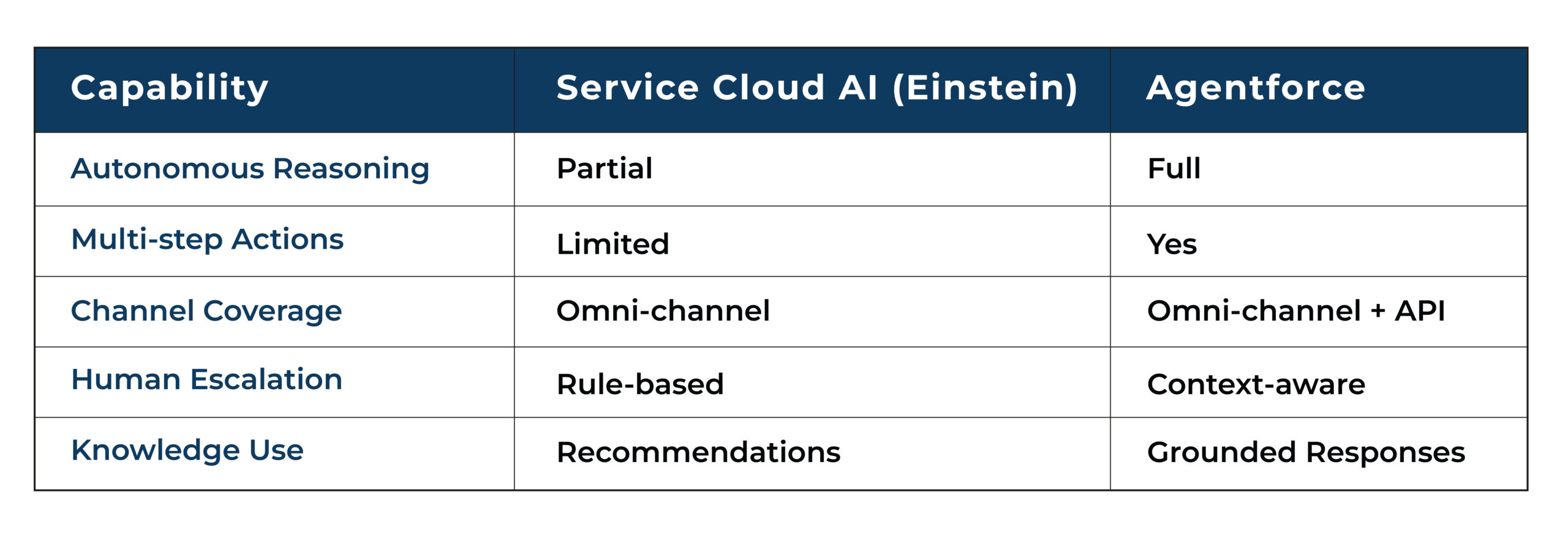
Service Cloud is Salesforce’s flagship customer service platform. Its AI layer, powered by Einstein AI, provides predictive case routing, sentiment analysis, article recommendations, and next-best-action suggestions. This is the intelligence backbone of your support operation.
Agentforce for Customer Service
Agentforce is Salesforce’s next-generation autonomous AI agent platform. Unlike simple chatbots, Agentforce agents can reason, take multi-step actions, and operate across your entire CRM ecosystem. When deployed for customer service, an Agentforce agent can handle entire case lifecycles from intake to resolution without human intervention, escalating only when genuinely needed.
Key Differences at a Glance:
3. Salesforce Agentforce Setup: Step-by-Step
Phase 1: Prerequisites and Licensing
- Salesforce Enterprise or Unlimited edition with Service Cloud
- Agentforce for Service license add-on
- Einstein Platform license for grounding and reasoning
- Data Cloud or permission to connect external knowledge sources
- System Administrator profile with Einstein and Agentforce permissions enabled
Phase 2: Enable Einstein and Agentforce in Your Org
- Navigate to Setup, then Einstein Setup, and enable Einstein AI features
- Go to Setup, then Agentforce Agents, and enable Agentforce Agents
- Grant permissions via the Agentforce User permission set to all agents users and admins
- Configure your Trusted AI Policy to align with your compliance requirements
Phase 3: Configure Your AI Agent
Within the Agentforce Agent Builder, configure the following:
- Agent Identity: Give your agent a name, persona, and tone guidelines that match your brand
- Topics: Define the support domains your agent handles such as billing, returns, and technical support
- Actions: Connect to Service Cloud data, knowledge articles, flows, and Apex actions
- Guardrails: Set clear boundaries for what the agent should and should not do
- Escalation Triggers: Configure when to hand off to a human agent with full case context
Phase 4: Connect Your Knowledge Base
A Salesforce Service Cloud AI agent is only as good as the knowledge it can access. Connect Salesforce Knowledge Articles as the primary grounding source. You can also ingest external documentation via Data Cloud connectors, SharePoint, or Confluence. Enable Knowledge Grounding in the Agentforce Agent Builder so responses are always factually anchored to your approved content.
4. Building Salesforce Service Cloud Automation Workflows
Omni-Channel Routing with AI Prioritization
Use Omni-Channel Flow in Service Cloud to route cases intelligently. Einstein’s case classification predicts case type, priority, and required skills before routing.
Automated Case Lifecycle Management
- Auto-create cases from any channel including email, web form, chat, and social
- Auto-populate fields using Einstein case classification
- Auto-send acknowledgment messages with estimated resolution time
- Auto-escalate cases that breach SLA thresholds
- Auto-close resolved cases after a confirmation window
- Auto-trigger CSAT surveys 24 hours post-resolution
Proactive Support Automation
True 24/7 AI support does not just react; it anticipates. Leverage Einstein’s predictive scoring to identify at-risk accounts before they contact support.
5. Deploying Agentforce for Customer Service Across Channels
- Embedded Chat (Messaging for Web)
- Messaging for In-App (Mobile)
- Email-to-Case with AI Response
- Voice Integration
- Self-Service Portal
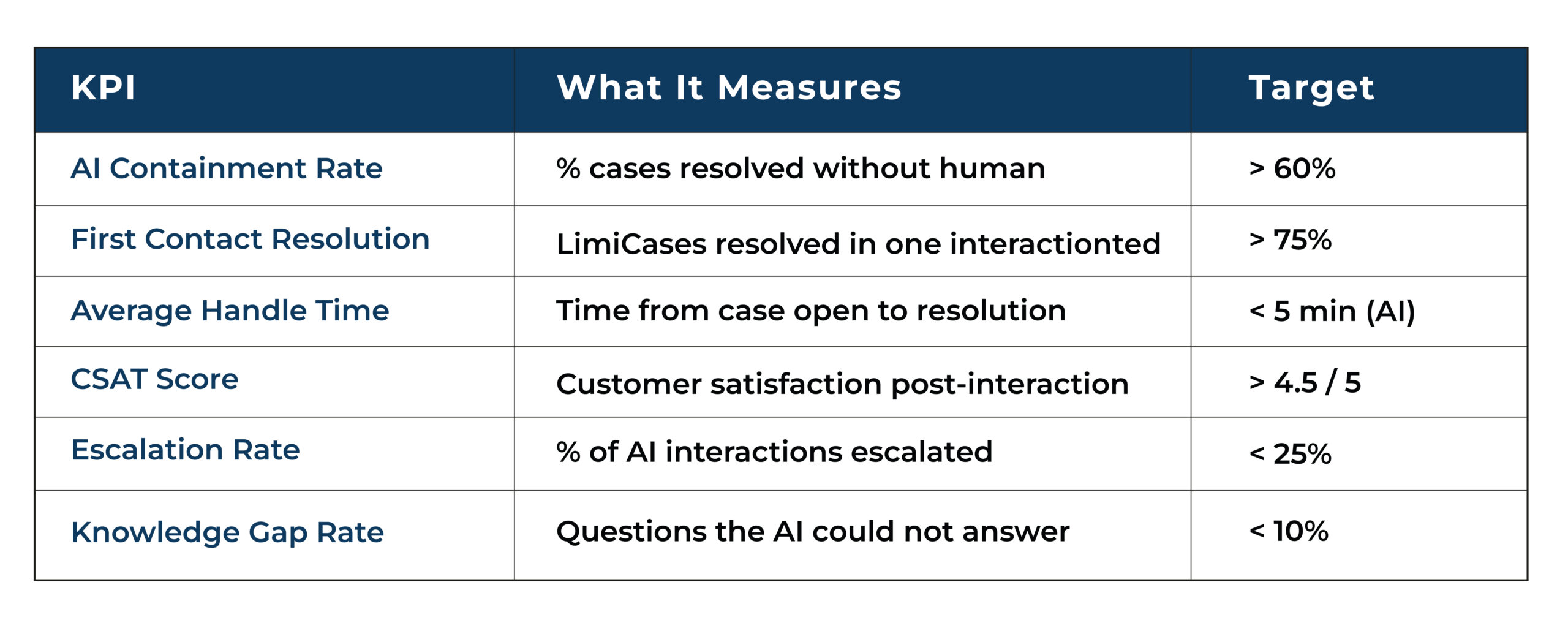
6. Measuring Performance: Key KPIs to Track
7. Common Implementation Mistakes and How to Avoid Them
- Skipping the Knowledge Base Audit
- Going Live Without a Human Escalation Plan
- Ignoring Tone and Brand Alignment
- Treating Deployment as Set and Forget
- Not Involving Your Human Agents
8. The Business Case: ROI of AI-Powered Support on Salesforce
Final Thoughts: Your Roadmap to 24/7 AI Support
Building a 24/7 AI-powered support system with Salesforce Service Cloud and Agentforce is no longer a complex, multi-year project reserved for enterprise giants. With the right preparation and continuous improvement, businesses of all sizes can deliver intelligent, always-on customer support.
Frequently Asked Questions
1. Why is 24/7 AI-powered support no longer optional for businesses?
Customers expect instant and always-on support, making AI essential.
2. What is the difference between Salesforce Service Cloud AI and Agentforce?
Service Cloud AI provides intelligence, while Agentforce delivers autonomous actions.
3. How do you set up an AI-powered support system using Agentforce?
It involves licensing, enabling features, configuring the agent, and connecting knowledge sources.
4. What role does the knowledge base play in AI-powered support?
It ensures AI provides accurate, grounded responses.
5. What KPIs should you track after deployment?
Track CSAT, containment rate, resolution time, escalation rate, and knowledge gaps.

A Salesforce Developer designs and customizes applications on the Salesforce platform using technologies like Apex, Visualforce, and Lightning to deliver efficient and scalable CRM solutions.
related blog